




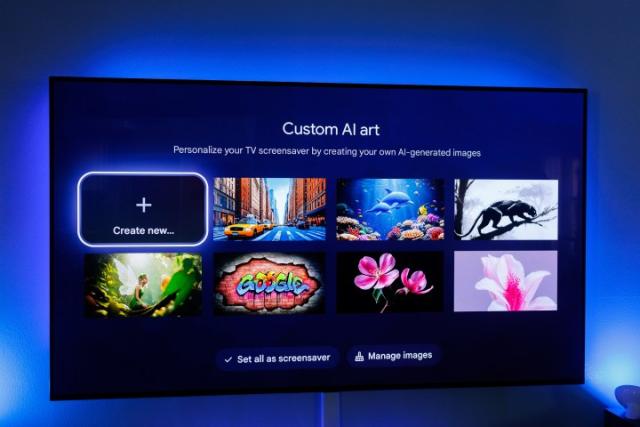
Google TV has recently introduced an exciting feature: AI-generated screensavers, enhancing the way users can personalize their viewing experience.
This innovative addition allows users to transform their idle screens into dynamic displays of art, moving beyond traditional static images and curated content.
What Are AI Screensavers?
AI screensavers utilize generative artificial intelligence to create unique images based on user preferences. Instead of relying solely on pre-selected photos or generic art, users can now describe what they want to see or choose from various templates, allowing for a more personalized touch.
Key Features
- Custom AI Art Creation: Users can generate screensavers by providing descriptive prompts. They can either type their requests using the on-screen keyboard or use the microphone on their remote to speak their ideas. For those seeking inspiration, the “Inspire Me” option generates random images based on user input.
- Gallery Management: The new feature includes a “Custom AI Art” tab where users can browse a gallery of AI-generated images. Users have the flexibility to save their favorites, delete unwanted images, or generate new ones based on existing prompts.
- User-Friendly Interface: Accessing and setting up AI screensavers is straightforward. Users navigate to Settings > System > Ambient mode on their Google TV home screen, where they can select the “Custom AI Art” option and begin creating.
How to Access AI Screensavers
To find and set up AI screensavers on your Google TV device:
- From the Google TV home screen, go to Settings.
- Select System and then Ambient mode.
- Choose Custom AI Art to start creating your screensaver.
- You can generate new art by describing your vision, selecting templates, or using the random generation feature.
Once you’ve created your desired image, you can save it and set it as your screensaver.
Advantages of AI Screensavers
- Personalization: Users can create screensavers that reflect their tastes and interests, making each viewing experience unique.
- Dynamic Content: Unlike static images, AI-generated art can provide a fresh look every time you turn on your TV.
- Creative Expression: The feature encourages creativity, allowing users to experiment with different styles and themes.
Availability
The rollout of AI screensavers began with the launch of the Google TV Streamer and is now widely available across various Google TV devices, including older models and Chromecast. This accessibility ensures that a broad audience can enjoy this new feature.




