Picking a small MIDI keyboard can be confusing. Every brand says it has the best pads, the best DAW control, or the best key feel.
After testing a batch of mini controllers side by side, here are six that stand out, each for a different reason. Whether you finger drum, use Ableton Live, use FL Studio, or want great key feel for playing piano, there is a good pick here for you, all under $150.
Quick Buying Guide
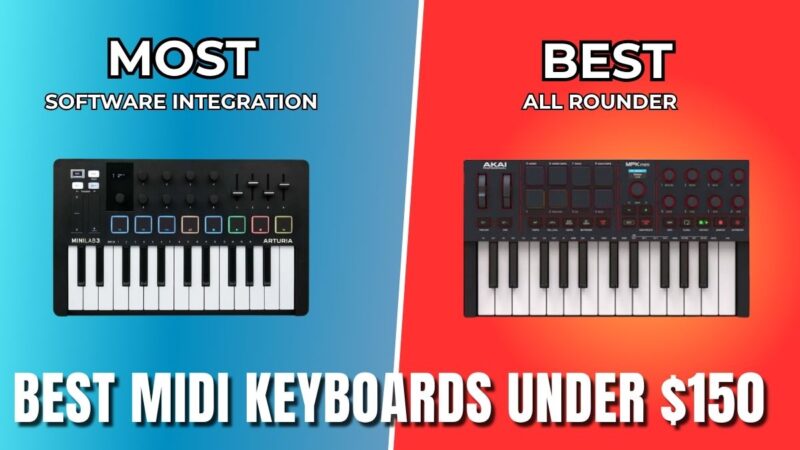
- Best all rounder and best pads: Akai MPK Mini Mark 4
- Best for Ableton Live: Novation Launchkey Mini MK4
- Best key feel and synth control: Arturia MiniLab 3
- Best for FL Studio: Novation FLkey Mini MK2
- Best value and most keys: M-Audio Oxygen Pro Mini
- Best for the Native Instruments ecosystem: Komplete Kontrol M32
1. Akai MPK Mini Mark 4
The MPK Mini has always been one of the most popular mini keyboards, and the Mark 4 fixes most of the complaints people had about earlier versions. It is a strong all rounder that covers almost every feature you would want, usually priced around $100 to $150.
Features
- 8 velocity and pressure sensitive RGB drum pads with two banks and note repeat
- Larger keys than the last version, though the action is still light
- New pitch and mod wheels instead of the old joystick
- Dedicated transport controls: play, stop, record, loop, quantize, undo, redo
- Small color screen with DAW feedback
- 8 endless encoders, USB-C, sustain pedal input, MIDI out
- Chord mode, scale lock, and a stronger arpeggiator with ratchets, ties, and accents
- Works closely with Akai’s own instrument plugin, plus mapped controls for Ableton, Logic, FL Studio, Bitwig, and Cubase
Pros & Cons
| Pros | Cons |
|---|---|
| Best feeling drum pads in this group | No faders for adjusting track volume at the same time |
| Strong, well rounded set of features | Key action is still on the lighter side |
| New transport controls fix an old gap | Not the deepest DAW integration around |
| Good virtual instrument control through Akai’s plugin |
2. Novation Launchkey Mini MK4
If your studio is built around Ableton Live, this keyboard is made for you. Novation Launchkey Mini MK4 trades a bit of key feel for deep clip launching and creative tools. It usually costs around $100 to $140.
Features
- 16 velocity sensitive pads with polyphonic aftertouch (smaller pads than the Akai, but responsive)
- Custom integration with Ableton Live, Logic, Cubase, Reason, and FL Studio
- Pads match Ableton clip colors, and you can launch clips or scenes, arm, mute, and solo tracks
- Step sequencing straight into Ableton clips using the pads
- 8 endless encoders, small screen, touch strips for pitch and mod, USB-C, sustain input, MIDI out
- Chord map mode that lays chords from your key across the pads, plus strum, mutate, and deviate options
- Built in arpeggiator with accents, ties, and ratchets
Pros & Cons
| Pros | Cons |
|---|---|
| Best Ableton Live workflow in this group | Keys feel light and a bit springy |
| Strong, genuinely useful chord tools | Pads are smaller and can feel crowded |
| Deep clip, scene, and mixer control | No built in instrument browsing like Akai or Arturia |
| Only has basic play and record buttons |
3. Arturia MiniLab 3
For pianists and synth lovers, the MiniLab 3 is the standout choice. It has the best key feel of any keyboard in this list and pairs it with strong virtual instrument control, usually priced around $100 to $130.
Features
- Larger keys with better down weight and up weight than the others, the best playing feel here
- Comes with Analog Lab software for instant control of synth sounds
- 12 total tactile controls (encoders and faders), the most of any keyboard in this list
- Encoders and screen work closely with Arturia software and DAW plugins
- One encoder is dedicated to browsing and loading presets
- Drum pads double as transport controls (play, stop, record)
- Basic clip and scene triggering for Ableton Live
Pros & Cons
| Pros | Cons |
|---|---|
| Best key feel for playing in this group | Pads are weaker than the others here |
| Excellent Arturia and Analog Lab integration | Pads double as transport controls, no dedicated buttons |
| Most tactile controls (encoders plus faders) | Faders control one track’s volume, sends, and pan, not the first four tracks |
| Good DAW plugin feedback on screen | FL Studio users do not get channel rack control |
4. Novation FLkey Mini MK2
FL Studio producers get a keyboard built just for their workflow. The FLkey Mini shares its hardware with the Launchkey Mini but adds channel rack control that nothing else here offers. It usually costs around $100 to $140.
Features
- Direct channel rack control, so you can program beats on a step sequencer without touching the mouse
- Mixer volume, pan, and send control, plus channel navigation
- Encoders map to plug-in parameters, with on-screen feedback
- Same chord and arpeggiator tools as the Launchkey MK4
- Similar build, key feel, and pad feel to the Launchkey Mini
Pros & Cons
| Pros | Cons |
|---|---|
| Best FL Studio channel rack control around | Keys feel light and a little mushy |
| Strong chord and arpeggiator tools | No dedicated note repeat button, unlike the older version |
| Good mixer and plug-in parameter control | Less virtual instrument browsing than Akai, Arturia, or NI |
5. M-Audio Oxygen Pro Mini
The Oxygen Pro Mini stands out for its value. It gives you more keys, real faders, and broad DAW support for a similar price to the others, usually around $100 to $150.
Features
- 32 keys, more than most keyboards in this class, though shorter and narrower
- 4 faders mapped by default to mixer volume, great for hands on mixing
- 4 knobs (not endless) that map to DAW plugin parameters
- Built in DAW settings for FL Studio, Logic, Cubase, and Pro Tools
- Transport controls, arpeggiator, chord and scale features, and basic Ableton Live clip triggering
- Pitch and mod wheels instead of touch strips
Pros & Cons
| Pros | Cons |
|---|---|
| Most keys and best value for the price here | Knobs are not endless, and there are only 4 |
| Real faders for one-handed mixing | No deep virtual instrument integration |
| Wide, built in DAW compatibility | Compact size limits pad and key spacing a bit |
6. Native Instruments Komplete Kontrol M32
Komplete Kontrol M32 is the oldest keyboard in this list, but it still matters if you use the Native Instruments ecosystem. It is more of a specialist tool than an all rounder, usually priced around $100 to $130.
Features
- 32 keys in a simple, compact layout
- Deep integration with Native Instruments’ Komplete Kontrol software
- Works with NKS compatible plugins from Arturia, Waves, u-he, Output, and more
- One dedicated encoder for browsing and testing sounds and presets quickly
- No drum pads, the only keyboard here without them
Pros & Cons
| Pros | Cons |
|---|---|
| Excellent Komplete Kontrol and NKS plugin browsing | No drum pads at all |
| Great as a second keyboard next to a bigger one | Has not been updated in years |
| Simple, focused layout | Fewer creative and DAW control extras than the others |
No single keyboard here wins in every category. It comes down to what matters most for how you make music. Pick the one that fits your workflow, and start making music instead of waiting for the perfect setup.