Blog

  • 25 Most‑Streamed Female Artists on Spotify of All Time

    25 Most‑Streamed Female Artists on Spotify of All Time

    Spotify streaming data from late 2024 to early 2025 shows which female artists dominate the platform. These rankings include both lead and featured credits. Taylor Swift leads by a wide margin and is the first female artist to pass 100 billion total streams.

    Top 25 Most‑Streamed Female Artists on Spotify (All Time)

    RankArtistTotal Streams (Approx.)Key Hits
    1Taylor Swift117BCruel Summer, Anti‑Hero, Blank Space
    2Ariana Grande63B7 rings, thank u, next, Side To Side
    3Rihanna55BUmbrella, Needed Me, We Found Love
    4Billie Eilish54Bbad guy, lovely, BIRDS OF A FEATHER
    5Nicki Minaj41BStarships, Super Freaky Girl, Bang Bang
    6Dua Lipa39BDon’t Start Now, Levitating, New Rules
    7Lana Del Rey38BSummertime Sadness, Young and Beautiful
    8SZA36BKill Bill, Snooze, Good Days
    9Karol G35BTQG, PROVENZA, Tusa
    10Lady Gaga34BShallow, Bad Romance, Poker Face
    11Beyoncé33BHalo, Crazy In Love, CUFF IT
    12Sia30BChandelier, Cheap Thrills, Unstoppable
    13Doja Cat29BPaint The Town Red, Kiss Me More, Say So
    14Shakira28BHips Don’t Lie, Waka Waka, Bzrp Vol. 53
    15Adele27BSomeone Like You, Hello, Rolling in the Deep
    16Selena Gomez25.6BLose You To Love Me, Wolves, Calm Down (Remix)
    17Katy Perry25.6BDark Horse, Roar, Firework
    18Olivia Rodrigo24.8Bdrivers license, good 4 u, vampire
    19Halsey24.3BWithout Me, Closer, Eastside
    20Miley Cyrus22.4BFlowers, Party in the U.S.A., Wrecking Ball
    21Cardi B21.4BWAP, I Like It, Bodak Yellow
    22Camila Cabello20.5BHavana, Señorita, Bam Bam
    23Bebe Rexha16.5BMeant to Be, I’m Good (Blue), In the Name of Love
    24BLACKPINK16.3BHow You Like That, Kill This Love, Pink Venom
    25Demi Lovato16.2BSorry Not Sorry, Heart Attack, Cool for the Summer

    Key Takeaways

    Taylor Swift’s Historic Lead

    Taylor Swift stands far ahead of every other female artist. Her catalog, constant releases, and global fan base drive record‑breaking numbers.

    Strong Pop and Hip‑Hop Presence

    Pop and hip‑hop artists dominate the list. Ariana Grande, Rihanna, Nicki Minaj, and Dua Lipa show long‑term streaming power.

    Global Reach Matters

    Artists like Karol G, Shakira, and BLACKPINK benefit from strong international audiences and cross‑language appeal.

    Methodology Note

    This ranking uses cumulative all‑time Spotify streams from lead and featured credits combined. If groups are excluded, Ellie Goulding would rank at number 25 with about 15.3 billion streams.

    Final Thoughts

    Spotify streaming totals highlight consistency, global reach, and strong catalogs. As streaming continues to grow, these artists set the benchmark for long‑term success in the digital music era.

  • 25 Most‑Streamed Female Albums on Spotify of All Time

    25 Most‑Streamed Female Albums on Spotify of All Time

    As of late December 2025, Spotify streaming data shows which female albums have earned the highest total streams of all time. Olivia Rodrigo’s debut album SOUR leads the list. Recent releases from Billie Eilish and Sabrina Carpenter also show how fast new albums can rise in the streaming era.

    Top 25 Most‑Streamed Female Albums on Spotify (All Time)

    RankAlbumArtistStreams (Approx.)Release Year
    1SOUROlivia Rodrigo16.2B2021
    2SOSSZA15.2B2022
    3Future NostalgiaDua Lipa14.6B2020
    4Dua LipaDua Lipa14.5B2017
    5LoverTaylor Swift13.8B2019
    6WHEN WE ALL FALL ASLEEP, WHERE DO WE GO?Billie Eilish13.3B2019
    7dont smile at meBillie Eilish12.0B2017
    8MidnightsTaylor Swift11.7B2022
    9folkloreTaylor Swift11.2B2020
    10Born To DieLana Del Rey10.5B2012
    11reputationTaylor Swift10.5B2017
    121989Taylor Swift9.9B2014
    13Teenage DreamKaty Perry9.7B2010
    14The Fame MonsterLady Gaga9.7B2009
    15Planet HerDoja Cat9.6B2021
    16HIT ME HARD AND SOFTBillie Eilish9.4B2024
    17Short n’ SweetSabrina Carpenter9.2B2024
    18thank u, nextAriana Grande9.2B2019
    19THE TORTURED POETS DEPARTMENTTaylor Swift9.1B2024
    2021Adele9.1B2011
    21ANTIRihanna8.9B2016
    22Dangerous WomanAriana Grande8.5B2016
    23My EverythingAriana Grande8.3B2014
    24MAÑANA SERÁ BONITOKarol G8.3B2023
    2525Adele8.3B2015

    Key Highlights and Trends

    Olivia Rodrigo Leads the List

    SOUR is the most‑streamed female album in Spotify history. Its strong singles and wide appeal keep streams growing years after release.

    Taylor Swift Dominates Album Count

    Taylor Swift has six albums in the top 25. This count does not include her re‑recorded Taylor’s Version albums, which also earn billions of streams.

    New Albums Rise Faster Than Ever

    Billie Eilish’s HIT ME HARD AND SOFT and Sabrina Carpenter’s Short n’ Sweet reached the top 20 in just over one year. Streaming allows new releases to grow at record speed.

    Older Albums Still Perform Strongly

    Albums like Teenage Dream and The Fame Monster continue to earn streams more than a decade after release.

    Final Thoughts

    Spotify streaming totals show both longevity and instant impact. Some albums grow slowly over many years, while others explode right after release. Together, these records highlight how female artists shape Spotify’s all‑time album history.

  • Top Video Streaming Services by Market Share in 2026

    Top Video Streaming Services by Market Share in 2026

    The global video streaming industry has grown into one of the largest digital markets, with an estimated value ranging between $674 billion and $941 billion in 2026.

    However, unlike music streaming, there is no single universal metric for market share. Instead, the landscape is best understood through a combination of subscriber share, platform reach, and total users.

    Despite this complexity, a clear group of dominant platforms has emerged, led by Netflix, YouTube, and Amazon Prime Video.

    Market Share Leaders

    Netflix remains the leading subscription video-on-demand (SVOD) platform globally. Depending on the metric used, it holds roughly 16% to 34% of the market and has surpassed 300 million subscribers worldwide, making it the most subscribed streaming service.

    YouTube operates on a different scale. With over 2.4 billion users, it is the most widely used video platform globally. While its paid market share is smaller, its dominance in total viewership makes it the largest streaming platform overall.

    Amazon Prime Video is another major player, holding an estimated 8% to 13% market share and reaching around 200 million users, largely through its bundled Prime membership model.

    The Second Tier

    A group of major competitors follows closely behind:

    • Disney+ — 4% to 14% market share, over 130 million subscribers
    • HBO Max / Max — around 8% market share, over 130 million users
    • Hulu — 6% to 11% market share, about 60+ million users
    • Paramount+ — around 5% market share, nearly 80 million subscribers
    • Apple TV+ — estimated 8–9% share, with a growing user base

    These platforms form the core of the global subscription streaming ecosystem, particularly in North America and Europe.

    China and Regional Giants

    The global market is not entirely dominated by Western platforms. China and regional markets have their own leaders:

    • Tencent Video — over 100 million subscribers and hundreds of millions of users
    • iQIYI — around 100 million subscribers
    • Youku — large user base across China

    In India and emerging markets, Disney+ Hotstar stands out with tens of millions of subscribers and a massive overall user base.

    Market Concentration

    Industry estimates suggest that the top five streaming platforms control over 70% of the global market, highlighting a high level of concentration. Netflix, Amazon Prime Video, and Disney+ consistently rank among the most influential services in terms of paid subscriptions.

    Key Trends Shaping Market Share

    Several major trends are influencing how market share evolves:

    • Ad-supported tiers are expanding rapidly, with platforms like Netflix and Disney+ offering cheaper plans
    • Bundling strategies (especially from Amazon and Apple) are driving user growth
    • Asia-Pacific markets are the fastest growing, fueled by China and India
    • Cost sensitivity is increasing, with many users subscribing to multiple services but seeking lower prices

    What Market Share Really Means

    In video streaming, market share depends heavily on how it is measured. Subscription-based platforms like Netflix dominate revenue and paid share, while platforms like YouTube dominate total audience and engagement.

    This creates a dual structure:

    • Netflix leads in paid subscriptions
    • YouTube leads in global reach
    • Amazon and Disney+ compete through ecosystem and content strategy

    The global video streaming market in 2026 is both massive and fragmented. While Netflix remains the leader in subscriptions, YouTube dominates overall usage, and a strong group of competitors continues to compete for market share.

    As the industry grows, competition will increasingly depend on pricing, content, and global expansion—ensuring that the streaming wars are far from over.

  • Top Music Streaming Services by Market Share in 2026

    Top Music Streaming Services by Market Share in 2026

    The global music streaming industry is defined by a clear hierarchy, with a few dominant platforms controlling most of the paid subscriber market.

    Based on the latest 2025–2026 data, Spotify leads the industry with 31.7% market share, making it the largest music streaming service globally by a significant margin.

    Market Share Rankings

    The current global market share distribution among major streaming platforms is as follows:

    • Spotify — 31.7%
    • Tencent Music Entertainment — 14.4%
    • Apple Music — 12.6%
    • Amazon Music — 11.1%
    • YouTube Music — 9.7%
    • NetEase Cloud Music — 6.7%
    • Yandex Music — 3.4%
    • Deezer — 1.3%
    • Other platforms combined — 9.7%

    Market Concentration

    The market is highly concentrated. Spotify alone holds nearly one-third of all paid subscriptions, while the top five platforms together account for around 80% of the global market. This highlights how a small group of companies dominates the industry.

    Tier Structure of the Market

    The market can be divided into three clear tiers:

    1. Market Leader
    Spotify stands alone at the top with a significant lead.

    2. Major Competitors
    Tencent Music, Apple Music, Amazon Music, and YouTube Music form the second tier, each holding roughly 10–15% of the market.

    3. Smaller and Regional Players
    Platforms like Yandex Music and Deezer, along with services such as Tidal and SoundCloud, make up smaller shares and often focus on specific markets or niches.

    Notable Regional & Niche Players

    Beyond global giants, several platforms play a crucial role in regional markets and niche audiences:

    • Tidal — A premium platform known for high-fidelity audio and artist-focused payouts, with around 7 million subscribers
    • Pandora — A long-standing player in the U.S. market with about 5–6 million subscribers, now owned by SiriusXM
    • Gaana — A regional platform in India with a smaller but dedicated user base
    • Anghami — Rapidly growing across the Middle East and North Africa, showing strong year-on-year growth
    • Boomplay — One of the leading platforms in Sub-Saharan Africa
    • Melon — A dominant domestic service in South Korea
    • JOOX — A Tencent-backed platform popular in Southeast Asia
    • SoundCloud — A global hub for independent and emerging artists with a large free user base

    These platforms may not command large global market shares, but they remain highly influential within their respective regions and communities.

    What Market Share Really Means

    These figures are based on paid subscribers, making them a strong indicator of revenue distribution rather than total usage. Some platforms, particularly YouTube Music, have much larger overall audiences when free users are included.

    The global music streaming market in 2026 remains dominated by a handful of major platforms, led by Spotify. However, regional and niche services continue to play an important role in shaping local markets and supporting diverse music ecosystems worldwide.

  • 100 Most Streamed Hip-Hop Artists in the World Right Now (2026)

    100 Most Streamed Hip-Hop Artists in the World Right Now (2026)

    Hip-hop is the most dominant genre in global streaming. From classic legends to modern chart-toppers, hip-hop artists generate billions of plays every year across platforms. Streaming data now plays a major role in measuring real influence, reach, and cultural impact.

    This list ranks the 100 most streamed hip-hop artists worldwide, based on total lead streams. The ranking reflects long-term listening behavior rather than short-term trends, making it a strong indicator of overall popularity and legacy in hip-hop.

    Full Ranking: Top 100 Most Streamed Hip-Hop Artists

    #ArtistTotal Streams
    1Drake97,186,075,792
    2Eminem54,097,259,117
    3Kanye West51,010,487,100
    4Travis Scott42,876,187,241
    5Kendrick Lamar41,274,607,337
    6Juice WRLD37,243,957,495
    7XXXTENTACION34,285,045,576
    8Future31,279,009,881
    9Metro Boomin26,665,435,036
    10Doja Cat25,870,012,246
    11J. Cole25,739,648,755
    12Nicki Minaj24,527,349,895
    1321 Savage22,555,885,421
    14Tyler, The Creator22,532,094,314
    15Lil Uzi Vert21,909,230,702
    16Lil Baby19,910,437,990
    17Pitbull19,213,927,818
    18$uicideboy$18,934,247,934
    19Mac Miller17,458,692,314
    20Lil Peep17,184,820,437
    21Lil Wayne16,365,607,662
    22Gunna16,039,049,722
    23YoungBoy Never Broke Again15,604,539,556
    24Playboi Carti15,277,702,684
    25A$AP Rocky14,700,428,094
    26Pop Smoke14,551,710,287
    27Young Thug14,052,176,619
    28Bizarrap13,696,246,365
    2950 Cent13,546,592,869
    30Cardi B13,404,722,644
    31Trippie Redd13,383,430,624
    32The Kid LAROI13,287,914,299
    33DaBaby13,197,424,733
    34Wiz Khalifa13,043,656,023
    35NF13,001,310,849
    36G-Eazy12,701,511,225
    37JAY-Z12,647,875,791
    38Duki12,451,493,687
    39A Boogie Wit da Hoodie12,161,396,761
    402Pac12,057,236,759
    41Don Toliver12,015,827,885
    42Macklemore12,005,994,518
    43Kodak Black11,799,981,081
    44Tyga11,677,127,799
    45Rels B11,667,404,185
    46Machine Gun Kelly11,315,010,950
    47Flo Rida11,299,536,879
    48Tory Lanez11,079,308,240
    49Ty Dolla $ign11,007,952,972
    50Polo G10,927,837,500
    51Kid Cudi10,760,520,076
    52Jack Harlow10,536,892,115
    53Migos10,468,634,541
    54Logic10,324,288,340
    55Lil Tecca10,272,603,148
    56Jul10,103,925,715
    57Eladio Carrion10,085,020,684
    58Snoop Dogg9,902,742,626
    59Russ9,633,517,870
    60Lil Durk9,527,466,795
    61Paulo Londra9,380,079,387
    62The Notorious B.I.G.9,274,882,586
    63Megan Thee Stallion8,256,098,786
    64Yeat8,234,108,760
    65Dr. Dre8,173,765,218
    66Lil Tjay8,123,625,456
    67Roddy Ricch8,076,442,991
    68Ninho8,075,389,378
    69Meek Mill7,864,201,108
    70Cartel De Santa7,814,960,821
    71Big Sean7,611,587,032
    72French Montana7,607,732,473
    73Gucci Mane7,436,392,848
    74Central Cee7,414,623,151
    75Rod Wave7,193,142,809
    76Dave7,065,390,224
    77Rae Sremmurd7,055,529,251
    78Anderson .Paak7,039,464,091
    79NAV7,022,182,247
    80NLE Choppa6,984,946,155
    81Macklemore & Ryan Lewis6,928,309,149
    82Ryan Lewis6,814,794,680
    836LACK6,741,535,271
    846ix9ine6,646,663,243
    85Karan Aujla6,455,378,453
    86GIMS6,452,355,579
    87Kevin Gates6,414,832,696
    88RAF Camora6,351,190,594
    89YNW Melly6,283,570,354
    90Nelly6,237,317,926
    91Chance the Rapper6,214,598,580
    92Milo j6,177,889,744
    93Outkast6,116,414,785
    94Lil Yachty6,059,560,144
    95Nicki Nicole5,899,996,504
    96Bonez MC5,889,440,109
    97Sfera Ebbasta5,841,114,929
    98Baby Keem5,728,866,495
    99Morad5,693,598,497
    100Tiago PZK5,690,298,039

    Last updated: 2026


    Why Streaming Numbers Matter in Hip-Hop

    Total streams reflect long-term listener demand. In hip-hop, where albums, singles, and collaborations drive constant engagement, high streaming numbers show both cultural relevance and staying power. Artists at the top of this list consistently perform across multiple eras and platforms.

    Final Thoughts: Hip-Hop’s Global Dominance

    Hip-hop continues to lead the music industry in influence, innovation, and reach. Artists like Drake, Eminem, and Kanye West dominate not just charts, but entire generations of listeners. At the same time, newer voices push the genre forward and expand its global footprint.

    As streaming grows worldwide, hip-hop’s dominance shows no sign of slowing down. This list will evolve, but its impact on modern music culture is already undeniable.

  • 100 Most Streamed EDM Artists on Spotify Right Now (2026)

    100 Most Streamed EDM Artists on Spotify Right Now (2026)

    Electronic Dance Music (EDM) continues to dominate global streaming platforms, and Spotify remains the best indicator of which artists are truly popular right now. From festival legends to modern hitmakers, EDM artists attract millions of listeners every month across playlists, radio, and viral charts.

    This article ranks the 100 most streamed EDM artists on Spotify in 2026, based on monthly listeners. The list also includes Spotify follower counts, which help show long-term fan support. While the data may contain minor inaccuracies or updates over time, it offers a strong snapshot of the current EDM landscape.

    Full Ranking: Top 100 EDM Artists on Spotify

    #ArtistMonthly ListenersFollowers
    1David Guetta78,035,43627,073,657
    2Calvin Harris69,256,09323,077,763
    3Marshmello51,599,62134,403,308
    4DJ Snake41,299,4079,239,992
    5Tiësto36,148,4447,943,787
    6Avicii35,377,02023,439,640
    7Swedish House Mafia26,887,4693,933,593
    8Martin Garrix21,735,61715,138,550
    9AFROJACK21,067,7284,027,145
    10Skrillex18,816,9247,562,942
    11Zedd16,026,4116,103,818
    12Alesso15,968,5144,030,395
    13Steve Aoki14,427,1263,791,401
    14MEDUZA14,002,624953,356
    15Galantis13,702,7873,466,715
    16Dimitri Vegas & Like Mike13,548,1753,579,770
    17W&W13,441,567944,478
    18R3HAB13,096,4202,603,338
    19Sebastian Ingrosso11,562,2131,005,636
    20Axwell11,203,5181,502,691
    21ILLENIUM10,608,8931,618,040
    22Kungs10,283,611980,020
    23Jax Jones10,209,7311,253,536
    24Eric Prydz7,895,399692,494
    25Axwell /\ Ingrosso7,522,8062,529,998
    26Gryffin7,471,8331,006,468
    27Hippie Sabotage7,174,6491,064,479
    28Loud Luxury7,125,481689,561
    29Sofi Tukker6,655,025922,511
    30Dynoro6,649,204313,607
    31Sigala6,321,7691,579,537
    32Cheat Codes6,316,6022,101,834
    33Don Diablo5,914,1161,842,917
    34Hardwell5,786,4083,610,273
    35The Blessed Madonna5,696,102127,263
    36SLANDER5,273,409586,031
    37Jack Ü5,042,7041,082,500
    38deadmau54,942,9522,846,826
    39Cedric Gervais4,845,682119,384
    40Showtek4,795,876481,347
    41twocolors4,639,472126,513
    42Nicky Romero4,467,6022,166,088
    43KSHMR4,418,1431,777,964
    44Kaskade4,389,660994,656
    45SIDEPIECE3,960,398121,945
    46ZHU3,707,149968,080
    47Cash Cash3,664,838698,900
    48Vicetone3,661,070515,477
    49Dillon Francis3,460,8061,143,677
    50Martin Jensen3,442,2341,262,765
    51Blasterjaxx3,289,212842,594
    52Yellow Claw3,259,8851,044,686
    53Tujamo3,024,669283,637
    54DVBBS2,970,8961,060,273
    55Fedde Le Grand2,966,674386,317
    56Dzeko2,778,06473,799
    57Otto Knows2,708,907384,831
    58Bassjackers2,557,794778,899
    59Ummet Ozcan2,550,933580,192
    60Subtronics2,033,049419,864
    61Louis The Child2,030,926489,505
    62NGHTMRE2,019,765478,753
    63Mike Williams1,997,340366,992
    64MOTi1,927,085262,574
    65Zeds Dead1,814,840658,457
    66Tommy Trash1,810,708147,444
    67Porter Robinson1,788,5971,216,725
    68Good Times Ahead1,763,286291,177
    69Rezz1,761,479593,877
    70Seven Lions1,738,514520,164
    71Audien1,724,945201,471
    72Flux Pavilion1,650,268714,017
    73Excision1,619,963772,490
    74Borgeous1,580,601551,516
    75Silk City1,441,82482,687
    76Sick Individuals1,379,319197,066
    77Brooks1,346,336319,565
    78Knock21,327,277154,064
    79Feenixpawl1,274,39328,594
    80Said The Sky1,266,376298,943
    81Third Party1,261,067144,288
    82Syn Cole1,248,480233,045
    83Matisse & Sadko1,240,620151,256
    84Quintino1,222,666613,219
    85DubVision1,208,319323,970
    86Wooli1,185,095149,919
    87San Holo1,178,961705,054
    88Dabin1,174,142200,504
    89Tim Berg1,169,405225,163
    90Adventure Club1,153,560319,212
    91Jauz1,136,645392,417
    92Madeon1,115,422653,128
    93Firebeatz1,071,126514,693
    94KAAZE1,069,752215,387
    95Alison Wonderland1,067,823501,438
    96Krewella1,062,521899,998
    97Michael Calfan1,049,171152,494
    98Carnage1,026,425307,909
    99Morgan Page1,018,068155,569
    100Kayzo999,689252,838

    Last updated: January 2026

    Why Monthly Listeners Matter in EDM

    Monthly listeners show how often an artist is played across Spotify in a given month. Unlike total streams, this metric highlights current popularity, not just past success. In EDM, where trends move fast, this is one of the clearest ways to measure real-time relevance.

    Final Thoughts: The State of EDM in 2026

    The EDM scene in 2026 remains strong, global, and diverse. Legends like David Guetta, Calvin Harris, and Tiësto continue to dominate, while modern stars and niche producers maintain loyal audiences.

    Streaming platforms have reshaped how EDM success is measured, and Spotify data now plays a key role in defining industry influence.

    As listener habits evolve and new tracks break through, this list will keep changing. One thing is certain—EDM is still one of the most powerful forces in modern music culture.

  • 10 Best Free Kontakt Libraries for Music Producers in 2025

    10 Best Free Kontakt Libraries for Music Producers in 2025

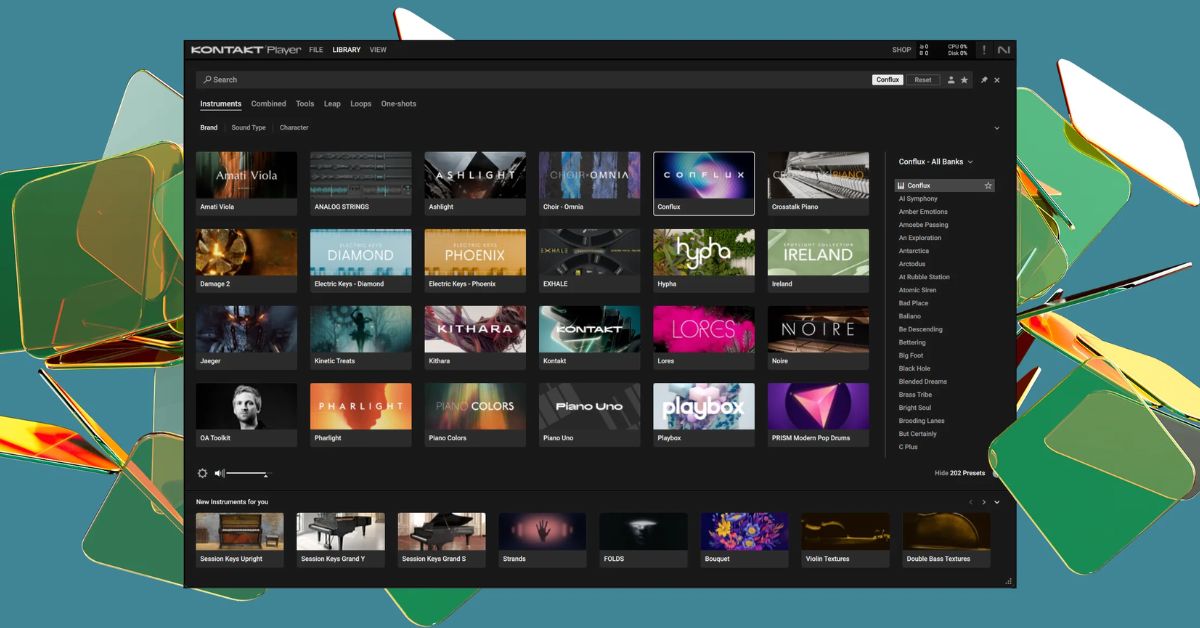
    If you use Native Instruments’ Kontakt Player, you’re in luck! There are many free Kontakt libraries available in 2025 that can help you create amazing music.

    These libraries work perfectly with the free Kontakt Player plugin, so you don’t need to worry about demo restrictions. You can use them without any time limits and they are completely free.

    Here are the best free Kontakt libraries you can download in 2025:

    1. Kontakt Factory Selection – Native Instruments

    This library is a great starting point for music producers. It offers a wide range of instruments, from acoustic pianos and drums to synthesizers and world instruments. It’s part of the Komplete Start bundle and is perfect for building your library when you’re just getting started.

    2. Twenty-Five – Native Instruments

    To celebrate their 25th anniversary, Native Instruments released Twenty-Five, a library with 150 unique presets sampled from some of their most popular products. It includes cinematic tones, bass sounds, and even pianos. This library is ideal for anyone who wants to create atmospheric music.

    3. Kontakt Play Selection – Native Instruments

    Kontakt Play Selection is another free library from Native Instruments. It contains presets from commercial libraries like Analog Dreams, Ethereal Earth, and Hybrid Keys. This is a great option for music producers looking for unique sounds for their tracks.

    4. Kinetic Treats – Native Instruments

    If you want quirky and unique sounds, Kinetic Treats is for you. It uses samples from children’s toys like electric trains and music boxes. The library creates evolving sounds and textures, making it perfect for experimental music and sound design.

    5. Blueprint – Fracture Sounds

    Blueprint is a series of free Kontakt libraries that focus on orchestral instruments and keys. It’s a great option for beginners who want to explore orchestral sounds and learn how to use Kontakt’s interface. The series includes instruments like drums, strings, and keys.

    6. Foundations – Heavyocity

    Foundations is a free library from Heavyocity that includes instruments like pianos, bass, strings, and choirs. It’s perfect for cinematic soundtracks. The Foundations Piano is particularly popular, as it combines grand piano samples with sound design layers to create unique textures.

    7. Orchestra Elements – Sonuscore

    If you’re looking for orchestral sounds, Orchestra Elements is one of the best free options. It includes strings, brass, wind, percussion, and choir sounds. It’s a great library for creating cinematic music, and its user-friendly interface helps beginners learn orchestration.

    8. The 88E – Impact Soundworks

    The 88E is a free experimental piano library. It uses an interesting method of playing all piano keys at once, creating unique sounds. It’s perfect for anyone looking for unusual and creative piano sounds.

    9. The Free Orchestra – ProjectSAM

    The Free Orchestra is a cinematic orchestral library that includes 14 patches, covering everything from string staccatos to brass clusters. It’s a great choice for composers looking to add orchestral sounds to their projects without spending any money.

    10. Free Stuff – Soniccouture & Cinesamples

    Both Soniccouture and Cinesamples offer free Kontakt libraries that feature unique instruments. Soniccouture’s free libraries include a choir, music boxes, and a tube drum, while Cinesamples offers instruments like a toy xylophone and a kalimba. These libraries add unusual and inspiring sounds to your collection.

    There are plenty of free Kontakt libraries available in 2025, and they’re perfect for anyone looking to expand their sound library without spending money.

    Whether you’re into orchestral music, experimental sounds, or unique instruments, there’s something for everyone. Download these free libraries and start creating great music today!

  • TrapTune is An Amazing Free Autotune Plugin for Trap, Hip Hop, and R&B

    TrapTune is An Amazing Free Autotune Plugin for Trap, Hip Hop, and R&B

    TrapTune by UnitedPlugins is an innovative autotune VST plugin designed specifically for vocal processing in genres like Trap, Hip Hop, and R&B.

    It combines pitch correction with various vocal effects, making it a versatile tool for music producers looking to enhance their vocal tracks.

    Key Features of TrapTune

    Automatic Tuning

    TrapTune offers automatic tuning capabilities, ranging from subtle pitch correction to more pronounced effects, such as the iconic “Cher effect”. This flexibility allows users to tailor the tuning intensity to suit their vocal needs.

    Vocal Effects

    TrapTune stands out with its built-in vocal effects, including:

    • Reverb: Adds depth and space to vocals.
    • Distortion: Provides a gritty texture, from subtle warmth to heavy distortion.
    • Delay: Controls feedback and timing to enhance vocal presence.
    • Second Voice: Transposes vocals to create harmonies, enriching the sound.

    User-Friendly Interface

    The intuitive interface makes it easy to adjust parameters like tuning intensity, speed, and style using simple knobs. The visual display helps track real-time pitch adjustments.

    Presets and Bypass Functionality

    TrapTune includes a variety of presets for different vocal styles and a bypass switch, allowing users to compare the original signal with the processed one for easy adjustments.

    Installation and Compatibility

    TrapTune is compatible with both macOS and Windows systems and supports formats like VST and AU, making it suitable for most digital audio workstations (DAWs).

    Pros and Cons

    ProsCons
    Combines multiple effects in one pluginSound quality may not match high-end plugins
    User-friendly interfaceSome features are basic compared to competitors
    Affordable priceLimited advanced controls in free version
    Effective for modern vocal stylesNot as widely known as other autotune plugins

    TrapTune by UnitedPlugins is a powerful tool for anyone looking to achieve polished vocal tracks with ease. Its combination of automatic tuning and integrated effects makes it especially useful for contemporary music genres.

    Whether you’re a beginner or an experienced producer, TrapTune can help you create unique vocal sounds quickly.

  • 5 Best Budget Studio Headphones Under $100

    5 Best Budget Studio Headphones Under $100

    Finding the right budget studio headphones under $100 can greatly enhance your audio experience without breaking the bank. For those looking to improve their sound quality while staying within a budget, there are several excellent options available.

    Here, we explore five of the best affordable studio headphones, each offering unique features that cater to different needs in audio production.

    Studio Headphones Under $100

    HeadphonesPriceTypeFrequency Response
    Audio-Technica ATH-M20x$49Over-ear, closed-back15 Hz – 20 kHz
    AKG K240 Studio$56Over-ear, semi-open15 Hz – 25 kHz
    Sennheiser HD 280 Pro$87Over-ear, closed-back8 Hz – 28 kHz
    Sony MDR-7506$98Over-ear, closed-back10 Hz – 20 kHz
    Audio-Technica ATH-M40x$99Over-ear, closed-back15 Hz – 24 kHz

    Audio-Technica ATH-M20x

    The Audio-Technica ATH-M20x is an excellent entry-level option priced at around $49. These over-ear, closed-back headphones deliver a balanced sound profile that is ideal for beginners seeking budget-friendly studio headphones. With a frequency response of 15 Hz to 20 kHz, they provide solid audio clarity and comfort during extended use. Their lightweight design makes them easy to wear for long sessions, making them perfect for those just starting in music production or audio mixing.

    AKG K240 Studio

    Next on our list is the AKG K240 Studio, available for about $56. These semi-open headphones are known for their exceptional sound quality and comfortable fit, making them a great choice among economical studio headphones. With a frequency response of 15 Hz to 25 kHz, they provide a natural soundstage that is particularly beneficial for mixing and monitoring. Their lightweight construction allows for hours of comfortable wear, making them a favorite among audio professionals who need reliable performance without sacrificing comfort.

    Sennheiser HD 280 Pro

    For those seeking excellent noise isolation, the Sennheiser HD 280 Pro is an outstanding choice at approximately $87. These closed-back headphones are designed for durability and comfort, featuring a robust build and plush ear cushions. As one of the top contenders in the realm of affordable studio headphones, they offer a frequency response of 8 Hz to 28 kHz, providing deep bass and clear highs. The HD 280 Pro’s passive noise isolation ensures that external sounds do not interfere with your audio experience, making them ideal for studio environments.

    Sony MDR-7506

    The Sony MDR-7506, priced around $98, is a staple in recording studios worldwide and a top pick among budget-conscious headphone users. Known for their neutral sound profile and comfort, these closed-back headphones feature 40mm drivers that deliver a frequency response from 10 Hz to 20 kHz. The lightweight design and generous padding make them comfortable for long sessions, while the coiled cable provides flexibility without tangling. Their ability to effectively reduce background noise makes them perfect for critical listening and monitoring applications.

    Audio-Technica ATH-M40x

    Finally, the Audio-Technica ATH-M40x, available for about $99, rounds out this list as a versatile option among budget-friendly studio headphones. These over-ear headphones offer a balanced frequency response of 15 Hz to 24 kHz and come equipped with detachable cables for added convenience. Designed with comfort in mind, the ATH-M40x features plush ear pads and a sturdy build, making them suitable for both professional monitoring and everyday listening.

    In conclusion, investing in quality budget studio headphones under $100 doesn’t have to be expensive. The options highlighted here provide excellent sound quality and comfort at an affordable price point.

    Whether you’re just starting in audio production or looking to upgrade your listening experience, these headphones will meet your needs without straining your budget. With these choices, you can enjoy high-quality audio without compromising on performance or comfort.

  • Free EDM Production Courses: Learn Electronic Music Production Without Cost

    Free EDM Production Courses: Learn Electronic Music Production Without Cost

    Here are some excellent free courses for EDM production that you can explore:

    Free EDM Production Courses

    W. A. Production’s “How to EDM” YouTube Tutorials

    A comprehensive series that covers the entire music production process, featuring DAW templates and insights from experienced artists like Redhead Roman and Ryan Enzed.

    A Beginner’s Guide to Making a Mainstream EDM Track

    Offered by Alison, this course focuses on mastering FL Studio and teaches sound design and production techniques similar to those used by top DJs like Martin Garrix.

    SoundGym School

    It provides a variety of free programs covering music production, audio engineering, mixing, and sound synthesis. These programs include practical exercises and community feedback to enhance learning.

    EDMProd Courses

    While primarily offering paid courses, EDMProd also offers free resources on electronic music production fundamentals, songwriting, and sound design.

    Sonic Academy

    Offers free courses for both beginners and advanced producers, covering various aspects of electronic music production.

    Udemy Free Music Production Courses

    Udemy hosts a range of free tutorials on music production, including an introduction to Presonus Studio One and other DAWs.

    Class Central’s Electronic Music Production Courses

    Features a collection of free online courses from renowned institutions like Berklee and CalArts, covering topics from sound synthesis to music theory.

    These resources will provide a solid foundation in EDM production techniques, whether you’re just starting or looking to enhance your skills further.

  • Is Ditto Music Right for You? Pros, Cons, and Crucial Licensing Tips

    Is Ditto Music Right for You? Pros, Cons, and Crucial Licensing Tips

    Ditto Music is a music distribution platform that helps artists release their tracks to popular streaming services. It is especially popular among electronic music artists and DJs. Ditto offers tools to manage releases, track performance, and earn royalties, but it also has some limitations to consider.

    Pros of Ditto Music

    Unlimited Releases
    Ditto offers an annual plan that allows artists to release an unlimited number of tracks. This is ideal for artists who release music often. Other platforms, like CD Baby, charge per release.

    Wide Distribution
    Ditto distributes music to major platforms like Spotify, Apple Music, and Amazon Music. It also supports Beatport, a platform used by DJs to buy tracks for their mixes.

    Artist Tools
    The platform offers pre-save links, chart registration (additional fee for Billboard), and analytics to track how your music performs.

    Financial Benefits
    Artists keep 100% of their royalties with Ditto’s annual plan. Unlike some services, Ditto does not take a cut from your earnings.

    Additional Services
    Ditto provides publishing administration and sync licensing services. These help artists place music in commercials, shows, and other media.

    Customer Support
    The platform offers 24/7 support through an AI chatbot.

    User Interface
    Ditto has a simple and clean interface. It categorizes traditional tracks and electronic dance mixes separately, which is useful for the EDM audience.

    Cons of Ditto Music

    No Automatic Revenue Splits
    If you work with collaborators, labels, or managers, you must manually divide royalties.

    Customer Service Limitations
    While support is available 24/7, the AI chatbot can make it hard to solve detailed problems.

    Mixed Reviews on Interface
    Some users dislike Ditto’s interface, despite others finding it easy to use.

    Simpler Service
    Ditto is a “bare-bones” platform. It lacks some advanced features offered by more established platforms like TuneCore or DistroKid.

    Important Licensing Warning

    For electronic dance mixes or derivative works, it is crucial to obtain proper licenses:

    • Master Use License – Needed if you use an existing mastered track.
    • Sync License – Needed if you include the track in a video.
    • Mechanical License – Needed for physical distribution.

    Failing to secure licenses can result in track rejection, fines, or legal trouble. While Ditto provides copyright checkboxes, artists are responsible for obtaining proper permissions from the original creators.

    Should You Use Ditto for Music Distribution?

    Ditto Music is a useful platform for artists who release music often and want to keep all their royalties. Its simple tools and broad distribution make it appealing, especially for EDM creators.

    However, the lack of automatic revenue splits and simpler service features may not suit everyone. Always take care to obtain proper licenses for derivative works to avoid legal risks.

  • Excite Audio and KSHMR Launch “Bloom KSHMR” Plugin to Bring South Asian Sounds to Modern Music

    Excite Audio and KSHMR Launch “Bloom KSHMR” Plugin to Bring South Asian Sounds to Modern Music

    Excite Audio and the famous producer KSHMR have released a new virtual instrument plugin called Bloom KSHMR.

    This plugin combines traditional South Asian sounds with modern music production tools. It launched globally on June 26, 2025, and is now available for purchase on Plugin Boutique.

    Rich Collection of Authentic Sounds

    Bloom KSHMR offers more than 250 presets. These include classic instruments like tablas, sitars, bansuri flutes, drum circles, and traditional vocals.

    KSHMR worked with musicians from India and nearby regions to record each sound carefully. The team used both analog and digital methods to keep the sounds authentic and ready for music production.

    User-Friendly Design and Features

    The plugin’s design is inspired by Rangoli, a colorful Indian art form. It has simple controls like Lo-Fi, Tube, Width, and Space for quick sound changes. For deeper editing, it offers tools to adjust playback, pitch, and panning. Users can also create loops and import their own samples to customize sounds further.

    KSHMR says, “Bloom KSHMR has Indian sounds and culture to offer you. But as you explore its features, you will see it can create almost anything.”

    Available for Different Systems and Prices

    Bloom KSHMR works on both Windows and Mac computers. It supports popular plugin formats such as VST, AU, and AAX.

    The regular price is $59, but it is on sale for $39 until July 31, 2025. There is also a rent-to-own plan and a Lite version to suit different budgets.

    A Tool to Inspire Global Music Creators

    Excite Audio and KSHMR want this plugin to highlight India’s musical heritage while helping producers worldwide create fresh sounds.

    Bloom KSHMR aims to be popular among Bollywood composers, electronic musicians, and anyone interested in South Asian music influences.

    The plugin is now available worldwide for music creators to download and start using.

  • 10 Free Pitch-Shifting VST Plugins for 2026 (Perfect for Vocals and Instruments)

    10 Free Pitch-Shifting VST Plugins for 2026 (Perfect for Vocals and Instruments)

    If you want to change the pitch of vocals or instruments, free VST plugins can do the job. These tools are perfect for vocal processing, harmonizing, creative effects, and sound design.

    Many include formant shifting, which keeps vocals sounding natural. They work on Windows and macOS and support VST, AU, or AAX formats. Here are the 10 best free pitch-shifting plugins in late 2026:

    Graillon 3 Free Edition (Auburn Sounds)
    Graillon 3 is excellent for vocals. It offers clean pitch-shifting (± octaves), pitch correction, and formant adjustment. You can tune naturally or create robotic effects.
    Download here

    MAutoPitch (MeldaProduction)
    This plugin combines auto-pitch correction with manual shifting. It also includes formant shifting, stereo expansion, and depth control. It is transparent and works well on monophonic sounds. Part of the free MFreeFXBundle.
    Download here

    Pitchproof (Aegean Music)
    Pitchproof is a harmonizer and pitch shifter. It blends warm analog-style tones with modern quality. Ideal for harmonies, octaves, or doubling vocals and guitars.
    Download here

    Pitch Drift (BABY Audio)
    Pitch Drift adds natural, tape-like fluctuations. It is perfect for giving monophonic sounds organic movement and lo-fi character.
    Download here

    Kilohearts Pitch Shifter (Kilohearts Essentials)
    This plugin uses a clean grain-delay method for pitch shifts with low artifacts. It is precise, highly automatable, and free in the Kilohearts Essentials bundle.
    Download here

    Inner Pitch Free (Auburn Sounds)
    Inner Pitch Free offers up to 24 semitones of pitch shift, separate L/R channels, formant correction, and tonal boost. Great for creative stereo effects.
    Download here

    GSnap (GVST)
    GSnap is a classic free pitch correction tool. It supports MIDI control for hard-tune effects. It works well for robotic vocals or subtle tuning fixes.
    Download here

    Pitch Shifter (Kilohearts Essentials)
    A simple, high-quality shifter suitable for real-time use with minimal CPU load. Available in the same free Essentials bundle as #5.

    Discord3 (Audio Damage)
    Discord3 is a vintage-style pitch shifter. It works for doubling, detuning, and experimental textures on vocals and guitars.
    Search “Audio Damage Discord3 free legacy” or check plugins4free.com

    Pitchmunk (Vox Samples)
    Pitchmunk offers independent pitch and formant controls (±48 semitones). It is ideal for vocal chops and smooth automation.
    Download here

    These plugins are widely recommended in 2026 for their quality and zero cost. Beginners can start with Graillon 3 or MAutoPitch for vocals. Always download from official websites to stay safe, and check DAW compatibility. Many plugins also have demo videos for quick guidance.

  • 10 Best Free Autotune VST Plugins in 2026

    10 Best Free Autotune VST Plugins in 2026

    Autotune plugins help you correct vocal pitch, from subtle natural tuning to bold robotic effects. In 2026, many free options are high-quality, versatile, and compatible with major DAWs (VST, AU, AAX, VST3) on Windows, macOS, and some Linux systems. Here are the 10 best free autotune plugins you can use today:

    Graillon 3 Free Edition (Auburn Sounds)
    The top choice for free autotune in 2026. It offers clean, natural-sounding pitch correction, formant control, and easy robotic modes. Perfect for vocals.
    Download here

    MAutoPitch (MeldaProduction)
    Versatile autotune with formant shifting, stereo expansion, depth control, and transparent results. Ideal for subtle fixes or creative effects. Part of the free MFreeFXBundle.
    Download here

    GSnap (GVST)
    Classic free pitch correction with MIDI control for robotic or subtle hard-tune effects. Lightweight and reliable.
    Download here

    KeroVee (g200kg)
    Strong for deep, robotic autotune. Offers scale-based tuning and MIDI mode. One of the oldest yet still popular choices for aggressive vocal styles.
    Download here

    Spoton (United Plugins / free editions)
    Beginner-friendly autotune with quick plug-and-play correction. Matches Graillon’s quality but simpler for fast fixes.
    [Download: check official sources like unitedplugins.com or plugins4free]

    Voloco (Resonant Cavity)
    Creative robotic tuner with presets for trap and hip-hop. Available as VST3/AU; ideal for effect-heavy vocals.
    Download here

    Autotalent (Tom Baran / open-source)
    Basic real-time pitch correction with formant preservation. Works well for natural-sounding vocals on a budget.
    [Download: search for “Autotalent VST” on GitHub or plugins4free]

    Beat Lab Autotuna
    Simple scale-based pitch correction. Set key and scale for quick snapping vocals. Perfect for beginners.
    [Download via free plugin packs or developer sites]

    Vox Tune (various free editions)
    Minimalist real-time/post correction tool. Easy interface, perfect for polishing vocals without complexity.
    [Download via free plugin packs or developer sites]

    x42-autotune (x42 plugins)
    Conservative, natural-sounding pitch correction. Best for subtle human-like fixes; open-source with LV2/VST ports.
    Download here

    These plugins are recommended in 2026 for both quality and ease of use. Beginners should start with Graillon 3 or MAutoPitch for vocals. Always download from official sources, test DAW compatibility, and watch demos for best results. Many plugins excel at natural tuning when retune speed is slowed.

  • 15 Best Synth VST Plugins for 2026: Free and Paid Options

    15 Best Synth VST Plugins for 2026: Free and Paid Options

    Synthesizer VST plugins continue to evolve in 2026, combining classic analog warmth with cutting-edge wavetable, granular, and hybrid engines.

    The top 15 plugins below include both paid industry standards and standout free options, selected for versatility, sound quality, and workflow across genres including EDM, pop, cinematic, and experimental music.

    All support modern formats such as VST3, AU, AAX, and CLAP on Windows and Mac, with some also compatible with Linux.

    Top Synth Plugins for 2026:

    Vital (Free) – Spectral wavetable synth with advanced editing, text-to-wavetable generation, spectral morphing, and high-quality built-in effects. Download here

    Serum (Xfer Records) – Wavetable king for sound design. Dual wavetables, FM/AM/RM warp modes, massive unison, and FX rack. Trial/Download

    Pigments (Arturia) – Multi-engine powerhouse: wavetable, virtual analog, granular, sample, and harmonic engines. Deep modulation options for complex sound creation. Trial/Download

    u-he Diva – Virtual analog emulation of classic hardware. Multiple oscillator/filter models, voice detune, and a large preset library. Trial/Download

    Surge XT (Free/Open-Source) – Hybrid synth with wavetable/FM/window oscillators, extensive modulation, 12 FX slots, and 2800+ presets. Download here

    Phase Plant (Kilohearts) – Modular multi-synth with generators, snapin FX, and advanced modulation lanes for custom sound design. Trial/Download

    Omnisphere (Spectrasonics) – Sample-based hybrid synth with vast library, granular/wavetable engines, and arpeggiator. Ideal for cinematic pads and textures. Trial/Download

    Dune 3 (Synapse Audio) – Multi-layer wavetable/virtual analog synth with 3 oscillators per voice, MSEGs, and swarm mode for supersaws. Trial/Download

    Massive X (Native Instruments) – Modern wavetable synth with complex modulators and performer routing for aggressive bass and lead sounds. Trial/Download

    u-he Hive 2 – Lightweight VA/wavetable synth with function generators and a shape sequencer. Low CPU usage for fast workflow. Trial/Download

    Dexed (Free) – Yamaha DX7 FM emulation with 6-operator engine and sysex import. Great for ’80s-style electric pianos, bells, and digital basses. Download here

    Rapid Synth (Parawave) – Wavetable/sampler hybrid with multi-sample layers and granular options for cinematic, aggressive tones. Trial/Download

    OB-Xd (Free) – Oberheim OB-X emulation with voice drift, multi-filter, and unison for thick, vintage polysynth tones. Download here

    Current (Minimal Audio) – Next-gen wavetable/granular hybrid with sub/additive oscillators, morphing filters, and content platform. Trial/Download

    Zebra3 (u-he) – Modular wavetable and spectral synth with comb/geomorph oscillators, MSEGs, and deep layering for complex soundscapes. Trial/Download

    This selection offers a full arsenal for producers: free powerhouses like Vital and Surge XT, innovative wavetable synths like Serum and Pigments, authentic analog emulations with Diva and Hive, and limitless hybrid engines such as Phase Plant and Omnisphere.

    Many plugins include free trials or full free versions—experiment in your DAW and combine with effects for professional results in 2026.

  • 10 Best Autotune Plugins for 2026: Free and Paid Options

    10 Best Autotune Plugins for 2026: Free and Paid Options

    Autotune and pitch correction plugins remain essential tools in 2026 for both subtle vocal tuning and the iconic robotic effects widely used in pop, hip-hop, trap, and EDM.

    The top 10 list combines industry-standard paid plugins with the best free alternatives, selected for sound quality, real-time performance, and versatility.

    All support modern formats such as VST3, AU, and AAX on Windows and Mac.

    Top Autotune Plugins:

    Antares Auto-Tune Pro – The original autotune plugin with graph mode, ultra-low latency, flex-tune, multiple algorithms, and ARA integration. Ideal for both natural and aggressive vocal effects.
    Download here

    Celemony Melodyne – Advanced pitch correction with polyphonic capabilities, note-by-note editing, and formant/time manipulation. Perfect for surgical tuning beyond real-time correction.
    Download here

    Auburn Sounds Graillon 3 (Free Edition) – Free autotune with three pitch engines, real-time correction, formant control, and built-in effects. Supports both natural tuning and hard robotic sounds.
    Download here

    Waves Tune Real-Time – Ultra-low latency plugin for live recording. Features instant correction, vibrato/scale controls, and seamless integration for real-time sessions.
    Download here

    MeldaProduction MAutoPitch (Free) – Automatic tuning with formant shift, stereo widening, limiter, and MIDI scale control. Clean results with creative depth/speed adjustments.
    Download here

    Antares Auto-Tune Access – Entry-level Auto-Tune with core real-time correction, scale/key selection, retune speed, and humanize features. Budget-friendly and user-friendly.
    Download here

    GVST GSnap (Free) – Classic free autotune with MIDI control and formant preservation. Reliable for basic tuning and creative robotic effects, especially on Windows.
    Download here

    Voloco (Free VST3/AU) – Autotune with presets and auto key detection. Includes six vocal presets for quick robotic effects, popular for hip-hop and trap.
    Download here

    Synchro Arts RePitch – Graphical pitch/time editor with formant correction and polyphonic support. Excellent for post-production when transparent, natural results are needed.
    Download here

    Spoton (Free) – Beginner-friendly, one-knob autotune. Simple controls for intensity and speed make it ideal for fast plug-and-play vocal correction.
    [Download via free VST directories]

    For most users, Graillon 3 Free is the top choice for everyday pitch correction, offering professional sound at no cost. Serious producers may prefer Auto-Tune Pro or Melodyne for maximum precision and control. Always download from official sources to ensure safety and the latest updates.

  • 10 Best Free Sampler VST Plugins for 2026

    10 Best Free Sampler VST Plugins for 2026

    Sampler VST plugins are essential tools for modern music production, allowing producers to load, manipulate, and perform with samples in real time. In 2026, a number of free samplers offer professional-grade functionality, from drum-focused kits to multi-layer instruments and SFZ/SoundFont players.

    These plugins are fully compatible with VST3/AU on Windows and Mac, with some also supporting Linux.

    Top Free Sampler Plugins:

    Decent Sampler – Lightweight and cross-platform, supports the .dslibrary format with community libraries, round-robin, and built-in effects. Ideal for loading high-quality free sample packs. Download here

    TX16Wx Software Sampler – Professional multi-sampler inspired by classic hardware. Features multi-layer mapping, modulation matrix, per-zone filters/envelopes/LFOs, and an integrated wave editor. Download here

    Sitala – Modern drum sampler with 16 pads, per-pad pitch/envelope/compression/shaping, auto-slicing, and drag-and-drop kit building. Download here

    Grace Sampler (One Small Clue) – User-friendly sampler with multiple filters, LFOs, envelopes per voice, and XY pads. Includes vintage synth patches for rapid instrument creation. [Available via free VST archives]

    sforzando (Plogue) – Lightweight SFZ player supporting advanced SFZ scripting and expressive orchestral libraries. Runs on the ARIA engine. Download here

    Speedrum Lite – Drum sampler with 16/32 pads, per-pad layering, effects chains, and MPE support. Versatile for kit building and live performance. Download here

    Grooove BPB – Expressive drum sampler with velocity layering, round-robin, and humanize options. Realistic acoustic and electronic kits. Download via Bedroom Producers Blog

    Poise – Percussion-focused sampler featuring 16 pads, multiple samples per pad, simple UI, and tuning/pan/envelope controls. [Available via free VST archives]

    Shortcircuit – Classic open-source sampler with zone mapping, filters, modulation, and loop editing. Suitable for vintage-style sampling and custom multisamples. [Download via updated forks/free VST directories]

    DSK SF2 – Simple SoundFont/SF2 player for GM or orchestral sounds. Lightweight and straightforward for quick use. Download here

    These plugins provide a complete sampling toolkit: general multi-sampling with TX16Wx and Decent Sampler, drum creation with Sitala and Speedrum, and format-specific solutions like sforzando and DSK SF2. They are low-CPU, production-ready, and compatible with a wide range of free sample libraries from Pianobook and community sources.

  • 10 Best Free Distortion VST Plugins for 2026

    10 Best Free Distortion VST Plugins for 2026

    Distortion VST plugins are essential for adding character, warmth, or aggressive crunch to guitars, drums, synths, and vocals. In 2026, a number of free options provide professional-grade sound with minimal CPU usage, covering everything from subtle analog saturation to digital bitcrushing and pedal emulations.

    All plugins below are fully free, support VST3/AU/AAX on Windows and Mac, and are recommended for both beginners and experienced producers.

    Top Free Distortion Plugins:

    Softube Saturation Knob – One-knob analog saturation with three modes: Neutral, Keep Low (bass warmth), and Keep High (sparkle). Adds tube-like harmonics or driven grit to vocals, drums, and buses. Download here

    CamelCrusher – Multi-effect distortion with compression, filtering, and two blendable distortion types (tube/mech). Classic for EDM and hip-hop grit. Download archived version

    Krush (Tritik) – Bitcrusher with analog-modeled drive, resonant filter, and LFO modulation. Perfect for lo-fi textures or extreme glitch effects. Download here

    Klanghelm IVGI – Variable saturation/distortion with asymmetry control. Ranges from transparent warmth to dense overdrive for mixes or instruments. Download here

    Voxengo Tube Amp – Vintage tube amplifier emulation with asymmetric modeling and oversampling. Adds analog warmth or aggressive amp tones. Download here

    TAL-Bitcrusher – Bit depth/sample rate reduction with shelf EQ and noise modulation. Lightweight lo-fi crunch for drums, hats, or synths. [Search TAL archives]

    Nembrini Audio Black Distortion – ProCo RAT pedal emulation with gain, filter, and volume controls. Rich overdrive suitable for guitars and synths. [Check Nembrini free plugins]

    BPB Dirty Filter Plus – Dual filter with built-in distortion and “Dirt” knob for creative mangling. Adds grit to a wide range of sources. Download via Bedroom Producers Blog

    Destruqtor – Companding distortion/saturation plugin. Exciter-like enhancement with drive and mix controls for subtle or punchy grit. [Check recent free effect bundles]

    Airwindows Distortion Plugins – Collection of algorithmic distortions (e.g., Loud, Density) with console-style drive and harmonic density. Pure, characterful saturation with endless variations. Download here

    These plugins cover a full spectrum of distortion: subtle analog warmth (Saturation Knob, IVGI), digital bitcrushing (Krush, TAL-Bitcrusher), pedal/amp emulations (Tube Amp, Black Distortion), and versatile multi-tools (CamelCrusher).

    Layering these effects can create rich textures and aggressive sound design for 2026 productions.

  • 10 Best Free Guitar VST Plugins for 2026 Every Producer Should Try

    10 Best Free Guitar VST Plugins for 2026 Every Producer Should Try

    Free guitar VST plugins in 2026 offer realistic, versatile instruments that rival many paid options. From acoustic and electric guitars to bass and specialty instruments, these plugins provide high-quality sampled sounds, expressive performance engines, and creative textures.

    All are fully free, support modern formats like VST3, AU, and AAX on Windows and Mac, and are highly recommended by recent reviews and producer communities.

    The top free guitar plugins include:

    Ample Guitar M Lite II (Ample Sound) – Sampled Martin D-41 acoustic guitar with advanced strumming engine, multiple articulations, double guitar mode, and capo logic. Ideal for fingerstyle, chords, and sketching songs.
    Download here

    Spitfire Audio LABS (Guitar Packs) – Expansive free guitar collections including strummed acoustic, electric, charango, lap steel, and harmonics. Perfect for cinematic, lo-fi, and experimental tones.
    Download here

    Shreddage 3 Stratus Free (Impact Soundworks) – Sampled Fender Stratocaster electric guitar with detailed articulations, realistic performance engine, and built-in FX mixer. Great for rock, metal, and clean tones.
    Download here

    DSK Dynamic Guitars – Rompler featuring acoustic, nylon, and steel-string guitars. Includes ADSR, built-in reverb, and dynamic amplitude response for quick, realistic sketching.
    Download here

    Ample Bass P Lite II (Ample Sound) – Sampled Fender Precision electric bass with finger, slap, pick, and sustain styles. Round-robin sampling ensures groovy, punchy basslines.
    Download here

    Guitar Harmonics Essential (Steinberg HALion Sonic) – Expressive flageolet/harmonics samples in the free HALion Sonic platform. Adds shimmer and texture to pads or leads.
    [Download via HALion Sonic SE]

    Vinyl Guitar – Lo-fi processed acoustic guitar samples with vinyl warble, noise, and multi-velocity layers. Suited for chill, hip-hop, trap, and ambient music.
    [Download via developer/free packs]

    Classic Guitar Lite – Multi-sampled nylon/classical guitar with authentic flamenco and classical tones. Ideal for backing, arpeggios, or world music influences.
    [Download via free plugin directories]

    Haunted Guitar Lite (Electronic Sound Lab) – Processed Fender Stratocaster with dark, atmospheric effects and eerie presets. Perfect for horror, ambient, or spooky sound design.
    [Download via developer/free archives]

    The Crow Hill Vaults (Guitar Packs) – Unique, characterful sampled guitars with organic, expressive quirks. A creative alternative to standard libraries.
    Download here

    These plugins cover strumming, riffing, bass support, and creative specialty guitars. They pair well with free amp simulators like AmpliTube Custom Shop for complete guitar rigs. Many include realistic engines or MIDI patterns, making them accessible for non-guitarists.

    Always download from official sources to ensure safety and the latest versions. Layering and experimentation can produce professional results in 2026.

  • 10 Best Free Drum VST Plugins for 2026 Every Producer Needs

    10 Best Free Drum VST Plugins for 2026 Every Producer Needs

    Free drum VST plugins in 2026 offer producers a wide range of options, from realistic acoustic kits to classic drum machine emulations and flexible samplers.

    These tools work on Windows and Mac, support VST3/AU formats, and provide features suitable for rock, pop, hip-hop, electronic, and experimental music.

    The most recommended free drum plugins include:

    Steven Slate Drums (SSD Free) – Realistic sampled acoustic kit with multiple presets, detailed velocity layers, and adjustable mic bleed and room settings. Ideal for rock, metal, and pop.
    Download here

    MT Power Drum Kit 2 – Pre-processed acoustic drum sampler recorded by a real drummer, with built-in compressor and EQ. Works well in full mixes without extra processing.
    Download here

    Spitfire Audio LABS Drums – Expressive sampled drum libraries with multiple free packs, including lo-fi and tape-processed kits. Constantly expanding with new cinematic and unusual sounds.
    Download here

    Sitala – Intuitive drum sampler with 16 pads, pitch/envelope/compression controls, auto-slicing, and drag-and-drop functionality. Perfect for custom kits or one-shots.
    Download here

    MiniSpillage – Drum synthesizer with three algorithms for bass drum, wood drum, and hi-hat. Allows deep sound design for electronic, pop, and EDM beats.
    Download here

    Drum Pro (StudioLinked) – Rompler with vintage and modern kits, plus over 20 expansion packs. Each pad has ADSR, pan, and filter controls for fast beat-making.
    Download here

    T.Rex 606 – Roland TR-606 drum machine emulation with accent, tuning, and decay controls. Suited for acid, techno, and retro electronic tracks.
    Download here

    BFD Player – High-quality acoustic drum instrument with over 5GB of sounds, grooves, and mixer options. Realistic feel for rock and funk productions.
    Download here

    MODO Drum CS (IK Multimedia) – Physically modeled acoustic drums with tuning, mic placement, and damping controls. Free mode includes full engine access with expandable kits.
    Download here

    Speedrum Lite – Modern drum sampler with 16 pads, layering, MPE support, and per-pad effects chains. Ideal for fast kit building and live performance.
    Download here

    These plugins cover the full drum production spectrum: SSD, MT Power, and LABS for acoustic realism; MiniSpillage and T.Rex for synthesis and emulation; Sitala and Speedrum for sampling flexibility.

    Many include grooves or presets to help jumpstart production. Producers should always download from official sources to ensure the latest versions and safety.

  • 10 Best Free Vocal VST Plugins for Radio-Ready Tracks in 2026

    10 Best Free Vocal VST Plugins for Radio-Ready Tracks in 2026

    Free vocal VST plugins in 2026 offer professional-level processing for pitch correction, widening, de-essing, saturation, and creative effects.

    These tools work on Windows and Mac, support VST3, AU, and AAX formats, and are highly recommended by recent reviews for mixing and enhancing vocals in any genre.

    The top free vocal plugins include:

    iZotope Vocal Doubler – Adds instant stereo thickness and chorus-like depth with simple controls. Ideal for fuller choruses or subtle enhancement.
    Download here

    Auburn Sounds Graillon 2 (Free Edition) – Live vocal changer and pitch corrector. Includes pitch shifting, formant adjustment, and robotic tuning. Perfect for natural correction or extreme effects.
    Download here

    Tokyo Dawn Labs TDR Nova – Parallel dynamic EQ with surgical bands. Effective for de-essing, resonance control, or boosting air without phase issues.
    Download here

    MeldaProduction MAutoPitch – Autotune-style pitch correction with adjustable speed, depth, and scale locking. Includes formant preservation and stereo tools.
    Download here

    Slate Digital Fresh Air – High-frequency exciter. Adds sparkle and “air” without harshness, enhancing clarity and presence in vocals.
    Download here

    Techivation T-De-Esser 2 – Modern de-esser with intensity and sharpness controls. Reduces sibilance naturally without dulling vocals.
    Download here

    Valhalla Supermassive – Lush reverb and delay with unique modes like Gemini or Warp. Ideal for cinematic washes and ambient vocal textures.
    Download here

    Klanghelm IVGI – Tube-style saturation with drive and asymmetry controls. Adds harmonic warmth and analog character to vocals.
    Download here

    Softube Saturation Knob – One-knob analog saturation. Simple and effective for subtle warmth or driven vocal textures.
    Download here

    Integraudio Deelay – Creative delay processor with diffusion, ducking, pitch shifting, and multiple modes. Perfect for slapback echoes, rhythmic repeats, or experimental effects.
    Download here

    These plugins form a complete vocal production chain: tuning (Graillon/MAutoPitch), EQ/de-essing (TDR Nova/T-De-Esser), widening/excitement (Vocal Doubler/Fresh Air), saturation (IVGI/Saturation Knob), and space (Supermassive/Deelay).

    Many professionals use them alongside paid tools for transparent and characterful results. Always download from official sources to ensure safety and the latest versions.

  • 10 Best Free Orchestral VST Plugins for Cinematic Scores in 2026

    10 Best Free Orchestral VST Plugins for Cinematic Scores in 2026

    Free orchestral VST plugins in 2026 offer professional-grade sounds, making cinematic scoring accessible without cost. These tools cover strings, brass, woodwinds, and percussion, and run on Windows and Mac using formats like VST3, AU, and AAX. Many work in free players such as Kontakt Player or SINE Player, providing realistic articulation and expressive performance.

    The top free orchestral plugins include:

    Spitfire Symphony Orchestra Discover – Full symphony orchestra with 44 instruments, 74 techniques, legatos, solos, and ensembles. Recorded at AIR Studios for cinematic depth.
    Download here

    BBC Symphony Orchestra Discover – Balanced full orchestra with essential articulations. Lightweight and ideal for sketching or final productions.
    Download here

    Spitfire Audio LABS (Orchestral Packs) – Free orchestral packs including Soft Strings, Symphonic Brass/Woodwinds, Percussion, and Choir. Constantly updated for cinematic and experimental textures.
    Download here

    Layers (Orchestral Tools) – Atmospheric full ensemble with strings, brass, woodwinds, and percussion in evolving pads. Delivered via the free SINE Player.
    Download here

    The Free Orchestra (ProjectSAM) – Cinematic samples with epic staccatos, sustains, and effects. Ideal for trailer-style power and dystopian designs.
    Download here

    Versilian Studios Chamber Orchestra 2 Community Edition (VSCO 2 CE) – Detailed chamber orchestra with extensive articulations. Flexible for chamber to full arrangements.
    Download here

    Virtual Playing Orchestra – SFZ-based orchestral library with sections and solos, scripting for natural performance, suitable for mixing with other libraries.
    Download here

    Sonatina Symphonic Orchestra – Public domain orchestral module with full sections including strings, brass, woodwinds, choir, percussion, and keys. Lightweight and reliable.
    [Download via free SFZ hosts]

    One Track Orchestra – Simplified all-in-one orchestral tool. Sections mapped across one keyboard for quick sketching and live performance.
    [Download via free VST directories]

    SINEfactory Instruments (Orchestral Tools) – Curated solo and ensemble strings, woodwinds, and brass. Offers expressive phrasing in the free SINE Player.
    Download here

    These plugins provide full symphonic depth or sectional control, with articulations and mic options for realism. Producers can start with Spitfire’s Discover editions and LABS for immediate professional results.

    Always download from official sources for latest versions and safety, and layer instruments for epic 2026 orchestral productions.

  • 10 Best Free Synth VST Plugins for 2026 Every Producer Needs

    10 Best Free Synth VST Plugins for 2026 Every Producer Needs

    Free synthesizer plugins in 2026 are offering professional-grade features that rival many paid options. Producers now have access to powerful tools for wavetable, subtractive, FM, and analog-style synthesis, all at no cost. These plugins work on Windows, Mac, and in many cases Linux, supporting modern formats like VST3, AU, and CLAP.

    The top free synth plugins recommended across recent reviews and music communities include:

    Vital – A spectral wavetable synthesizer, praised as the best free alternative to Serum. It features advanced wavetable editing, text-to-wavetable generation, spectral morphing, modulation routing, and built-in effects.
    Download here

    Surge XT – Open-source hybrid synth with multiple oscillator types, over 2800 presets, extensive modulation options, MPE support, and low CPU usage.
    Download here

    Dexed – Accurate emulation of the Yamaha DX7 FM synth. It includes six-operator FM synthesis, patch management, and sysex support for authentic ‘80s sounds.
    Download here

    TAL-Noisemaker – Versatile subtractive synth with ring modulation, arpeggiator, and built-in effects. Ideal for gritty basses, leads, and evolving textures.
    Download here

    Tyrell N6 – Analog-modeled synth inspired by Roland Juno, featuring dual oscillators, chorus, and feedback. Well-suited for lush pads, strings, and retro leads.
    Download here

    OB-Xd – Oberheim OB-X emulation with voice variation, multi-mode filter, unison detune, and oscillator sync. Delivers thick, vintage polysynth tones.
    Download here

    Zebralette – Single-oscillator introduction to Zebra’s engine. Includes wavetable, spectral oscillators, comb filter, visual envelopes, and deep modulation options.
    Download here

    PG-8X – Roland JX-8P emulation with warm filters, precise envelopes, and subtle imperfections. Favoured for retro and synthwave productions.
    Download here

    Pendulate – Chaotic monosynth using a double-pendulum oscillator. Features physics-based oscillations, wavefolder, low-pass gate, and evolving textures.
    Download here

    Helm – Flexible subtractive polysynth with formant filtering, dual oscillators, stutter effect, and easy modulation. Great for learning synthesis with modern features.
    Download here

    These plugins provide a complete toolkit for music production. Vital and Surge XT are recommended for modern sound design, Dexed for FM classics, and emulations like Tyrell N6 and OB-Xd for vintage warmth.

    Many include thousands of community presets. Producers are advised to download directly from official sites for safety and to ensure the latest versions.

  • 10 Best Free Piano VST Plugins for Stunning Tracks in 2026

    10 Best Free Piano VST Plugins for Stunning Tracks in 2026

    Free piano VST plugins in 2026 offer professional-grade realism and character, from intimate felt pianos to bright concert grands and vintage electric pianos. Many of these tools now rival premium options.

    They run on Windows and Mac, support VST3, AU, and AAX formats, and are highly recommended for composers, producers, and beat-makers across genres.

    The top free piano plugins include:

    Spitfire Audio LABS Pianos – Includes Soft Piano, Tape Piano, Electric Piano, and more. Features expressive velocity layers, built-in reverb/delay, and constantly updated packs for cinematic, lo-fi, and ambient projects.
    Download here

    8Dio 1928 Steinway Grand Piano – Vintage Steinway piano with over 4,000 samples, dual mic positions, velocity morphing, and pedal controls. Ideal for classical and emotional scoring.
    Download here

    Heavyocity FOUNDATIONS Piano – Cinematic hybrid grand with layered textures and expressive controls. Blends acoustic realism with modern cinematic sound design.
    Download here

    Audiolatry Grand Piano – Yamaha C5 concert grand with multi-velocity layers, ADSR, reverb, and pan/tune controls. Versatile for pop, classical, and production sketching.
    Download here

    Versilian Studios Upright No. 1 – Characterful upright piano with round-robins, multiple mics, and dynamic response. Lightweight and realistic for jazz, singer-songwriter, and intimate tracks.
    Download here

    Keyzone Classic – Multi-piano rompler with five presets, ADSR, pan/velocity controls, and up to 12 layers per note. Quick and versatile for sketching across genres.
    Download here

    Salamander Piano – Yamaha C5 grand with extensive velocity layers and clean hall recording. Great for orchestral and ensemble use.
    [Download via Pianobook or SFZ hosts]

    Iowa Piano – Steinway grand with nearly every note individually sampled. Classic, warm, and convincing for practice, performance, and recordings.
    [Download via bigcat Instruments or free libraries]

    Spitfire Audio BBC Symphony Orchestra Discover Piano – Part of full orchestral library. Features balanced, mix-ready grand piano with essential articulations.
    Download here

    ProjectSAM The Free Orchestra Pianos – Cinematic piano selections with epic sustains and staccatos. Runs in free Kontakt Player, ideal for trailer scoring and dramatic builds.
    Download here

    These plugins cover everything from soft intimate tones (LABS) to vintage resonance (8Dio) and cinematic power (Heavyocity, ProjectSAM). Many include mic options, velocity layers, and built-in effects.

    Start with Spitfire LABS and 8Dio for immediate results. Download from official sources for the latest versions and safety, and combine with free reverbs for professional-quality piano in 2026.

  • 10 Best AI VST Plugins for Music Production in 2026

    10 Best AI VST Plugins for Music Production in 2026

    AI VST plugins analyze your audio, learn from millions of examples, and suggest settings that fit your track. They speed up boring tasks and improve your sound. Here are the 10 best options you can run inside your DAW today.

    Which One Should You Buy First?

    If you…Start with…
    Mix musicNeutron 5 or smart:EQ 3
    Master your own tracksOzone 12
    Write songsInstacomposer 2 or Orb Producer Suite 3
    Work with vocalsSynthesizer V or LALAL.AI
    Design soundsSynplant 2
    Program drumsPlaybeat 3
    Add analog warmthBaby Audio TAIP

    Most producers end up using three or four of these tools together.

    1. iZotope Ozone 12

    Best for: Mastering

    Ozone 12 handles final mastering. Its AI Master Assistant listens to your mix and suggests EQ, compression, and limiting settings. You get a polished master in minutes instead of hours. It runs as a VST, AU, or AAX plugin.

    2. iZotope Neutron 5

    Best for: Mixing

    Neutron 5 is a mixing suite. Its Mix Assistant 2.0 uses machine learning to recommend EQ, compression, and balance adjustments across your tracks. The Unmask Module finds frequency clashes and fixes them automatically.

    3. Synthesizer V

    Best for: Vocal synthesis

    This plugin generates realistic singing voices from MIDI, lyrics, or your own vocal takes. You pick a voice model and edit pitch and timing in a familiar piano-roll view. It sounds convincing across pop, rock, and electronic genres.

    4. Baby Audio TAIP

    Best for: Analog warmth

    TAIP emulates analog tape using neural networks instead of traditional math. It learns the exact sonic differences between dry and processed audio. The result adds warmth and glue to digital tracks without the hardware hassle.

    5. Synplant 2

    Best for: Sound design

    Synplant 2 grows synth sounds from “seeds” using a genetic algorithm. Its Genopatch feature drops in any audio sample and reverse-engineers a playable synth patch that matches it. You get unique textures that no standard synth produces.

    6. Audiomodern Playbeat 3

    Best for: Drum sequencing

    Playbeat 3 is an AI drum sequencer. You load your samples and the plugin generates infinite groove variations. It learns your preferences as you use it. Lock the parts you like and let the rest mutate until you find the perfect rhythm.

    7. W.A. Production Instacomposer 2

    Best for: MIDI generation

    This plugin writes MIDI for you. You set the key, scale, and mood. It generates melody, chord, bass, and pad tracks that follow real music theory. Use the output as a starting point and tweak it by hand from there.

    8. Orb Producer Suite 3

    Best for: Composition

    This suite includes four plugins: Chords, Melody, Bass, and Arpeggio. They work together so when you change a chord, the melody and bass update automatically. The Infinity button mutates patterns continuously while your track plays.

    9. LALAL.AI

    Best for: Stem separation

    LALAL.AI splits full songs into clean stems using deep learning. It isolates vocals, drums, bass, and instruments with minimal bleed. The plugin version sits inside your DAW so you can extract stems without leaving your project.

    10. smart:EQ 3

    Best for: Intelligent EQ

    smart:EQ 3 analyzes your audio and applies corrective EQ automatically. It matches your track to genre-specific profiles and handles cross-channel processing between multiple tracks. You spend less time sweeping frequencies and more time finishing songs.

  • Spotify vs. Apple Music vs. Tidal: Which Pays Artists More in 2026?

    Spotify vs. Apple Music vs. Tidal: Which Pays Artists More in 2026?

    If you’re an artist trying to understand where your music earns the most—or a listener who wants to know where your subscription dollars actually go—this comparison breaks down the real numbers behind streaming payouts in 2026.

    The Short Answer

    Tidal pays the most per stream, averaging $0.012 to $0.015 per play—roughly 3 to 5 times more than Spotify . Apple Music sits in the middle at $0.006 to $0.008, while Spotify remains the lowest among major platforms at $0.003 to $0.005 .

    But per-stream rate is only part of the story. Here’s what actually determines how much artists earn.

    Per-Stream Payouts: The 2026 Breakdown

    PlatformPer StreamPer 1,000 Streams~Per 1M Streams
    Tidal$0.012 – $0.015$6.00 – $9.00~$7,500
    Apple Music$0.006 – $0.008$5.50 – $8.00~$6,750
    Amazon Music$0.004 – $0.005$4.00 – $6.00~$5,000
    Spotify$0.003 – $0.005$2.50 – $4.50~$3,500
    YouTube Music$0.001 – $0.003$1.20 – $3.00~$2,100

    Sources: Chartlex 2026 analysis, Relix, Rebel Music Distribution

    Why the Gap Is So Large

    1. Subscription Pricing Drives the Pool

    Tidal charges more per month than Spotify. That higher revenue feeds a larger royalty pool, which translates to higher per-stream payouts—even with fewer total users .

    Apple Music also benefits from having no free ad-supported tier. Every stream comes from a paying subscriber, so the average payout per play stays elevated .

    2. The Pro-Rata Model: Where Your Money Actually Goes

    Most platforms, including Spotify, Apple Music, and Tidal, use a pro-rata (market-centric) payment system :

    1. All subscription and ad revenue goes into a single global pool.
    2. That pool is divided based on each artist’s share of total platform streams.
    3. Your subscription money does not go directly to the artists you listen to—it goes to whoever dominates total streams globally.

    This means a jazz listener who only plays independent artists still subsidizes pop megastars through the pooled model .

    3. Free vs. Premium Streams Are Not Equal

    Spotify’s large free tier drags down its average. A stream from a US Premium subscriber might generate ~$0.005, while a free-tier stream from a lower-GDP country might generate as little as $0.0005—an 8x difference .

    What Spotify Actually Pays: A Realistic Breakdown

    Spotify paid out $11 billion in 2025, the largest annual payment to music from any retailer in history . But the per-stream rate has remained stubbornly flat.

    StreamsGross Earnings (at $0.004 avg)
    1,000$4.00
    10,000$40.00
    100,000$400.00
    1,000,000$4,000.00

    Important: These are gross figures before anyone takes a cut. Here’s what happens next:

    • Distributor/Label: Takes 10–30%
    • Publisher: Takes ~15%
    • Manager: Takes 15–20% (if applicable)

    An independent artist keeping 100% of rights might net $3,000–$3,400 from 1 million Spotify streams. A major-label artist on a standard deal might see $950 or less after recoupment .

    The 1,000-Stream Threshold

    In 2024, Spotify introduced a policy requiring tracks to reach 1,000 streams within 12 months to generate any royalties at all . Spotify stated this was for fraud prevention, but the practical effect is that millions of legitimate tracks from independent artists now earn zero dollars—while still being served to listeners and driving platform engagement .

    Platform-by-Platform: What Artists Should Know

    Tidal

    • Best for: Artists who want the highest per-stream rate
    • Payout: $0.012–$0.015 per stream
    • Trade-off: Smaller user base means fewer total streams; less algorithmic discovery than Spotify
    • Unique angle: Higher subscription cost ($10.99–$19.99) directly supports larger royalty pool

    Apple Music

    • Best for: Artists with engaged, paying audiences
    • Payout: $0.006–$0.008 per stream
    • Advantage: No free tier = every stream is from a subscriber
    • Trade-off: Less viral discovery infrastructure than Spotify’s playlist ecosystem

    Spotify

    • Best for: Discovery and scale
    • Payout: $0.003–$0.005 per stream
    • Advantage: 750+ million users worldwide; dominant playlist and algorithmic recommendation engine
    • Reality check: Should be viewed as a growth engine, not a primary revenue source for most artists

    What Actually Determines Your Rate

    Even on the same platform, two artists with identical stream counts can earn very different amounts. Here are the variables :

    FactorImpact
    Listener geographyUS/UK Premium streams pay ~$0.005; Indian free-tier streams pay ~$0.001
    Subscription tierPremium subscribers contribute far more to the pool than ad-supported listeners
    Stream durationStreams under 30 seconds don’t count for royalties on most platforms
    Release timingHoliday releases compete with higher total volume, diluting per-stream value
    Playlist contextEditorial playlists often skew toward Premium subscribers in high-RPM markets

    User-Centric Models: The Alternative

    Some platforms and initiatives are testing user-centric payment models, where your subscription fee goes only to the artists you actually stream—not into a global pool .

    Under this model, a niche artist with 5,000 loyal listeners who stream their music 30% of the time would receive 30% of those listeners’ subscription fees. Under pro-rata, that same artist gets diluted by total platform volume and earns far less relative to their actual audience value .

    Spotify has tested user-centric models in select markets but has not rolled them out globally as of 2026 .

    The Bottom Line for Artists

    Don’t choose one platform. The artists earning the most from streaming in 2026 typically:

    • Release consistently to build catalog depth
    • Distribute across all major platforms
    • Use Spotify for discovery and audience growth
    • View Tidal and Apple Music as higher-margin revenue channels
    • Supplement streaming with live performance, merchandise, and sync licensing

    Streaming income compounds. A single viral track is rare; a catalog of 50–100 songs generating steady streams across multiple platforms creates sustainable revenue.

    Frequently Asked Questions

    Does per-stream rate matter more than total streams?

    Not necessarily. Tidal’s $0.013 rate means nothing if you only get 1,000 streams there. Spotify’s lower rate can generate more total income if you’re pulling 500,000+ streams monthly thanks to its discovery algorithms. Most successful artists optimize for both reach and rate.

    Why doesn’t Spotify raise its per-stream rate?

    Spotify argues that the pro-rata model makes a fixed “rate” misleading—more subscribers and more streams both grow the total pool, even if the per-unit value stays flat . The company also notes it pays out nearly 70% of all music revenue it collects .

    Can I see exactly what I earn per stream?

    Not really. Spotify for Artists and similar dashboards show total royalties, but the per-stream figure is a backward-calculated average, not a guaranteed rate. Your actual earnings vary month to month based on the factors listed above.

    Do these rates include songwriter/publishing royalties?

    No. The figures above reflect recording royalties (what goes to the artist/label). Songwriters and publishers receive separate mechanical and performance royalties, typically adding another layer of 10–15% to the total rights holder payout.

    Key Takeaways

    • Tidal pays the highest per stream ($0.012–$0.015), but has the smallest audience
    • Apple Music offers strong middle-ground payouts ($0.006–$0.008) with no free-tier dilution
    • Spotify dominates discovery but pays the least per play ($0.003–$0.005)
    • Your actual earnings depend on geography, tier, catalog size, and distribution deal—not just stream count
    • The smartest strategy is multi-platform: use Spotify for growth, Tidal/Apple Music for margin
  • Suno vs Udio vs Soundraw: Best AI Music Generator Comparison (2026)

    Suno vs Udio vs Soundraw: Best AI Music Generator Comparison (2026)

    The AI music generation industry has developed rapidly since 2023 and is now a practical toolset for creators, musicians, and video producers. By 2026, platforms such as Suno, Udio, and Soundraw represent three distinct approaches to AI-assisted music creation rather than competing directly in the same category.

    Each tool is designed for a different workflow: full song generation, production-level control, or background music for content creation.

    Suno vs Udio vs Soundraw Compared: At a Glance

    ToolPrimary FocusBest Use CaseVocalsFree AccessStarting Price
    SunoFull song generationCreators, musicians, hobbyistsYesLimited daily credits$10/month
    UdioHigh-fidelity production controlProducers, remixersYesLimited credits$10/month
    SoundrawAdaptive background musicVideo editors, podcastersNoTrial only$16.99/month

    Industry Context: How AI Music Tools Work in 2026

    AI music platforms generally fall into three categories:

    • Text-to-music generation (Suno, Udio): Generates complete songs from prompts
    • Studio-assisted composition tools (Udio advanced workflows): Focused on structure, refinement, and editing
    • Adaptive scoring platforms (Soundraw): Designed for video and background audio production

    Unlike traditional music software (DAWs), these tools rely on machine learning models trained on large audio datasets. However, output quality, licensing terms, and creative control vary significantly between platforms.

    Suno: Full Song Generation with Vocals

    Suno is currently one of the most widely used AI music generators, known for producing complete songs with vocals, lyrics, and instrumentation from simple text prompts.

    Key Capabilities

    • Generates full tracks in under a minute
    • Supports vocal and instrumental compositions
    • Offers extended song length options in newer models
    • Includes editing features via Suno Studio (browser-based workflow)
    • Allows remixing from audio uploads or voice inputs

    Suno is generally designed for speed and accessibility rather than deep production control.

    Strengths

    • Very fast creative output
    • Strong vocal generation compared to most competitors
    • Beginner-friendly interface
    • Useful for demos and content creation

    Limitations

    • Output consistency varies depending on prompts
    • Limited granular control compared to production tools
    • Licensing terms and commercial use conditions should be reviewed carefully before monetization
    • Advanced editing still less flexible than traditional DAWs

    Best For

    Content creators, musicians prototyping ideas, and users who want complete songs without technical production knowledge.

    Udio: High-Control AI Music Production

    Udio takes a more structured, production-oriented approach compared to Suno. Instead of generating complete songs instantly, it builds music in segments that can be extended and refined.

    Key Capabilities

    • Segment-based generation for structured composition
    • High-quality audio output suitable for production use
    • Style blending and inpainting tools for targeted edits
    • Stem separation available on paid plans (where supported)
    • Designed for iterative workflow rather than one-shot generation

    Strengths

    • Higher level of audio detail and mix clarity
    • Greater creative control over arrangement
    • More suitable for professional production workflows
    • Better flexibility for remixing and restructuring tracks

    Limitations

    • Requires more time and iteration than Suno
    • Learning curve is higher for new users
    • Feature availability (such as downloads or stems) may vary based on licensing updates
    • Free tier is limited in output capacity

    Best For

    Music producers, remix artists, and creators who want more control over structure and sound design.

    Soundraw: Adaptive Music for Video and Content Creation

    Soundraw is not a direct competitor to Suno or Udio in songwriting. Instead, it focuses on generating royalty-free background music designed for visual content.

    Key Capabilities

    • Customizable music based on mood, genre, and tempo
    • Timeline-based editing for video synchronization
    • Instrumental-only output
    • Designed for commercial content use cases

    Strengths

    • Predictable, production-ready background music
    • Easy integration into video workflows
    • Suitable for YouTube, podcasts, and advertising content
    • Clear focus on licensing and usability

    Limitations

    • No vocal generation
    • Less creative unpredictability compared to Suno/Udio
    • Paid access required for full functionality
    • Not intended for standalone music creation

    Best For

    Video editors, content creators, and businesses needing consistent background music for media production.

    Comparison Summary

    Audio Quality

    Udio generally provides the highest level of technical detail in mixing and separation. Suno performs strongly in vocal realism and creative output. Soundraw prioritizes clarity for background use rather than standalone listening quality.

    Creative Control

    Udio offers the most granular control through segment-based editing. Suno balances simplicity with moderate editing features. Soundraw provides structured but limited customization focused on video timing.

    Ease of Use

    Suno is the most accessible tool for beginners. Soundraw is simple but purpose-specific. Udio requires more experience but offers deeper control.

    Commercial Use Considerations

    All three platforms provide some level of commercial licensing, but terms vary and may change over time. Users should always review current licensing agreements before publishing monetized content.

    Which Tool Should You Use?

    • Suno: Best for fast, complete song generation with vocals
    • Udio: Best for structured production and remix-oriented workflows
    • Soundraw: Best for video background music and commercial content scoring

    Rather than competing directly, these tools serve different stages of the modern creative workflow.

    Final Perspective

    AI music generation in 2026 is no longer experimental. It is a functional layer in modern creative production workflows. However, the tools are still evolving, particularly in areas such as licensing clarity, output consistency, and professional integration.

    For most creators, the choice is not about finding a single “best” platform, but selecting the tool that matches their production goal: ideation, production control, or media scoring.

  • 10 Best Sample Managers in 2026 for Music Producers

    10 Best Sample Managers in 2026 for Music Producers

    Music producers collect loads of samples. Before long, folders become a mess. Kicks, snares, loops, vocals, and textures end up everywhere. A good sample manager fixes that.

    The best sample managers in 2026 do more than sort files. They scan your library, tag sounds by key, BPM, and tone, and help you find similar samples fast. Many also work inside your DAW, so you can drag sounds straight into your project.

    Here are the 10 best sample managers in 2026.

    1. Sononym

    Best overall AI-powered sample manager

    Sononym is one of the smartest tools on this list. It analyses your samples by how they actually sound, not just by filename. That means you can find similar kicks, snares, or textures fast.

    It is simple, powerful, and great for big local libraries.

    2. Atlas 2 by Algonaut

    Best for drum samples and kit building

    Atlas 2 is built for drum producers. It scans your drum sounds, tags them, and lays them out visually so you can build kits quickly.

    It is fast, fun, and very useful for hip-hop, trap, and electronic music.

    3. Loopcloud

    Best for cloud samples and DAW preview

    Loopcloud mixes your own samples with a huge online library. It lets you preview sounds in your project tempo and key before you drag them in.

    That makes it a strong choice for producers who want fresh ideas all the time.

    4. ADSR Sample Manager

    Best free sample manager

    ADSR Sample Manager is a solid free option. It scans your library, adds useful tags, and lets you preview sounds inside your DAW.

    It is ideal for beginners or anyone who wants a simple tool without spending much.

    5. Waves Cosmos Sample Finder

    Best for deep AI tagging

    Waves Cosmos uses AI to organise huge sample libraries fast. It auto-tags your sounds and makes them easier to search and browse.

    It is a great pick if your folders are a complete mess.

    6. XO by XLN Audio

    Best visual drum sample browser

    XLN Audio XO is another great drum-focused option. It maps your drum samples in a colourful visual space, which makes it easy to find similar sounds and build kits.

    It looks good, works fast, and feels creative.

    7. Splice Desktop App

    Best for fresh royalty-free samples

    Splice is more than a sample store. Its desktop app helps you organise downloads, save favourites, and use AI-powered search to find similar sounds.

    It is best for producers who download new samples all the time.

    8. Serato Sample

    Best for slicing and flipping samples

    Serato Sample is not a full sample manager in the usual sense, but it is brilliant for chopping audio. It detects key and BPM fast and makes slicing very easy.

    It is perfect for hip-hop, remixing, and creative sample work.

    9. AudioCipher MIDI Vault

    Best for audio and MIDI organisation

    AudioCipher helps organise both audio and MIDI in one place. It lets you sort by key, scale, and vibe, which makes idea hunting much easier.

    It is useful for producers who work with melody and samples together.

    10. Basehead

    Best for pro-level library management

    Basehead is a serious tool for large sample and sound effect libraries. It has strong tagging, search, and metadata tools for heavy users.

    It suits sound designers and advanced producers with very large collections.

    Final thoughts

    The best sample manager depends on how you work. If you want strong AI search on local files, go for Sononym or Waves Cosmos. If drums matter most, Atlas 2 and XO are great picks. If you want cloud access, Loopcloud and Splice are hard to beat.

    A good sample manager saves time and helps you find better sounds faster. That can make a big difference when you are trying to finish more music.

    Which one are you using right now?

  • 25 Best Free VST Plugins in 2026 for Music Production (Full Guide + Downloads)

    25 Best Free VST Plugins in 2026 for Music Production (Full Guide + Downloads)

    Free VST plugins in 2026 are no longer entry-level tools. Many are actively used in commercial production environments, from bedroom studios to professional mixing setups. The biggest shift is not availability, but quality — free tools now cover synthesis, mixing, mastering, and sound design at a professional level.

    This guide focuses on legally free, actively maintained, production-ready plugins that are safe for long-term use in real projects.

    What Defines a Professional Free Plugin in 2026

    Every plugin included here meets strict practical criteria:

    • Actively maintained or widely adopted in production workflows
    • No time-limited restrictions or hidden paid upgrades required for core features
    • Stable VST3/VST2 compatibility across modern DAWs
    • Official developer distribution only
    • Suitable for commercial or semi-commercial use

    Synthesizers

    Vital (Matt Tytel)

    Download Vital

    Vital is a spectral wavetable synthesizer that visually represents sound in real time. Unlike traditional synths, it allows you to see how harmonics change as you modify oscillators and filters. This makes it extremely valuable for beginners learning synthesis concepts.

    The free version includes multiple wavetables, modulation sources, and routing options that rival paid plugins like Serum. It is widely used in electronic music, cinematic sound design, and bass production.

    Best for: modern electronic music, bass design, cinematic textures, and learning synthesis visually

    Surge XT (Surge Synth Team)

    Download Surge XT

    Surge XT is an open-source hybrid synthesizer combining wavetable, FM, subtractive, and granular synthesis. It is one of the most flexible free synthesizers available, with a large preset library and deep modulation system.

    It is also CPU-efficient despite its complexity, making it suitable for large projects. The open-source nature ensures continuous updates from the community.

    Best for: versatile sound design, experimental synthesis, and full-track production

    OB-Xf (Surge Synth Team Fork)

    Download OB-Xf

    OB-Xf is a modern continuation of the OB-Xd analog synthesizer concept, modeled after classic Oberheim hardware. It focuses on warm, vintage-style analog tones that are widely used in synthwave, ambient, and pop production.

    It is not overly complex, making it beginner-friendly while still producing professional-quality analog emulation.

    Best for: analog pads, vintage synth sounds, and retro production styles

    Dexed (Yamaha DX7 Emulator)

    Download Dexed

    Dexed is a faithful FM synthesis emulator of the Yamaha DX7, one of the most influential synthesizers in music history. FM synthesis is known for its complexity, but Dexed simplifies programming while preserving authentic sound behavior.

    It is especially useful for electric pianos, bells, basses, and digital textures commonly heard in 80s and 90s music.

    Best for: FM synthesis learning, electric pianos, basses, and digital textures

    Komplete Start (Native Instruments)

    Download Komplete Start

    Komplete Start is a curated bundle of instruments and effects from Native Instruments, including Kontakt Player and Reaktor-based tools. It provides immediate access to sampled instruments and basic production tools used in professional workflows.

    While limited compared to paid Komplete versions, it introduces beginners to industry-standard ecosystems.

    Best for: sample-based production, orchestral basics, and learning NI ecosystem

    Equalizers

    ZL Equalizer 2

    Download ZL Equalizer 2

    ZL Equalizer 2 is a high-precision parametric EQ with dynamic processing capabilities. It allows frequency shaping with visual feedback and real-time response adjustment.

    It is often compared to premium EQs due to its clean interface and transparent processing.

    Best for: surgical EQ correction, mastering, and detailed frequency shaping

    TDR Nova (Tokyo Dawn Labs)

    Download TDR Nova

    TDR Nova combines parametric EQ and dynamic compression in a single plugin. This allows frequencies to be reduced only when they exceed a threshold, making it extremely effective for vocal and mix cleanup.

    It is widely used in both amateur and professional mixing environments due to its transparency and flexibility.

    Best for: vocal cleanup, harsh frequency control, and mastering precision

    Ignite Amps PTeq-X

    Download PTeq-X

    PTeq-X is an analog-style Pultec EQ emulation designed to add musical tone shaping rather than surgical correction. It is based on classic hardware EQs used in professional studios.

    It is especially effective on vocals, bass, and mix buses where smooth tonal enhancement is preferred.

    Best for: musical EQ shaping, warmth, and analog-style tone enhancement

    Compression and Dynamics

    FETish (Analog Obsession)

    Download FETish

    FETish emulates the classic 1176 FET compressor, known for fast attack and aggressive dynamics control. It is widely used on vocals, drums, and guitars.

    It helps beginners understand how compression shapes energy and transients in a mix.

    Best for: punchy vocals, drum control, and aggressive compression

    LA-LA (Analog Obsession)

    Download LA-LA

    LA-LA emulates the LA-2A optical compressor, which provides smooth and transparent gain reduction. Unlike fast compressors, it focuses on natural leveling rather than shaping transients.

    It is widely used for vocals and bass in professional mixing chains.

    Best for: smooth vocal leveling and natural dynamic control

    Limiter №6

    Download Limiter №6

    Limiter №6 is a multi-stage mastering limiter that processes audio through sequential stages including compression, limiting, clipping, and protection.

    Unlike simple limiters, it is designed for mastering-level loudness control while preserving clarity and avoiding distortion.

    Best for: mastering, loudness control, and final mix limiting

    Saturation and Distortion

    FerricTDS mkII

    Download FerricTDS mkII

    FerricTDS mkII emulates analog tape saturation, adding harmonic distortion and natural compression. It is commonly used to glue mix elements together.

    It also helps reduce harsh digital clarity by introducing subtle warmth and compression behavior.

    Best for: analog warmth, mix glue, and tape-style saturation

    Klanghelm IVGI

    Download IVGI

    IVGI is a simple saturation plugin designed to add harmonic richness and perceived loudness. It is extremely lightweight but effective for shaping tone.

    It is often used subtly on vocals, drums, and synths to improve presence.

    Best for: harmonic enhancement, warmth, and mix density

    iZotope Trash Lite

    Download Trash Lite

    Trash Lite is a simplified distortion engine designed for creative sound design. It allows controlled destruction of audio signals for artistic effect.

    It is especially useful in electronic music and experimental production.

    Best for: creative distortion, sound design, and aggressive textures

    Reverb and Delay

    Valhalla SuperMassive

    Download SuperMassive

    SuperMassive is a hybrid delay and reverb plugin designed for large spatial effects. It excels at creating atmospheric, cinematic, and ambient soundscapes.

    Each algorithm produces distinct spatial behavior, making it highly versatile for creative production.

    Best for: ambient sound design, cinematic space, and large reverbs

    Dragonfly Reverb

    Download Dragonfly Reverb

    Dragonfly Reverb provides realistic room, hall, and plate reverbs. It is designed for natural spatial placement in mixes rather than creative effects.

    It is commonly used in acoustic and vocal mixing environments.

    Best for: realistic spatial mixing and acoustic environments

    TAL Reverb-2

    Download TAL Reverb-2

    TAL Reverb-2 is a classic algorithmic reverb known for smooth and musical decay. It is widely used for synths and ambient textures.

    It is simple but effective, making it beginner-friendly.

    Best for: ambient textures, synths, and smooth reverb tails

    TAL Dub-II

    Download TAL Dub-II

    TAL Dub-II is a delay plugin modeled after classic dub production techniques. It includes modulation and saturation for rhythmic delay effects.

    It is especially useful in electronic and experimental genres.

    Best for: rhythmic delay, dub effects, and groove-based production

    Vocal Processing

    Graillon (Auburn Sounds)

    Download Graillon

    Graillon is a real-time pitch correction and vocal modulation plugin. It can be used for subtle tuning or extreme robotic effects.

    It is commonly used in modern pop, trap, and electronic vocals.

    Best for: pitch correction and vocal effects

    T-De-Esser (Techivation)

    Download T-De-Esser

    T-De-Esser is designed to reduce harsh sibilant frequencies in vocal recordings. It targets “S” and “T” sounds without affecting overall vocal clarity.

    It is an essential cleanup tool in vocal production.

    Best for: vocal clarity and sibilance control

    iZotope Vocal Doubler

    Download Vocal Doubler

    Vocal Doubler simulates doubled vocal recordings by creating stereo width and subtle timing variation.

    It is commonly used to thicken lead vocals without recording multiple takes.

    Best for: vocal thickening and stereo enhancement

    Utility and Analysis

    Voxengo SPAN

    Download SPAN

    SPAN is a real-time spectrum analyzer that visually displays frequency balance across a mix.

    It is widely used for mixing decisions, especially in balancing low-end and midrange clarity.

    Best for: frequency analysis and mix correction

    Kilohearts Essentials

    Download Kilohearts Essentials

    Kilohearts Essentials is a modular plugin suite containing compressors, filters, delays, and utility effects.

    It is designed for flexible signal processing and works across all major DAWs.

    Best for: modular sound design and flexible mixing

    Drums and Sampling

    MT Power Drum Kit 2

    Download MT Power Drum Kit 2

    MT Power Drum Kit 2 is a realistic acoustic drum instrument with built-in grooves and multiple velocity layers.

    It is one of the most natural-sounding free drum plugins available.

    Best for: acoustic drums, pop, and rock production

    Decent Sampler

    Download Decent Sampler

    Decent Sampler is a free sampler that supports a wide library of community-made instruments, including piano, strings, and orchestral sounds.

    It is widely used as a Kontakt alternative for beginners.

    Best for: sampled instruments and orchestral production

    Recommended Starter Setup

    For beginners, a focused setup is more effective than installing everything:

    • Vital (synthesis and sound design)
    • TDR Nova (EQ and correction)
    • FETish (compression control)
    • Valhalla SuperMassive (spatial effects)
    • FerricTDS mkII (saturation and warmth)
    • Voxengo SPAN (mix analysis)
    • MT Power Drum Kit 2 (drums)

    This provides a complete production chain from synthesis to mastering at zero cost.

    Final Insight

    Free VST plugins in 2026 are no longer limited or simplified tools. Many are used in real commercial productions and can compete directly with paid alternatives.

    The key factor in production quality is no longer plugin cost, but understanding of mixing, arrangement, and sound design principles.

  • 5 Best Free DAWs in 2026: Which One Should Beginners Start With?

    5 Best Free DAWs in 2026: Which One Should Beginners Start With?

    Choosing a digital audio workstation (DAW) is one of the most important early decisions in music production. In 2026, several fully functional free DAWs allow beginners to record, produce, and export professional-quality music without purchasing expensive software.

    However, each DAW is designed with a different workflow in mind. The right choice depends on your operating system, music style, and long-term goals.

    This guide breaks down the most reliable free DAWs based on real-world usability, not just feature lists.

    Quick Decision Guide (Best DAW by Use Case)

    Platform / GoalRecommended DAWDownload
    Mac / iOS (fast music creation)GarageBandhttps://www.apple.com/mac/garageband/
    Windows (professional full DAW)Cakewalk by BandLabhttps://www.bandlab.com/products/cakewalk
    Any device (no install needed)BandLabhttps://www.bandlab.com/
    Beat making / electronic musicLMMShttps://lmms.io/
    Cross-platform flexibilityWaveform Freehttps://www.tracktion.com/products/waveform-free

    1. GarageBand (Mac / iOS) — Best Starting Point for Beginners

    🔗 Download: https://www.apple.com/mac/garageband/

    GarageBand is one of the most accessible music production tools available today. It comes pre-installed on Apple devices, making it the fastest way to begin producing music without setup barriers.

    GarageBand by Apple DAW

    Key Strengths

    GarageBand is designed for simplicity without removing core production capability. Its built-in instruments, loops, and “Drummer” feature allow users to create structured tracks quickly. Projects can also be upgraded directly into Logic Pro, Apple’s professional DAW, which makes it a long-term learning pathway.

    Limitations

    • No third-party VST plugin support
    • Limited advanced mixing tools
    • Restricted customization compared to professional DAWs

    Best For

    Beginners who want to create complete songs quickly, especially singer-songwriters and pop producers on Apple devices.

    2. Cakewalk by BandLab (Windows) — Best Free Professional DAW

    🔗 Download: https://www.bandlab.com/products/cakewalk

    Originally a premium DAW (SONAR Platinum), Cakewalk is now completely free under BandLab. It is currently one of the most powerful free DAWs available for Windows users.

    Key Strengths

    Cakewalk provides a full professional production environment with unlimited audio and MIDI tracks, advanced mixing tools, and full VST3 support. It is suitable for full commercial production workflows.

    Limitations

    • Steeper learning curve for beginners
    • Interface is designed for professional users
    • Requires time to understand workflow

    Best For

    Windows users who want a full studio-grade DAW without cost and are willing to learn a professional workflow.

    3. BandLab (Browser / Mobile) — Best for Instant Music Creation

    🔗 Access: https://www.bandlab.com/

    BandLab runs entirely in a browser and also has mobile apps, making it one of the most accessible entry points into music production.

    Bandlab

    Key Strengths

    BandLab allows users to create, collaborate, and export music without installation. It includes basic production tools, loop libraries, and real-time collaboration features.

    Limitations

    • Limited deep mixing capabilities
    • No third-party plugin support
    • Designed more for sketches than full production

    Best For

    Beginners who want to experiment quickly or collaborate remotely without technical setup.

    4. LMMS (Linux / Windows / Mac) — Best for Beat Makers

    🔗 Download: https://lmms.io/

    LMMS is an open-source DAW focused on electronic music production and MIDI-based composition.

    Key Strengths

    LMMS is highly effective for beat-making workflows using step sequencing and piano roll editing. It is lightweight, free, and actively maintained by the community.

    Limitations

    • Does not support audio recording (no vocals or live instruments)
    • Limited compatibility with some VST plugins
    • Not suitable for full recording workflows

    Best For

    Hip-hop producers, electronic music creators, and sample-based workflows.

    5. Waveform Free (Tracktion) — Best Cross-Platform DAW

    🔗 Download: https://www.tracktion.com/products/waveform-free

    Waveform Free is a fully featured DAW with no track limits or export restrictions, making it one of the most flexible free options available.

    Key Strengths

    It supports unlimited tracks, full plugin compatibility, and a customizable interface. It is designed to scale with the user as their production skills grow.

    Limitations

    • Less intuitive interface for beginners
    • Requires time to learn workflow structure
    • UI is less polished than GarageBand

    Best For

    Users who want long-term flexibility across Windows, Mac, and Linux.

    Other DAWs (Not Recommended as Primary Free Options)

    DAWReason
    AudacityAudio editing only (not full music production)
    ReaperFree trial but requires paid license for long-term use
    Pro Tools IntroLimited track and feature restrictions
    Ableton Live LiteRequires hardware bundle for full access
    SoundBridgeTrack limitations reduce scalability

    How to Choose the Right DAW

    1. Platform matters most

    • Mac → GarageBand
    • Windows → Cakewalk or Waveform Free
    • Any device → BandLab

    2. Your production style

    • Vocals + songwriting → GarageBand or Cakewalk
    • Beats / electronic music → LMMS
    • Experimental / flexible workflows → Waveform Free

    3. Long-term goal

    • Casual music creation → GarageBand / BandLab
    • Professional production → Cakewalk or Waveform Free

    Key Principle: Stay Consistent

    Switching DAWs frequently slows progress. Most production skills—such as EQ, compression, arrangement, and gain staging—are transferable across all platforms.

    The most important factor is not the software itself, but consistency in practice and finishing complete tracks.

    Frequently Asked Questions

    Can free DAWs produce professional music?

    Yes. Many commercially released tracks have been created using free tools like GarageBand. Quality depends on skill, not software cost.

    Should beginners start with free or paid DAWs?

    Beginners should always start free. Paid software becomes useful only when free tools limit your workflow.

    Do all DAWs sound the same?

    Yes. DAWs process audio similarly. Differences lie in workflow and features, not sound quality.

    🎯 Final Recommendation

    The best DAW is the one that helps you finish music consistently.

    • Mac users should start with GarageBand
    • Windows users should start with Cakewalk
    • Beginners unsure should start with BandLab immediately

    The barrier to entry is no longer cost—it is consistency.

  • 5 Best Free Audio Editing Software in 2026: For Podcasts & Music

    5 Best Free Audio Editing Software in 2026: For Podcasts & Music

    Professional audio editing no longer requires a studio budget. In 2026, free software handles everything from podcast production and voiceover cleanup to full music composition and mixing. The challenge isn’t finding a free tool — it’s finding one that doesn’t cripple you with track limits, export restrictions, or watermarked output.

    We tested the top free audio editors and DAWs available right now. These five tools deliver genuinely professional workflows without costing a cent.

    Quick Comparison Table

    ToolTypeTracksPlatformBest ForStandout Feature
    AudacityWaveform EditorUnlimitedWin/Mac/LinuxPodcasts, voice editingNoise Reduction, spectral editing
    Cakewalk SonarFull DAWUnlimitedWindows onlyMusic production, mixingProfessional console, VST support
    GarageBandBeginner DAW32 maxMac/iOS onlySongwriting, beginnersSmart Instruments, loop library
    Waveform FreeFull DAWUnlimitedWin/Mac/LinuxCross-platform producersSingle-window workflow, no limits
    OcenaudioLightweight EditorSingle-fileWin/Mac/LinuxQuick edits, cleanupReal-time effects preview

    Tools to Avoid (Limited or Not Truly Free)

    ToolFree LimitationWhy Skip
    LMMSNo audio recordingExcellent for electronic beats but cannot record vocals or instruments — a critical gap for most music producers
    ArdourNag screen / $45 to removePowerful open-source DAW, but the free version has a persistent donation nag screen; paid removal required for clean experience
    BandLab (online)Cloud-only, limited tracksGood for collaboration but restricted compared to desktop DAWs; not suitable for serious production
    Pro Tools First16-track limit, cloud storage onlyAvid’s “free” tier is too restrictive for anything beyond basic demos; forces cloud dependency
    Studio One PrimeNo VST support, no MP3 exportPreSonus locks core functionality behind paid tiers; the free version is intentionally crippled

    What We Tested For

    • No artificial track limits: Must handle multi-track projects without arbitrary restrictions
    • No watermark on exports: Clean WAV, MP3, FLAC, or project files you can actually publish
    • Recurring free access: Not a 30-day trial — fully functional, ongoing free software
    • Real recording capability: Must support live audio input (microphone, instruments, interfaces)
    • Cross-platform or native optimization: Works well on its target platform

    1. Audacity — Best for Podcasts & Voice Editing

    Best for: Podcasters, voiceover artists, journalists, and anyone who needs to edit spoken word quickly and precisely

    Audacity is the most downloaded free audio editor in history, and it remains the best starting point for anyone working with voice. It’s not a DAW — it’s a dedicated waveform editor designed for cutting, cleaning, and exporting audio files.

    What You Get for Free

    • Completely free and open-source — no paid tier, no upsells, no account required
    • Multi-track waveform editing with precise cut, copy, paste, and splice tools
    • Noise Reduction — sample a noise profile and remove background hiss, hum, and room tone
    • EQ, compression, normalization, and limiting built-in
    • Spectral editing — visually identify and remove specific frequencies (clicks, pops, breaths)
    • Batch processing via Chains/Macros for repetitive tasks
    • Every format supported: WAV, MP3, FLAC, OGG, AIFF, and more
    • Cross-platform: Windows, macOS, Linux
    • No watermark, no export restrictions, no track limits

    The Trade-Offs

    • Destructive editing — changes are applied directly to the audio file (though undo is unlimited within a session)
    • No MIDI support — cannot work with virtual instruments or MIDI controllers
    • No real-time effects during recording — effects are applied post-recording
    • Dated interface — functional but not modern-looking
    • No built-in instruments or loops — purely an editor, not a production environment
    • Plugin support limited to Nyquist, LADSPA, LV2, and VST (with some compatibility issues)

    Verdict

    Audacity is essential for every podcaster and voice creator. The noise reduction alone justifies the download — it can rescue recordings made in imperfect environments. For music production, it’s too limited (no MIDI, no virtual instruments), but as a dedicated audio editor, nothing free comes close.

    2. Cakewalk by BandLab / Cakewalk Sonar (Free Tier) — Best Full DAW for Windows

    Best for: Windows-based musicians, producers, and engineers who need a complete professional DAW without paying

    Cakewalk was once a $500 commercial DAW (SONAR Platinum). BandLab acquired it and released it as a fully functional free DAW for Windows. In 2026, the free tier of Cakewalk Sonar continues to offer the most complete feature set of any free music production software.

    What You Get for Free

    • Unlimited audio, MIDI, and instrument tracks
    • Full VST plugin support — use any third-party virtual instrument or effect
    • Professional mixing console with bus routing, sidechain compression, and advanced automation
    • Built-in effects: EQ, compression, reverb, delay, amp simulators, and more
    • Piano Roll, Step Sequencer, and Matrix View for MIDI composition
    • AudioSnap for tempo matching and loop syncing
    • ARA support for advanced vocal editing (Melodyne integration)
    • 24-bit / 192kHz recording and export
    • No watermark, no export restrictions, no time limits

    The Trade-Offs

    • Windows only — no macOS or Linux support
    • Steeper learning curve than GarageBand or Audacity
    • Dated interface compared to modern DAWs like Ableton or Logic
    • Free tier limitations: Only 1 Arranger Track, no Track Manager, no Plugin Oversampling, no BandLab Sounds integration
    • Requires BandLab account for activation
    • System requirements: 8-core CPU, 16GB RAM recommended

    Verdict

    For Windows users serious about music production, Cakewalk is the only free DAW that genuinely competes with paid options. The mixing console, VST support, and unlimited tracks make it suitable for professional releases. The free tier limitations are minor — most producers won’t miss the locked features until they’re already making money from music.

    3. GarageBand — Best for Mac Beginners & Songwriters

    Best for: Mac and iOS users who want to start making music immediately with minimal learning curve

    GarageBand comes pre-installed on every Mac and is free on iOS. It’s the most beginner-friendly entry point into music production, with a drag-and-drop workflow that lets you build a complete song in under 30 minutes.

    What You Get for Free

    • Completely free with macOS and iOS
    • Drag-and-drop loop library with thousands of professional Apple Loops
    • Smart Instruments — play realistic drums, guitars, and keyboards without knowing music theory
    • Built-in virtual instruments: synths, drum kits, orchestral sounds, and more
    • Multi-touch instruments on iOS
    • Drummer feature — AI-generated drum tracks that follow your song’s groove
    • Basic mixing tools with EQ, compression, and reverb
    • 24-bit WAV export
    • Seamless upgrade path to Logic Pro — open GarageBand projects directly in Logic
    • No watermark, no export restrictions

    The Trade-Offs

    • Mac and iOS only — no Windows or Android version
    • 32-track limit — sufficient for most songs but restrictive for complex arrangements
    • No VST plugin support — only AU (Audio Unit) plugins
    • Limited to 4 effect plugins per track — workable but not flexible for complex mixing
    • No true mixing console — simplified track header controls instead of a dedicated mixer view
    • Limited mastering capabilities — no professional-grade mastering tools

    Verdict

    GarageBand is the perfect starting point for Mac users. The Smart Instruments and loop library make it possible to create polished music without any prior knowledge. The 32-track limit and plugin restrictions will eventually push serious producers toward Logic Pro ($200 one-time), but most beginners won’t hit those walls for months or years.

    4. Tracktion Waveform Free — Best Cross-Platform DAW

    Best for: Producers who work across multiple operating systems or want a modern, unconventional DAW workflow

    Waveform Free is a full-featured DAW developed by Tracktion. Unlike “lite” free DAWs, it doesn’t remove core functionality to force an upgrade. You get unlimited tracks, full audio and MIDI editing, automation, and plugin support without restrictions.

    What You Get for Free

    • Unlimited tracks — audio, MIDI, and automation
    • Full VST plugin support on Windows, macOS, and Linux
    • Modern single-window workflow — no floating windows or cluttered interface
    • Cross-platform: Windows, macOS, Linux, and even Raspberry Pi
    • No artificial export limits — export in any format, any length
    • Advanced features: MIDI editing, time-stretching, pitch-shifting, and plugin sandboxing
    • Regular updates — version 13.5 in 2026 includes stability and performance improvements
    • No watermark, no nag screens, no time limits

    The Trade-Offs

    • Unconventional interface — single-window workflow is different from traditional DAWs like Pro Tools or Logic
    • Weaker stock plugins compared to GarageBand or Cakewalk
    • Less refined advanced routing for complex mix sessions
    • Smaller community than GarageBand or Cakewalk — fewer tutorials and templates
    • Learning curve for users coming from other DAWs

    Verdict

    Waveform Free is the best option for producers who value flexibility and cross-platform compatibility. If you work on multiple machines (Mac at home, Windows at the studio, Linux for live performance), Waveform is the only free DAW that follows you everywhere. The unconventional interface rewards users who take the time to learn it.

    5. Ocenaudio — Best Lightweight Editor for Quick Tasks

    Best for: Users who need a fast, stable, and intuitive editor for quick edits, noise cleanup, and format conversion

    Ocenaudio strikes a balance between Audacity’s power and GarageBand’s simplicity. It’s a lightweight, cross-platform audio editor with a modern interface and real-time effects preview — something Audacity lacks.

    What You Get for Free

    • Completely free — no paid tier, no ads, no account required
    • Real-time effects preview — hear changes instantly without rendering
    • Multi-selection editing — select and edit multiple portions of a file simultaneously
    • Spectrogram view for frequency-based editing and noise identification
    • Large file handling — processes long recordings without lag or crashes
    • VST plugin support for extended functionality
    • Non-destructive editing — undo/redo without altering the original file
    • Cross-platform: Windows, macOS, Linux
    • Clean, modern interface — more intuitive than Audacity

    The Trade-Offs

    • No multi-track editing — single-file editor only, not a DAW
    • No MIDI support — cannot work with virtual instruments
    • No batch processing — must edit files one at a time
    • Less powerful than Audacity for advanced tasks like spectral repair or macro automation
    • No built-in instruments or loops — purely an editor

    Verdict

    Ocenaudio is the best choice for users who find Audacity overwhelming but need more than a basic trim tool. The real-time effects preview and modern interface make it ideal for quick podcast edits, voiceover cleanup, and format conversion. It’s not a replacement for a full DAW, but as a lightweight editor, it’s faster and more pleasant to use than Audacity for simple tasks.

    Recommended Workflow by Use Case

    For Podcast Production

    1. Audacity — Record, noise reduction, EQ, compression, and export
    2. Ocenaudio — Quick trim and cleanup if Audacity feels too complex
    3. Cakewalk — If you need music beds, intros, and multi-track mixing with voice

    For Music Production (Windows)

    1. Cakewalk Sonar — Primary DAW for recording, MIDI, mixing, and mastering
    2. Audacity — For sample editing, noise reduction, and format conversion
    3. Waveform Free — If you need to work across multiple PCs or operating systems

    For Music Production (Mac)

    1. GarageBand — Start here; learn arrangement, MIDI, and basic mixing
    2. Logic Pro — Upgrade when you hit the 32-track limit or need advanced features ($200 one-time)
    3. Audacity — For sample editing and voice recording cleanup

    For Quick Audio Cleanup

    1. Ocenaudio — Fast, intuitive, real-time preview
    2. Audacity — If you need spectral editing or batch processing

    For Cross-Platform Production

    1. Waveform Free — Primary DAW that works on Windows, Mac, and Linux
    2. Audacity — For editing tasks on any platform
    3. Ocenaudio — For lightweight quick edits on any platform

    Important Legal & Safety Notes

    Licensing & Ownership

    • Audacity, Ocenaudio, LMMS, and Ardour are open-source — you own your projects and can use them commercially
    • GarageBand is free but Apple retains rights to the software; your content is yours
    • Cakewalk free tier requires a BandLab account; your projects are stored locally but activation is tied to their service
    • Waveform Free is proprietary but free to use; your projects are fully yours

    Plugin Safety

    • Only download VST plugins from reputable sources (developer websites, established marketplaces like Plugin Boutique or KVR Audio)
    • Free plugins from unknown sources can contain malware or crash your DAW
    • Always scan downloaded plugins with antivirus software before installing

    Audio Interface Compatibility

    • All five tools support standard ASIO (Windows) and Core Audio (Mac) drivers
    • For low-latency recording, use a dedicated audio interface rather than built-in sound cards
    • Cakewalk and Waveform Free benefit most from ASIO-compatible hardware

    Backup Your Projects

    • Free DAWs don’t include cloud backup — save project files to multiple locations
    • Export stems (individual track WAVs) regularly in case a project file corrupts
    • Cakewalk projects can be opened in Sonar (paid) but not easily transferred to other DAWs

    When to Upgrade from Free

    Consider paying when:

    • You hit GarageBand’s 32-track limit — upgrade to Logic Pro ($200 one-time)
    • You need advanced mixing with bus sends, sidechain routing, and complex automation — Cakewalk Membership or Logic Pro
    • You need third-party plugins that your free DAW doesn’t support — Cakewalk (Windows) or Logic Pro (Mac)
    • Your sessions exceed 30–40 tracks and free DAWs struggle with stability
    • You need professional mastering tools — dedicated mastering plugins or services
    • You want specific workflow features like Ableton’s Session View or FL Studio’s pattern system

    For most creators, the free tools above are sufficient for 1–3 years of serious production before an upgrade is necessary.

    FAQ

    Q: Can I really make professional music with free software?
    A: Yes. Many hit songs started in GarageBand. Cakewalk was a $500 DAW before it was free. The limitation is your skill, not the software.

    Q: Which free DAW is closest to FL Studio?
    A: LMMS is inspired by FL Studio’s pattern-based workflow, but it lacks audio recording. For a complete FL Studio-like experience, you’ll need to pay for FL Studio itself.

    Q: Can I use these tools for commercial podcast production?
    A: Yes. Audacity, Ocenaudio, Cakewalk, and Waveform Free all permit commercial use. GarageBand is also free for commercial use. Just avoid using copyrighted loops in commercial releases without clearance.

    Q: Do I need an audio interface?
    A: For voice recording and podcasting, a USB microphone is sufficient. For music production with instruments, a dedicated audio interface (Focusrite, PreSonus, Universal Audio) provides better sound quality and lower latency.

    Q: What’s the difference between a DAW and an audio editor?
    A: A DAW (Digital Audio Workstation) is for music production — multi-track recording, MIDI, virtual instruments, mixing, and mastering. An audio editor is for working with existing audio files — cutting, cleaning, noise reduction, and format conversion. Audacity and Ocenaudio are editors; Cakewalk, GarageBand, and Waveform are DAWs.

    Q: Can I open projects between these tools?
    A: Generally no — each uses its own project format. However, you can export stems (individual track WAVs) from any tool and import them into another. GarageBand projects open directly in Logic Pro.

    Q: Are there any hidden costs?
    A: No. All five tools are genuinely free with no subscription, no watermark, and no export restrictions. The only “cost” is Cakewalk’s free tier requiring a free BandLab account for activation.

    Q: Which tool should I start with as a complete beginner?
    A: Mac users: GarageBand. Windows users: Cakewalk if you’re serious about music, Audacity if you’re doing podcasts or voice work. Linux users: Ardour (accept the nag screen) or Waveform Free.

    This guide was last updated in May 2026. Free audio software evolves constantly — features, system requirements, and platform support are subject to change. Always download from official websites and verify current system requirements before installing.

  • 10 Best AI Music Generator Apps and Websites for 2026

    10 Best AI Music Generator Apps and Websites for 2026

    AI music tools have evolved fast — from generating full songs with vocals to creating adaptive soundtracks and mood‑based loops. Whether you’re a beginner experimenting with ideas or a pro crafting polished tracks, here are the best AI music generators you should try in 2026.

    1. Suno AI – Best All‑Around AI Song Generator

    👉 https://www.suno.com
    Suno remains one of the most popular platforms for turning simple text prompts into full songs with vocals and instruments. It’s great for creators who want complete, polished tracks fast. Its music generation supports both instrumental and lyric‑based creations, making it a top choice for songwriters and content creators alike.

    2. Udio – High‑Quality Vocal and Pop‑Style Tracks

    👉 https://www.udio.com
    Udio excels at producing realistic vocals and clean audio quality, making it perfect for pop, hip‑hop, and mainstream song styles. Creators can refine song structure and styles, remix sections, and export more finished results.

    3. Soundverse AI Music Generator – Best for Instrumentals

    👉 https://www.soundverse.ai
    Soundverse is ideal if you want custom instrumentals and background music, especially with detailed vibe and genre control. It also ties into features like AI lyric writing and loop modes for seamless repetition in videos and games.

    4. Soundraw – Customizable Track Generation

    👉 https://soundraw.io
    Soundraw lets you adjust tempo, instruments, and track sections after the AI generates a song base. It’s perfect for creators wanting more control over structure than typical prompt‑only tools.

    5. Mubert – Real‑Time Generative Music

    👉 https://mubert.com
    Mubert focuses on infinite music streams and mood‑based generation — ideal for podcasts, streams, or long background soundtracks. Its adaptive nature makes it stand out from fixed‑length song generators.

    6. Beatoven.ai – Mood‑Driven Background Music

    👉 https://beatoven.ai
    Beatoven shines at creating background music tailored to moods and transitions, useful for video scoring or branding. It also supports commercial‑friendly licensing, making it practical for creatives wanting to monetize.

    7. AIVA – Composer‑Style AI for Film & Games

    👉 https://www.aiva.ai
    AIVA has been around a while and is known for cinematic and orchestral compositions. It’s more suited to users looking for dramatic scoring or music with complex arrangements.

    8. Boomy – Quick Song Creation for Beginners

    👉 https://www.boomy.com
    Boomy makes it super easy to whip up songs using templates and simple controls. It’s great for casual creators, social media content, and experimenting with different genres.

    9. Soundful – Genre‑Focused Beats and Loops

    👉 https://www.soundful.com
    Soundful helps generate genre‑specific music — especially EDM, lo‑fi, and pop loops — that you can drop directly into video projects or mixes.

    10. Loudly – Fast Creation for Content & Social

    👉 https://www.loudly.com
    Loudly is built for creators who need quick, vibe‑based tracks for social platforms. It’s less about deep editing and more about fast results you can use immediately.

    Bonus Picks (Useful Tools)

    • Endel – AI soundscapes personalized for focus, sleep, and relaxation.
    • BandLab – A cloud‑based DAW with collaborative creation tools (not purely AI but useful for finalizing tracks).

    AI music generation in 2026 isn’t just experimental — it’s a practical creative tool. From full songs with vocals to adaptive background soundtracks, there’s an app or platform for every workflow and skill level. Try a few of these to see which fits your creative style and project needs.

  • 15 AI Tools Musicians Can Use to Create and Promote Music

    15 AI Tools Musicians Can Use to Create and Promote Music

    AI tools have changed how music is created, edited, and promoted. In 2026, you don’t need a full studio or marketing team to produce songs, design visuals, or promote your releases.

    However, not all AI tools are built for the same purpose. Some generate full songs, others help with mixing, and some are designed for promotion and content creation.

    This guide breaks down 15 AI tools musicians can actually use, grouped by real-world use cases — with clear explanations, limitations, and when to use each.

    Quick Setup: A Practical AI Workflow for Musicians

    If you’re starting out, this combination covers most needs:

    • Music creation: Suno or Udio
    • Editing & mastering: LANDR or iZotope tools
    • Artwork & visuals: Canva or Adobe Firefly
    • Promotion: Copy.ai or Buffer AI

    This setup allows you to go from idea → finished track → promotion without paid software.

    AI Tools for Music Creation (Song Generation)

    1. Suno

    Suno generates complete songs from text prompts, including vocals, lyrics, and instrumentation.

    • Best for: quick demos, social media content, idea generation
    • Not ideal for: final commercial releases without reviewing licensing

    Visit: https://suno.ai

    2. Udio

    Udio focuses on higher-quality generation with more control over structure and sound.

    • Best for: producers who want more control
    • Limitation: slower workflow compared to Suno

    Visit: https://udio.com

    3. Soundraw

    Soundraw creates royalty-free instrumental music tailored for content.

    • Best for: YouTube, background music
    • Limitation: no vocals

    Visit: https://soundraw.io

    4. Boomy

    Boomy allows users to create songs and publish them directly to streaming platforms.

    • Best for: beginners releasing music quickly
    • Limitation: limited control over composition

    Visit: https://boomy.com

    5. AIVA

    AIVA specializes in composing cinematic and orchestral music.

    • Best for: film scoring, emotional compositions
    • Limitation: less suited for modern pop or EDM

    Visit: https://aiva.ai

    AI Tools for Audio Editing & Production

    6. LANDR

    LANDR offers AI mastering and distribution tools.

    • Best for: quick mastering without technical knowledge
    • Limitation: less control than manual mastering

    Visit: https://www.landr.com

    7. iZotope Ozone (AI Mastering Assistant)

    Ozone uses AI to suggest mastering settings based on your track.

    • Best for: semi-professional mastering workflows
    • Limitation: requires DAW knowledge

    Visit: https://www.izotope.com

    8. iZotope RX

    RX helps clean audio (noise removal, repair, vocal clarity).

    • Best for: fixing recordings
    • Limitation: not a music creation tool

    Visit: https://www.izotope.com

    9. LALAL.AI

    LALAL.AI separates vocals and instruments from songs.

    • Best for: remixing, sampling (with proper rights)
    • Legal note: only use audio you have rights to

    Visit: https://www.lalal.ai

    10. Moises.ai

    Moises offers stem separation and practice tools.

    • Best for: musicians learning or remixing
    • Limitation: depends on input quality

    Visit: https://moises.ai

    AI Tools for Music Promotion & Marketing

    11. Copy.ai

    Copy.ai generates captions, bios, and promotional text.

    • Best for: social media posts, release announcements
    • Limitation: requires editing for authenticity

    Visit: https://www.copy.ai

    12. Jasper AI

    Jasper is designed for longer-form marketing content.

    • Best for: blogs, artist branding
    • Limitation: overkill for simple posts

    Visit: https://www.jasper.ai

    13. Buffer AI Assistant

    Buffer helps generate and schedule social media posts.

    • Best for: consistent posting
    • Limitation: depends on platform strategy

    Visit: https://buffer.com

    AI Tools for Artwork & Visual Content

    14. Canva (AI Tools)

    Canva includes AI image generation and design tools.

    • Best for: cover art, social posts
    • Limitation: less control than advanced tools

    Visit: https://www.canva.com

    15. Adobe Firefly

    Firefly generates high-quality visuals and design assets.

    • Best for: professional artwork and branding
    • Limitation: requires Adobe ecosystem familiarity

    Visit: https://www.adobe.com/firefly

    How to Choose the Right AI Tools

    1. Define your goal

    • Making songs → Suno / Udio
    • Editing audio → iZotope / LANDR
    • Promotion → Copy.ai / Buffer
    • Visuals → Canva / Firefly

    2. Start simple

    Avoid using too many tools at once. One tool per task is enough.

    3. Check licensing before publishing

    AI tools often allow commercial use only on paid plans.

    Legal and Safety Considerations

    • Only upload audio you own or have permission to use
    • Avoid generating content that imitates real artists
    • Review each platform’s commercial licensing terms
    • Be cautious with voice cloning or identity-based tools

    Final Thoughts

    AI tools in 2026 are no longer experimental — they are practical tools that can speed up music production and promotion.

    However, they are not replacements for creativity. The best results come from combining your ideas with AI assistance, not relying on automation alone.

    For most musicians, a simple setup using 3–5 tools is more effective than trying every platform available.

  • 19 Best Free Tools for Music Producers in 2026

    19 Best Free Tools for Music Producers in 2026

    Professional music production no longer requires a professional budget. The gap between free and paid tools has narrowed to the point where Grammy-nominated engineers use the same free plugins as bedroom producers.

    The list below covers only genuinely free, legally available tools—no trials with hidden paywalls, no feature-locked baitware, and no pirated software.

    Free DAWs: The Foundation

    You need a canvas before you can paint. These digital audio workstations are fully functional at zero cost.

    GarageBand

    Apple’s pre-installed DAW is the most capable free option available. It shares the same audio engine as Logic Pro, includes the Alchemy synth, a realistic Drummer track, and thousands of Apple Loops. Every GarageBand project opens directly in Logic Pro when you outgrow it.

    Limitation: macOS and iPadOS only.

    Check out GarageBand

    Cakewalk by BandLab

    A full-featured Windows DAW with no track limits, no export restrictions, and full VST plugin support. It was formerly SONAR Platinum, a $499 commercial DAW that BandLab acquired and released for free. It includes a console-style mixer, ProChannel strip processing, and advanced MIDI editing.

    Limitation: Windows only.

    Check out Cakewalk by BandLab

    BandLab (Browser DAW)

    Runs entirely in your web browser with no installation required. You get virtual instruments, a loop library, basic mixing tools, and real-time collaboration. Ideal for Chromebooks, school computers, or producers who want to sketch ideas before moving to a desktop DAW.

    Limitation: Requires an internet connection; no VST plugin support.

    Check out BandLab

    LMMS

    Open-source, cross-platform beat-making software inspired by FL Studio. It includes built-in synthesizers (ZynAddSubFX, Triple Oscillator), a step sequencer, and Piano Roll editing. It is one of the few capable native options for Linux users.

    Limitation: No audio recording; stock instruments sound dated compared to commercial DAWs.

    Check out LMMS

    Reaper

    Technically a 60-day free trial, but Reaper continues to function after the trial period with only a startup reminder. The discounted personal license is $60 if you choose to pay. It is lightweight, highly customizable, and supports VST2, VST3, and AU formats. Stock instruments are minimal, so you will rely on free VST plugins.

    Check out Reaper

    Free Virtual Instruments: The Sound Sources

    These plugins generate the sounds that define your productions.

    Vital

    A professional-grade wavetable synthesizer that rivals paid options like Serum. The free version includes three oscillators, a spectral warping engine, a modulation matrix with visual feedback, and hundreds of free community presets. It is the single best starting point for learning sound design.

    Check out Vital

    Surge XT

    An open-source hybrid synthesizer featuring wavetable, FM, and subtractive synthesis with over 2,000 presets. Maintained by an active community, it is stable, deep, and completely free. It challenges the flexibility of paid synths like Massive X.

    Check out Surge XT

    Decent Sampler

    A free sampler plugin that plays dedicated Decent Sampler libraries. The format has become a standard for indie developers releasing free instruments. Load it with free piano, strings, or drum libraries and you have a legitimate alternative to Kontakt.

    Check out Decent Sampler

    Ample Guitar M Lite II

    A realistic, expressive acoustic guitar plugin with articulations and velocity layers. It is genuinely free through Plugin Boutique and sounds good enough for professional acoustic demos.

    Check out Ample Guitar M Lite II

    Arturia Analog Lab Free

    A curated selection of presets from Arturia’s flagship V Collection. You get hundreds of sounds from iconic synths and keyboards, all running in a free plugin wrapper. It is limited compared to the paid version but covers essential pads, leads, and basses.

    Check out Arturia Analog Lab Free

    Free Mixing & Mastering Plugins: The Polish

    These shape your raw recordings into finished tracks.

    Valhalla Supermassive

    A reverb and delay hybrid with over 20 distinct algorithms. It creates everything from realistic rooms to massive cinematic drones. Many professional engineers use it alongside plugins that cost hundreds of dollars.

    Check out Valhalla Supermassive

    TDR Nova

    A dynamic EQ that functions as a parametric EQ, de-esser, and multiband compressor in one interface. It teaches you how dynamic EQ works while solving real mixing problems. The interface remains clean and modern years after its release.

    Check out TDR Nova

    Kilohearts Essentials

    A complete modular effects suite covering EQ, compression, distortion, delay, reverb, and modulation. These are simple to use but built on sophisticated DSP. They integrate into Kilohearts’ paid Snap Heap system if you ever upgrade.

    Check out Kilohearts Essentials

    Limiter No6

    A transparent mastering limiter with multiple limiting stages, metering, and dithering. It protects your mix from clipping without the aggressive pumping of cheaper limiters. Essential if your free DAW’s stock limiter is basic.

    Check out Limiter No6

    Free Creative Effects: The Character

    These add texture, space, and color that stock plugins often lack.

    iZotope Trash Lite

    A streamlined distortion and saturation engine. It offers characterful saturation and aggressive tone-shaping with minimal setup. Useful for adding harmonic richness to sterile digital synths or gritting up drum buses.

    Check out iZotope Trash Lite

    OB-Xf

    A free Oberheim OB-X emulation forked from the original open-source OB-Xd code. It delivers classic analog pads, brass, and bass sounds. Because it is actively maintained by the Surge Team, it remains compatible with modern systems.

    Check out OB-Xf

    Native Instruments Freebies

    Native Instruments regularly releases free instruments, effects, and Komplete Start bundles. The selection rotates, but it consistently includes usable synths, sampled instruments, and creative effects.

    Check out Native Instruments Freebies

    Free Sample Libraries: The Building Blocks

    Crow Hill Company Free Instruments

    Beautiful, characterful acoustic instruments recorded with professional quality. These are not stripped-down demos; they are full instruments released as a marketing gateway to their paid catalog.

    Check out Crow Hill Company

    FFOSSO Free Sound Library

    A diverse collection of high-quality sampled instruments and textures. It fills gaps in your palette without requiring a paid sampler beyond Decent Sampler or Kontakt Player.

    Check out FFOSSO

    Workflow tip: Start with one free DAW and five plugins. Learn your stock compressor and EQ before downloading third-party alternatives.

    The best producers are distinguished by their decisions, not their plugin folders. A well-mixed track in GarageBand is indistinguishable from one made in a $2,000 Pro Tools setup.

  • How to Generate Music From Your Audio (AI Tools Guide 2026)

    How to Generate Music From Your Audio (AI Tools Guide 2026)

    AI music generation in 2026 is no longer limited to text prompts. Modern tools now allow creators to upload audio directly—such as voice memos, hummed melodies, or reference tracks—and transform them into fully produced music.

    This capability is reshaping music production workflows by removing technical barriers and allowing ideas to be developed from simple recordings.

    However, not all platforms handle audio inputs in the same way. Some focus on full song generation, while others specialize in style matching or structured remixing.

    🎯 Which Tool Should You Use?

    GoalRecommended Tool
    Turn voice memos into full songsSuno
    Precise remixing and editingUdio
    Style-matched variationsMiniMax Music
    Experimental low-cost generationACE-Step
    Structured production workflowsSoundverse

    What “Generate Music From Audio” Actually Means

    There are two primary approaches used in AI music tools:

    TypeFunctionBest Use Case
    Audio-to-Song GenerationConverts a short audio clip into a full compositionSongwriters, vocalists, idea development
    Reference-Based Style MatchingUses full tracks to generate similar or derived musicProducers, remixing, consistency workflows

    In both cases, your audio acts as a creative seed, where the AI analyzes pitch, rhythm, structure, and tonal characteristics before generating new musical output.

    5 Best AI Tools for Audio-to-Music Generation

    1. Suno — Best for Full Song Creation from Audio

    🔗 https://suno.com

    Suno is currently one of the most widely used platforms for transforming short audio inputs into complete songs with vocals, instrumentation, and structure.

    Key Capabilities

    • Upload or record voice memos, melodies, or riffs
    • Generate full songs based on audio input
    • Use natural language prompts to guide output
    • Edit and refine tracks in Suno Studio
    • Export multi-stem audio (on supported plans)

    Suno is designed to turn rough ideas into complete musical compositions quickly, making it ideal for early-stage songwriting.

    Strengths

    • Fast end-to-end song generation
    • Strong vocal synthesis quality
    • Simple workflow for non-technical users
    • Useful for turning ideas into demos

    Limitations

    • Output consistency varies between generations
    • Limited precision control compared to production tools
    • Licensing and commercial usage terms should be reviewed before publishing

    Best For

    Songwriters, content creators, and musicians turning voice ideas into finished tracks.

    2. Udio — Best for Controlled Audio Remixing

    🔗 https://www.udio.com

    Udio focuses on structured generation and refinement rather than instant full-song creation.

    Key Capabilities

    • Upload audio for stylistic transformation
    • Extend or continue existing music
    • Remix audio into new genres
    • Segment-based generation for precise control
    • Inpainting tools for targeted edits

    Unlike full-song generators, Udio processes audio in structured segments, allowing more detailed control over arrangement and progression.

    Strengths

    • High audio fidelity
    • Strong structural control over composition
    • Suitable for iterative production workflows
    • Effective for remix and variation generation

    Limitations

    • Requires more time and iteration
    • Workflow is less beginner-friendly
    • Feature availability (such as downloads) may vary depending on licensing status

    Best For

    Producers and remix artists who want control over structure and arrangement.

    3. MiniMax Music — Best for Reference-Based Style Matching

    🔗 https://www.minimax.io (product availability may vary by region)

    MiniMax Music specializes in generating new tracks based on reference audio input.

    Key Capabilities

    • Upload a reference track (with vocals and instrumentation)
    • Generate new music in similar style or structure
    • Produce multiple variations at low cost
    • Supports lyric-based generation inputs

    This tool is particularly useful when maintaining a consistent musical style across multiple tracks.

    Strengths

    • Strong style consistency
    • Cost-efficient generation
    • Useful for variation-based production workflows

    Limitations

    • Input requirements are stricter (audio + vocals preferred)
    • Less suited for freeform creativity

    Best For

    Producers creating multiple tracks in a consistent sonic direction.

    4. ACE-Step — Best Low-Cost Audio Remixing Tool

    🔗 https://github.com/ace-step (open-source ecosystem varies)

    ACE-Step is an open-source AI audio model focused on affordability and flexibility.

    Key Capabilities

    • Audio-to-audio remixing
    • Section replacement (inpainting)
    • Audio extension (outpainting)
    • Experimental production workflows

    Strengths

    • Extremely low cost per generation
    • Flexible experimentation environment
    • Open-source accessibility

    Limitations

    • Lower audio quality compared to premium tools
    • Requires technical setup in many cases
    • Not optimized for commercial-grade output

    Best For

    Experimental producers and developers working with AI audio systems.

    5. Soundverse — Best for Structured Production Workflows

    🔗 https://soundverse.ai

    Soundverse combines AI generation with structured editing tools designed for more professional production workflows.

    Key Capabilities

    • Reference-based music generation
    • Stem separation tools
    • Section-based song analysis
    • Arrangement editing and refinement

    Strengths

    • End-to-end production workflow
    • Useful for structured composition
    • Suitable for commercial project development

    Limitations

    • Requires learning curve
    • More complex than consumer-focused tools

    Best For

    Producers who want full control over arrangement and production structure.

    Best Practices for High-Quality Output

    Before Uploading Audio

    • Use WAV or FLAC instead of compressed formats
    • Keep clips between 15–60 seconds
    • Avoid background noise or distortion
    • Ensure melody or rhythm is clearly identifiable

    After Generation

    • Generate multiple variations (3–5 recommended)
    • Use remix or extend features for refinement
    • Apply detailed prompts for better control
    • Export stems where available for mixing workflows

    Legal and Usage Considerations

    AI music tools introduce new considerations around audio ownership and usage rights.

    • Only upload audio you own or have rights to use
    • Avoid uploading copyrighted music for transformation
    • Review platform-specific licensing terms before commercial release
    • Commercial usage rights vary by provider and subscription tier

    While some platforms provide royalty-free licensing, the legal framework around AI-generated music is still evolving.

    Final Perspective

    Generating music from audio inputs represents a shift from traditional production workflows. Instead of building music manually from scratch, creators now begin with ideas captured in simple recordings and refine them through AI-assisted systems.

    The most effective approach is not replacing creativity, but accelerating it—turning raw ideas into structured musical output with fewer technical barriers.

  • 500 Most‑Streamed Artists on Spotify Right Now

    500 Most‑Streamed Artists on Spotify Right Now

    As of late December 2025, Spotify’s monthly listener data shows which artists attract the largest audiences worldwide. This ranking is based on current monthly listeners, daily changes, and historical peaks. Pop, hip‑hop, and legacy artists dominate the list, with strong seasonal boosts for classic and holiday music acts.

    Top 500 Most‑Streamed Artists on Spotify (by Monthly Listeners)

    1. Bruno Mars ― 129.01M
    2. The Weeknd ― 118.62M
    3. Bad Bunny ― 117.92M
    4. Rihanna ― 105.96M
    5. Taylor Swift ― 105.82M
    6. Justin Bieber ― 103.67M
    7. Lady Gaga ― 96.76M
    8. Coldplay ― 92.68M
    9. Billie Eilish ― 91.42M
    10. Drake ― 88.44M
    11. Ariana Grande ― 84.90M
    12. J Balvin ― 83.79M
    13. Ed Sheeran ― 82.98M
    14. David Guetta ― 79.72M
    15. Shakira ― 77.52M
    16. Kendrick Lamar ― 75.99M
    17. Maroon 5 ― 73.52M
    18. Eminem ― 73.32M
    19. SZA ― 71.24M
    20. Calvin Harris ― 70.05M
    21. Kanye West ― 69.88M
    22. Sabrina Carpenter ― 66.82M
    23. Pitbull ― 66.59M
    24. Lana Del Rey ― 65.58M
    25. Dua Lipa ― 65.42M
    26. Daddy Yankee ― 65.32M
    27. Harry Styles ― 65.20M
    28. Sia ― 64.62M
    29. Post Malone ― 64.27M
    30. Katy Perry ― 63.25M
    31. Zara Larsson ― 61.37M
    32. Olivia Dean ― 61.14M
    33. Michael Jackson ― 60.79M
    34. Rauw Alejandro ― 60.18M
    35. Travis Scott ― 60.14M
    36. Chris Brown ― 59.93M
    37. sombr ― 59.61M
    38. Doja Cat ― 57.35M
    39. Adele ― 57.20M
    40. Djo ― 56.79M
    41. Black Eyed Peas ― 56.24M
    42. Arijit Singh ― 55.88M
    43. Sean Paul ― 55.76M
    44. Arctic Monkeys ― 55.42M
    45. RAYE ― 55.14M
    46. Future ― 55.10M
    47. Beyoncé ― 54.47M
    48. Imagine Dragons ― 54.19M
    49. Shreya Ghoshal ― 53.30M
    50. Ozuna ― 53.28M
    51. Linkin Park ― 53.08M
    52. Halsey ― 52.92M
    53. KAROL G ― 52.80M
    54. Miley Cyrus ― 52.61M
    55. Sam Smith ― 51.89M
    56. Alex Warren ― 50.95M
    57. Queen ― 50.59M
    58. Fleetwood Mac ― 49.89M
    59. DJ Snake ― 49.83M
    60. Tate McRae ― 49.80M
    61. Khalid ― 49.41M
    62. The Chainsmokers ― 49.39M
    63. Pritam ― 49.09M
    64. Marshmello ― 48.79M
    65. Ellie Goulding ― 48.11M
    66. A.R. Rahman ― 47.99M
    67. Lil Wayne ― 47.97M
    68. Olivia Rodrigo ― 47.05M
    69. Farruko ― 47.00M
    70. Charlie Puth ― 46.97M
    71. Justin Timberlake ― 46.78M
    72. Elton John ― 46.74M
    73. Don Toliver ― 46.62M
    74. Don Omar ― 46.38M
    75. Maluma ― 46.23M
    76. 50 Cent ― 45.89M
    77. The Neighbourhood ― 45.70M
    78. A$AP Rocky ― 45.62M
    79. OneRepublic ― 45.42M
    80. Shawn Mendes ― 45.31M
    81. USHER ― 45.08M
    82. KPop Demon Hunters Cast ― 44.96M
    83. Fuerza Regida ― 44.94M
    84. Red Hot Chili Peppers ― 44.88M
    85. Ne-Yo ― 44.85M
    86. Britney Spears ― 44.71M
    87. Radiohead ― 44.56M
    88. Playboi Carti ― 44.50M
    89. Peso Pluma ― 44.47M
    90. One Direction ― 44.29M
    91. Nicki Minaj ― 44.26M
    92. Anuel AA ― 44.11M
    93. The Police ― 44.07M
    94. Benson Boone ― 43.77M
    95. Camila Cabello ― 43.69M
    96. JENNIE ― 43.60M
    97. Metro Boomin ― 43.54M
    98. Wiz Khalifa ― 43.50M
    99. Tame Impala ― 43.46M
    100. Teddy Swims ― 43.21M
    101. Daniel Caesar ― 43.11M
    102. Hozier ― 42.10M
    103. Madonna ― 41.81M
    104. EJAE ― 41.64M
    105. Selena Gomez ― 40.92M
    106. REI AMI ― 40.85M
    107. J. Cole ― 40.85M
    108. 21 Savage ― 40.82M
    109. Romeo Santos ― 40.66M
    110. Kesha ― 40.59M
    111. JAY-Z ― 40.53M
    112. Disney ― 40.43M
    113. Flo Rida ― 40.40M
    114. HUNTR/X ― 40.30M
    115. Akon ― 40.07M
    116. Gorillaz ― 39.99M
    117. AUDREY NUNA ― 39.89M
    118. Grupo Frontera ― 39.12M
    119. Tyler, The Creator ― 38.95M
    120. Anitta ― 38.84M
    121. Myke Towers ― 38.67M
    122. Feid ― 38.67M
    123. Kali Uchis ― 38.62M
    124. ABBA ― 38.38M
    125. Tems ― 38.34M
    126. Tyla ― 38.26M
    127. Green Day ― 38.14M
    128. The Marías ― 38.10M
    129. Frank Ocean ― 38.03M
    130. Swae Lee ― 37.78M
    131. Nicky Jam ― 37.71M
    132. Twenty One Pilots ― 37.56M
    133. Beéle ― 37.13M
    134. Avicii ― 36.95M
    135. Irshad Kamil ― 36.90M
    136. Ty Dolla $ign ― 36.80M
    137. Gracie Abrams ― 36.67M
    138. Nirvana ― 36.64M
    139. JHAYCO ― 36.60M
    140. Sachin-Jigar ― 36.52M
    141. Empire Of The Sun ― 36.21M
    142. Cardi B ― 36.06M
    143. Alicia Keys ― 35.96M
    144. The Goo Goo Dolls ― 35.79M
    145. Manuel Turizo ― 35.72M
    146. AC/DC ― 35.49M
    147. Chappell Roan ― 35.47M
    148. Lil Uzi Vert ― 35.43M
    149. Udit Narayan ― 35.29M
    150. The Kid LAROI ― 35.16M
    151. Ovy On The Drums ― 35.08M
    152. P!nk ― 34.86M
    153. Diplo ― 34.77M
    154. Pharrell Williams ― 34.57M
    155. Guns N’ Roses ― 34.57M
    156. Gunna ― 34.47M
    157. XXXTENTACION ― 34.40M
    158. The Beatles ― 34.36M
    159. Tiësto ― 34.35M
    160. Vishal-Shekhar ― 34.22M
    161. Bebe Rexha ― 34.16M
    162. KATSEYE ― 33.99M
    163. ROSALÍA ― 33.93M
    164. Enrique Iglesias ― 33.42M
    165. Nelly Furtado ― 33.32M
    166. Demi Lovato ― 33.22M
    167. Amitabh Bhattacharya ― 32.91M
    168. Charli xcx ― 32.59M
    169. Tainy ― 32.49M
    170. Morgan Wallen ― 32.46M
    171. Snoop Dogg ― 32.45M
    172. Cigarettes After Sex ― 32.45M
    173. Mariah Carey ― 32.42M
    174. Chencho Corleone ― 32.40M
    175. Major Lazer ― 32.37M
    176. Omar Courtz ― 32.29M
    177. Paramore ― 32.16M
    178. Mithoon ― 32.09M
    179. Tanishk Bagchi ― 32.00M
    180. Metallica ― 31.90M
    181. Tinashe ― 31.82M
    182. Arcángel ― 31.64M
    183. Atif Aslam ― 31.36M
    184. Clean Bandit ― 31.36M
    185. Bizarrap ― 31.35M
    186. Shankar Mahadevan ― 31.29M
    187. Juice WRLD ― 31.23M
    188. Bon Jovi ― 31.19M
    189. The Killers ― 31.15M
    190. Anne-Marie ― 31.13M
    191. Lil Baby ― 31.12M
    192. Creedence Clearwater Revival ― 31.00M
    193. ZAYN ― 30.79M
    194. Billy Joel ― 30.78M
    195. James Arthur ― 30.59M
    196. ROSÉ ― 30.55M
    197. Noah Kahan ― 30.51M
    198. Young Thug ― 30.43M
    199. Junior H ― 30.37M
    200. Tom Odell ― 30.35M
    201. Sonu Nigam ― 30.34M
    202. Jennifer Lopez ― 30.23M
    203. Christina Aguilera ― 30.15M
    204. Childish Gambino ― 30.05M
    205. Mark Ronson ― 29.99M
    206. Neton Vega ― 29.95M
    207. Mac Miller ― 29.91M
    208. Joji ― 29.84M
    209. Danny Ocean ― 29.78M
    210. Dei V ― 29.77M
    211. KK ― 29.62M
    212. Cris MJ ― 29.62M
    213. Kodak Black ― 29.56M
    214. Gigi Perez ― 29.46M
    215. PARTYNEXTDOOR ― 29.33M
    216. Jason Derulo ― 29.27M
    217. Alan Walker ― 29.17M
    218. Phil Collins ― 29.04M
    219. Miguel ― 28.94M
    220. Kehlani ― 28.92M
    221. Luis Fonsi ― 28.86M
    222. Ryan Castro ― 28.78M
    223. Carín León ― 28.73M
    224. Quevedo ― 28.70M
    225. PinkPantheress ― 28.63M
    226. Dave ― 28.53M
    227. Vishal Mishra ― 28.51M
    228. SIENNA SPIRO ― 28.44M
    229. Doechii ― 28.42M
    230. Whitney Houston ― 28.27M
    231. Macklemore ― 28.17M
    232. Alka Yagnik ― 28.12M
    233. The Cranberries ― 28.09M
    234. Plan B ― 28.09M
    235. Wisin & Yandel ― 28.08M
    236. GIVĒON ― 28.06M
    237. 2Pac ― 28.00M
    238. Kid Cudi ― 27.97M
    239. Chinmayi ― 27.96M
    240. Ava Max ― 27.94M
    241. Ravyn Lenae ― 27.92M
    242. Zion & Lennox ― 27.90M
    243. The Script ― 27.87M
    244. Mohit Chauhan ― 27.80M
    245. Manoj Muntashir ― 27.53M
    246. Florence + The Machine ― 27.40M
    247. DaBaby ― 27.38M
    248. French Montana ― 27.38M
    249. Becky G ― 27.37M
    250. Oasis ― 27.35M
    251. Shankar-Ehsaan-Loy ― 27.27M
    252. El Alfa ― 27.25M
    253. Lewis Capaldi ― 27.19M
    254. Dominic Fike ― 27.17M
    255. Pink Floyd ― 27.14M
    256. Tears For Fears ― 27.13M
    257. Blessd ― 26.99M
    258. Ñengo Flow ― 26.94M
    259. Bee Gees ― 26.80M
    260. TOTO ― 26.77M
    261. Timbaland ― 26.74M
    262. The Rolling Stones ― 26.62M
    263. Bob Marley & The Wailers ― 26.61M
    264. BTS ― 26.52M
    265. Sunidhi Chauhan ― 26.52M
    266. Daft Punk ― 26.48M
    267. Lorde ― 26.46M
    268. Lola Young ― 26.42M
    269. Zach Bryan ― 26.40M
    270. Swedish House Mafia ― 26.29M
    271. Sean Kingston ― 26.26M
    272. Trippie Redd ― 26.22M
    273. Bryan Adams ― 26.20M
    274. Tito Double P ― 26.18M
    275. Aerosmith ― 25.96M
    276. The Notorious B.I.G. ― 25.95M
    277. Prince Royce ― 25.90M
    278. Lily-Rose Depp ― 25.87M
    279. Burna Boy ― 25.85M
    280. Backstreet Boys ― 25.84M
    281. Vance Joy ― 25.76M
    282. Sayeed Quadri ― 25.74M
    283. Maná ― 25.73M
    284. Aventura ― 25.73M
    285. Himesh Reshammiya ― 25.71M
    286. El Bogueto ― 25.69M
    287. Kumaar ― 25.61M
    288. Rema ― 25.41M
    289. Kapo ― 25.36M
    290. G-Eazy ― 25.35M
    291. Sade ― 25.29M
    292. Central Cee ― 25.21M
    293. Luke Combs ― 25.18M
    294. Evanescence ― 25.18M
    295. Outkast ― 25.05M
    296. System Of A Down ― 25.03M
    297. Brent Faiyaz ― 24.93M
    298. Megan Thee Stallion ― 24.89M
    299. Kygo ― 24.82M
    300. Chris Stapleton ― 24.81M
    301. Robin Schulz ― 24.77M
    302. Rels B ― 24.76M
    303. Oscar Maydon ― 24.74M
    304. Dire Straits ― 24.72M
    305. She & Him ― 24.59M
    306. Nickelback ― 24.53M
    307. The Cure ― 24.51M
    308. Lord Huron ― 24.49M
    309. Disco Lines ― 24.49M
    310. Fall Out Boy ― 24.49M
    311. AFROJACK ― 24.47M
    312. Yandel ― 24.44M
    313. Shilpa Rao ― 24.42M
    314. Keane ― 24.38M
    315. Steve Lacy ― 24.37M
    316. Shashwat Sachdev ― 24.26M
    317. Dr. Dre ― 24.26M
    318. Jess Glynne ― 24.25M
    319. Yung Beef ― 24.23M
    320. Madison Beer ― 24.23M
    321. B.o.B ― 24.15M
    322. TV Girl ― 24.11M
    323. Tory Lanez ― 24.06M
    324. Tyga ― 24.04M
    325. Shaggy ― 24.02M
    326. Anirudh Ravichander ― 23.85M
    327. Anderson .Paak ― 23.81M
    328. Natanael Cano ― 23.77M
    329. Kings of Leon ― 23.76M
    330. T-Pain ― 23.73M
    331. MC Meno K ― 23.72M
    332. Sebastian Yatra ― 23.72M
    333. Avril Lavigne ― 23.46M
    334. Conan Gray ― 23.44M
    335. Vishal Dadlani ― 23.39M
    336. Jack Harlow ― 23.34M
    337. Javed Ali ― 23.30M
    338. beabadoobee ― 23.24M
    339. Nelly ― 23.15M
    340. Laufey ― 23.09M
    341. Elvis Presley ― 22.96M
    342. Mitski ― 22.93M
    343. Anu Malik ― 22.91M
    344. Amit Trivedi ― 22.89M
    345. Alok ― 22.84M
    346. Sachet-Parampara ― 22.83M
    347. Fetty Wap ― 22.80M
    348. The Smiths ― 22.79M
    349. Meghan Trainor ― 22.69M
    350. d4vd ― 22.62M
    351. Amy Winehouse ― 22.54M
    352. Panic! At The Disco ― 22.54M
    353. Eagles ― 22.51M
    354. De La Soul ― 22.51M
    355. BLACKPINK ― 22.42M
    356. Mc Gw ― 22.41M
    357. Daryl Hall & John Oates ― 22.41M
    358. Jubin Nautiyal ― 22.29M
    359. Kunaal Vermaa ― 22.27M
    360. John Legend ― 22.27M
    361. Prince ― 22.24M
    362. Gwen Stefani ― 22.24M
    363. Camilo ― 22.24M
    364. benny blanco ― 22.18M
    365. Labrinth ― 22.17M
    366. Kate Bush ― 22.04M
    367. Limp Bizkit ― 22.02M
    368. Neeti Mohan ― 22.01M
    369. Diljit Dosanjh ― 21.90M
    370. Måneskin ― 21.85M
    371. Sajid-Wajid ― 21.84M
    372. Disclosure ― 21.80M
    373. Bruce Springsteen ― 21.75M
    374. Sachet Tandon ― 21.75M
    375. Jelly Roll ― 21.74M
    376. U2 ― 21.71M
    377. FloyyMenor ― 21.69M
    378. Faheem Abdullah ― 21.68M
    379. Daya ― 21.67M
    380. F1 The Album ― 21.65M
    381. Parampara Tandon ― 21.59M
    382. HUGEL ― 21.50M
    383. a-ha ― 21.49M
    384. Imogen Heap ― 21.41M
    385. Yo Yo Honey Singh ― 21.41M
    386. Grupo Firme ― 21.41M
    387. EsDeeKid ― 21.40M
    388. MC Ryan SP ― 21.34M
    389. Luis Miguel ― 21.33M
    390. Marvin Gaye ― 21.29M
    391. DJ Khaled ― 21.24M
    392. Sech ― 21.17M
    393. W Sound ― 21.16M
    394. Jowell & Randy ― 21.06M
    395. Rahat Fateh Ali Khan ― 21.01M
    396. Marc Anthony ― 20.98M
    397. JVKE ― 20.98M
    398. Martin Garrix ― 20.95M
    399. Amaal Mallik ― 20.91M
    400. Luis R Conriquez ― 20.85M
    401. Myles Smith ― 20.84M
    402. Lost Frequencies ― 20.82M
    403. George Michael ― 20.79M
    404. Christian Nodal ― 20.76M
    405. Mac DeMarco ― 20.75M
    406. Lata Mangeshkar ― 20.72M
    407. Bryson Tiller ― 20.67M
    408. Fred again.. ― 20.66M
    409. Mora ― 20.61M
    410. R.E.M. ― 20.57M
    411. Gabito Ballesteros ― 20.55M
    412. Aditya Rikhari ― 20.47M
    413. Earth, Wind & Fire ― 20.46M
    414. BigXthaPlug ― 20.44M
    415. Glass Animals ― 20.43M
    416. Foo Fighters ― 20.37M
    417. Roop Kumar Rathod ― 20.29M
    418. Journey ― 20.28M
    419. Nadhif Basalamah ― 20.28M
    420. The Offspring ― 20.26M
    421. YoungBoy Never Broke Again ― 20.24M
    422. Skrillex ― 20.23M
    423. Eladio Carrion ― 20.12M
    424. Coolio ― 20.07M
    425. David Bowie ― 20.04M
    426. Kailash Kher ― 19.98M
    427. Bastille ― 19.98M
    428. Justin Quiles ― 19.94M
    429. Bill Withers ― 19.91M
    430. Reik ― 19.90M
    431. Kausar Munir ― 19.84M
    432. Julieta Venegas ― 19.83M
    433. S. P. Balasubrahmanyam ― 19.77M
    434. Ella Langley ― 19.71M
    435. Jonas Blue ― 19.68M
    436. Tulsi Kumar ― 19.65M
    437. Dido ― 19.65M
    438. Lauv ― 19.58M
    439. Karan Aujla ― 19.58M
    440. Lil Peep ― 19.57M
    441. Xavi ― 19.57M
    442. My Chemical Romance ― 19.48M
    443. Stevie Wonder ― 19.44M
    444. Chase Atlantic ― 19.42M
    445. Young Miko ― 19.34M
    446. Natasha Bedingfield ― 19.31M
    447. Led Zeppelin ― 19.29M
    448. 5 Seconds of Summer ― 19.22M
    449. Lenny Tavárez ― 19.21M
    450. Anuv Jain ― 19.19M
    451. 3 Doors Down ― 19.18M
    452. Stephen Sanchez ― 19.13M
    453. Summer Walker ― 19.13M
    454. Banda MS de Sergio Lizárraga ― 19.11M
    455. Keyshia Cole ― 19.10M
    456. Muse ― 19.04M
    457. Ray Dalton ― 19.04M
    458. Frank Sinatra ― 19.03M
    459. Big Sean ― 19.02M
    460. Devi Sri Prasad ― 19.01M
    461. Mc Rodrigo do CN ― 19.01M
    462. Macklemore & Ryan Lewis ― 18.95M
    463. AP Dhillon ― 18.93M
    464. Carly Rae Jepsen ― 18.92M
    465. Alejandro Sanz ― 18.85M
    466. Rochak Kohli ― 18.84M
    467. Bryant Myers ― 18.84M
    468. The 1975 ― 18.84M
    469. Foreigner ― 18.83M
    470. Julión Álvarez y su Norteño Banda ― 18.81M
    471. Hariharan ― 18.80M
    472. Hotel Ugly ― 18.78M
    473. Train ― 18.77M
    474. Shaarib Toshi ― 18.76M
    475. DJ Japa NK ― 18.75M
    476. Lil Durk ― 18.75M
    477. Céline Dion ― 18.73M
    478. Jessie J ― 18.71M
    479. GIMS ― 18.69M
    480. Troye Sivan ― 18.65M
    481. L.V. ― 18.63M
    482. Annie Lennox ― 18.55M
    483. Lil Tecca ― 18.54M
    484. Jeremih ― 18.52M
    485. Juanes ― 18.43M
    486. De La Ghetto ― 18.43M
    487. Jason Mraz ― 18.42M
    488. Marco Antonio Solís ― 18.41M
    489. Noriel ― 18.41M
    490. Yan Block ― 18.32M
    491. Shaboozey ― 18.30M
    492. blink-182 ― 18.29M
    493. Sameer Anjaan ― 18.23M
    494. Kelly Clarkson ― 18.23M
    495. Migos ― 18.22M
    496. JID ― 18.20M
    497. Stromae ― 18.19M
    498. Zedd ― 18.18M
    499. Calum Scott ― 18.17M
    500. Sexyy Red ― 18.17M

    Ariana Grande, Justin Bieber, and Taylor Swift sit near the top due to broad global appeal and strong catalogs.

    Artists like Mariah Carey, Wham!, and Brenda Lee see large increases during the holiday season.

    Classic acts such as Queen, Elvis Presley, and Frank Sinatra continue to attract tens of millions of listeners.

    Spotify’s top 500 shows how streaming rewards both new hits and timeless music. Current chart stars, holiday favorites, and legendary artists all compete for listener attention in today’s global streaming era.