
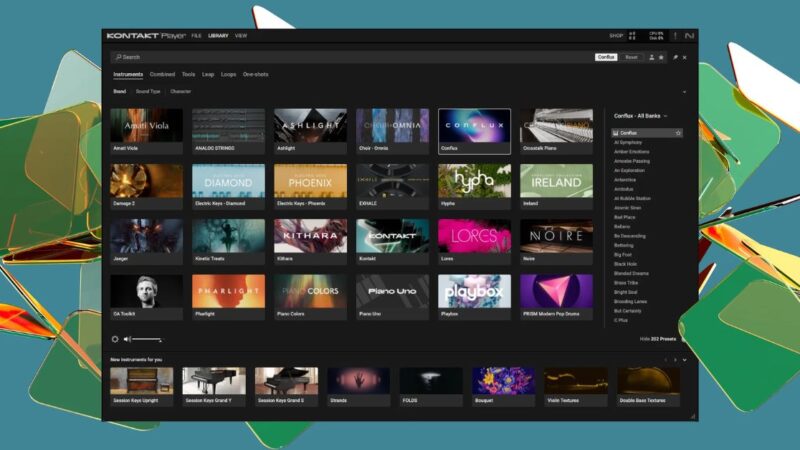
The best free Kontakt libraries can give music producers access to realistic pianos, orchestral instruments, guitars, choirs and cinematic textures without spending hundreds of dollars on sample libraries.
Whether you produce electronic music, hip-hop, pop, film scores or ambient tracks, these instruments can expand your sound palette and help you create more expressive arrangements.
However, there is one important detail to understand before downloading anything: not every free Kontakt library works with the free Kontakt Player. Some libraries require the paid version of Kontakt, while others may have specific version requirements or additional installation steps.
This guide highlights 12 free Kontakt instruments and collections worth exploring, explains what each is best suited for, and helps you understand compatibility, licensing and installation.
Product availability and free editions can change. Check the linked developer pages before downloading, particularly when a library has a limited free edition or requires a specific version of Kontakt.
1. Komplete Start: Best Free Starter Collection
Komplete Start is a free collection from Native Instruments that gives beginners access to a selection of instruments, effects and sounds. Rather than downloading individual libraries from multiple developers, you can explore several types of production tools through one ecosystem.
Depending on the current collection, its contents can support synthesizer programming, sampled instruments, sound design and mixing.
Best for: Beginners who want a broad starting toolkit.
Why it stands out: It offers more variety than a single-instrument library and provides a convenient introduction to Native Instruments software.
Limitations: Komplete Start is a bundle, not one Kontakt library. Individual products can have different installation requirements, and not every included instrument should be assumed to be a standalone Kontakt Player library.
Download: Native Instruments Komplete Start
2. Foundations Piano: Best for Cinematic Piano
Heavyocity’s Foundations series focuses on accessible instruments for modern scoring and production. Foundations Piano is a candidate for producers who want a piano sound suited to emotional melodies, cinematic arrangements and atmospheric compositions.
A dedicated piano library can be useful when a basic DAW piano lacks the character or ambience needed for a track.
Best for: Film-inspired music, ambient production and melodic songwriting.
Why it stands out: It offers a focused starting point for piano-based compositions.
Limitations: Check the current product page for availability, the exact free edition, installation requirements and whether the instrument is licensed for the free Kontakt Player.
Download: Heavyocity
3. Audio Imperia GLADE: Best for Cinematic Textures
Audio Imperia is known for cinematic instruments and orchestral sound design. GLADE is worth investigating if you want expressive textures that can complement conventional orchestral arrangements.
Cinematic libraries can be particularly useful for transitions, evolving layers and emotional backgrounds that need more movement than a simple sustained pad.
Best for: Cinematic music, trailers and atmospheric arrangements.
Why it stands out: Its intended sound-design direction makes it a candidate for producers looking beyond traditional orchestral patches.
Limitations: Verify whether a free version is currently available and confirm its Kontakt Player licensing before treating it as a zero-cost option.
Download: Audio Imperia
4. Sonuscore Orchestra Elements: Best for Beginner Orchestration
Orchestral libraries can help producers add strings, brass and other ensemble sounds to compositions without hiring musicians or recording a live orchestra.
Sonuscore’s orchestral products are worth exploring if you want to create cinematic arrangements or combine orchestral layers with electronic production.
Best for: Beginner composers and hybrid orchestral music.
Why it stands out: An accessible orchestral instrument can make it easier to experiment with arrangements and discover how different sections work together.
Limitations: Confirm the availability of the specific free edition. Do not assume that every Sonuscore product or edition works with the free Kontakt Player.
Download: Sonuscore
5. Shreddage 3 Stratus FREE: Best for Electric Guitar
Virtual guitars can be challenging to program convincingly because realistic performances depend on articulation, note transitions, timing and playing technique.
Shreddage 3 Stratus FREE is a candidate for producers who want an electric-guitar instrument for rock, pop, metal or electronic arrangements.
Best for: Guitar-based compositions and MIDI-driven production.
Why it stands out: A dedicated guitar instrument can provide more guitar-specific articulation and performance options than a generic synthesizer patch.
Limitations: Realistic results may require careful MIDI programming. Verify the current free edition, supported Kontakt version and Player compatibility.
Download: Impact Soundworks
6. Jacob Collier Audience Choir: Best for Vocal Textures
Choir libraries can add a human element to cinematic music, ambient tracks and electronic productions. They are particularly effective for sustained chords, vocal layers and atmospheric passages.
Jacob Collier Audience Choir is a candidate for producers interested in choir-based textures without purchasing a large orchestral library.
Best for: Cinematic arrangements, ambient music and layered vocal productions.
Why it stands out: Choir sounds can introduce a sense of scale and harmonic depth that is difficult to reproduce with a conventional synthesizer.
Limitations: Check the official product listing for current access, installation requirements and Kontakt Player support.
Download: Native Instruments
7. Analog Dreams: Best for Retro Synth Sounds
Analog Dreams is associated with the retro-inspired synthesizer sound palette in the Native Instruments ecosystem. It is worth considering for warm pads, electronic leads and vintage-style textures.
For electronic producers, sampled or hybrid synthesizer instruments can complement dedicated VST synthesizers by offering ready-to-use sounds that need less programming.
Best for: Synthwave, electronic pop, house and retro-inspired production.
Why it stands out: It provides a different approach to synthesizer sound design than programming every patch from scratch.
Limitations: Confirm the current product edition, licensing and installation requirements. Its inclusion in a particular Native Instruments bundle does not automatically establish that every version is available separately for free.
Download: Native Instruments
8. Hypha: Best for Organic Electronic Textures
Electronic music does not have to rely entirely on conventional synthesizers. Organic samples, unusual tonal layers and evolving textures can make a track feel more distinctive.
Hypha is worth investigating for producers looking for sound-design material that can complement percussion, synthesizers and atmospheric effects.
Best for: Experimental electronic music, ambient production and sound design.
Why it stands out: Textural instruments can introduce variation without requiring another conventional lead or bass patch.
Limitations: Verify its current free status, download availability and Kontakt requirements before adding it to your collection.
Download: Native Instruments
9. Sonokinetic EMP Mark II: Best for Electric Piano
Electric piano sounds are useful across R&B, soul, jazz, pop and electronic music. They can provide soft harmonic support, rhythmic chord patterns or the central motif of a track.
Sonokinetic EMP Mark II is a candidate for producers seeking an electric-piano instrument within the Kontakt ecosystem.
Best for: R&B, soul, jazz-inspired production and melodic electronic music.
Why it stands out: A dedicated electric piano can provide a more appropriate starting sound than a generic keyboard patch.
Limitations: Confirm that the specific library remains freely available and determine whether it requires the full version of Kontakt.
Download: Sonokinetic
10. LUX Orchestral Strings Elements: Best for String Arrangements
Strings can add movement, emotion and harmonic depth to a production. Short articulations work well for rhythmic patterns, while sustained strings can support melodies and create tension.
LUX Orchestral Strings Elements is a candidate to investigate if you need string sounds for cinematic or hybrid electronic compositions.
Best for: Film scoring, orchestral arrangements and emotional electronic music.
Why it stands out: Dedicated string instruments offer a more focused option than using a generic pad to imitate an ensemble.
Limitations: Verify the exact product and edition before downloading. Check the available articulations, free status and Kontakt Player requirements.
Download: Sonuscore
11. Emergence Audio Infinite Collection: Best for Experimental Sound Design
Experimental sample libraries can help producers create sounds that do not fit neatly into conventional instrument categories. These may include evolving textures, unusual tonal layers and material designed for cinematic or atmospheric use.
Emergence Audio is worth exploring if you want to move beyond standard piano, guitar and orchestral sounds.
Best for: Ambient music, cinematic sound design and experimental production.
Why it stands out: Unconventional textures can provide a distinctive layer beneath familiar instruments.
Limitations: Verify which specific instruments are free, whether they are still offered and whether they require Kontakt Player or the full sampler.
Download: Emergence Audio
12. The 88E: Best for Experimental Piano Textures
A conventional piano library focuses on reproducing an acoustic instrument. Experimental piano libraries take a different approach, using altered tones, unusual processing or unconventional playing techniques to create new textures.
The 88E is a candidate for producers interested in unusual piano-based sounds rather than a traditional concert-piano reproduction.
Best for: Ambient, experimental and cinematic music.
Why it stands out: Unconventional piano sounds can create a distinctive motif without relying on another synthesizer.
Limitations: Confirm current availability, the exact product listing, supported Kontakt versions and the relevant license before downloading.
Download: Check the developer’s official listing before publishing a direct link.
Free Kontakt Player vs. Full Kontakt: What’s the Difference?
This is the most important distinction to understand before installing a library.
Kontakt is Native Instruments’ software sampler. Kontakt Player is its free version, designed to run compatible instruments and libraries.
Some third-party libraries are licensed to run in Kontakt Player. Others require the paid full version of Kontakt, even when the library itself is free to download.
| Compatibility label | What it means |
|---|---|
| Kontakt Player compatible | The library is licensed to run in the free player, subject to version requirements |
| Full Kontakt required | The library needs the paid full version |
| Verify before installing | Current licensing, availability or requirements have not been confirmed |
If a library requires full Kontakt, it may run in demo mode in Kontakt Player and stop functioning after a limited period. Check the developer’s instructions before relying on it in a project.
Also distinguish between a library that requires the full version of Kontakt and an instrument that runs independently as a VST plugin. These are different software requirements.
How to Install Free Kontakt Libraries in FL Studio
Once you have selected a library, follow the developer’s installation instructions. The exact steps depend on whether it is a Kontakt Player instrument, a full-Kontakt library or a standalone plugin.
- Download from the official developer. Check the supported Kontakt version, operating system and license before installing.
- Install the required software. Some libraries require Native Access, while others use a separate installer or provide downloadable files.
- Open Kontakt. Load the library through the appropriate Kontakt browser or product interface. Player-compatible libraries may appear in the Libraries section or another supported browser, depending on the product.
- Open FL Studio. Add Kontakt or Kontakt Player as an instrument plugin using FL Studio’s plugin manager.
- Load the instrument. Open the desired library inside Kontakt and create a MIDI pattern or play notes using your keyboard.
- Troubleshoot missing libraries. If an instrument does not appear, check the installation location, Kontakt version and developer instructions. Do not assume a missing library is incompatible until you have checked its requirements.
A Kontakt library is not necessarily a standalone VST3 instrument. In many cases, you load the library inside Kontakt rather than scanning the library folder directly in FL Studio.
Can You Use Free Kontakt Libraries in Commercial Music?
Many free Kontakt instruments are designed for music production, but the exact terms depend on the developer and the product.
Before using a library in a commercial release, check its license for:
- Commercial use in songs, albums, film scores and other productions.
- Restrictions on redistributing samples or extracting individual sounds.
- Requirements for attribution or registration.
- Separate conditions for bundled loops, presets or other included content.
Using an instrument to create a finished musical composition is different from redistributing the underlying sample files. A free download does not automatically grant permission to resell or share those samples independently.
If the licensing terms are unclear, contact the developer before releasing the work commercially.
Frequently Asked Questions
Are all free Kontakt libraries compatible with Kontakt Player?
No. Some are licensed for the free Kontakt Player, while others require the paid full version. Always check the library’s official requirements.
Do I need to buy Kontakt to use free libraries?
Not necessarily. Player-compatible libraries can run in Kontakt Player without purchasing the full sampler. Libraries that require full Kontakt need the paid version or another explicitly supported solution.
Are free Kontakt libraries good enough for professional music?
Yes, free instruments can be useful in professional productions. Their suitability depends on sound quality, performance controls, recording depth and the needs of your project.
Can I use free Kontakt libraries in FL Studio?
Yes, provided the library works with the Kontakt version you have installed and the Kontakt plugin is compatible with your FL Studio setup.
How much storage do Kontakt libraries need?
Requirements vary considerably. Small instruments may take relatively little space, while detailed sample libraries can occupy several gigabytes. Check the official download size and installation requirements before downloading.
Comments are closed.