



Close Menu
    Facebook X (Twitter) Instagram
    Facebook X (Twitter) Instagram Pinterest
    NoMusica.com
    • AI
    • Tech
      • Electronics & Gadgets
      • Apps & Updates
      • Smartphones
    • Films & Shows
    • Music
    • Gaming
    • Streaming
    • Music Production
    NoMusica.com
    Tech & Science

    Windows 11 Gets a New Look with Easy-to-Understand System Settings

    2 Mins Read
    Share Facebook Twitter Pinterest Telegram WhatsApp Copy Link

    Microsoft is improving the Windows 11 Settings to make it easier for users to understand their PC specs.

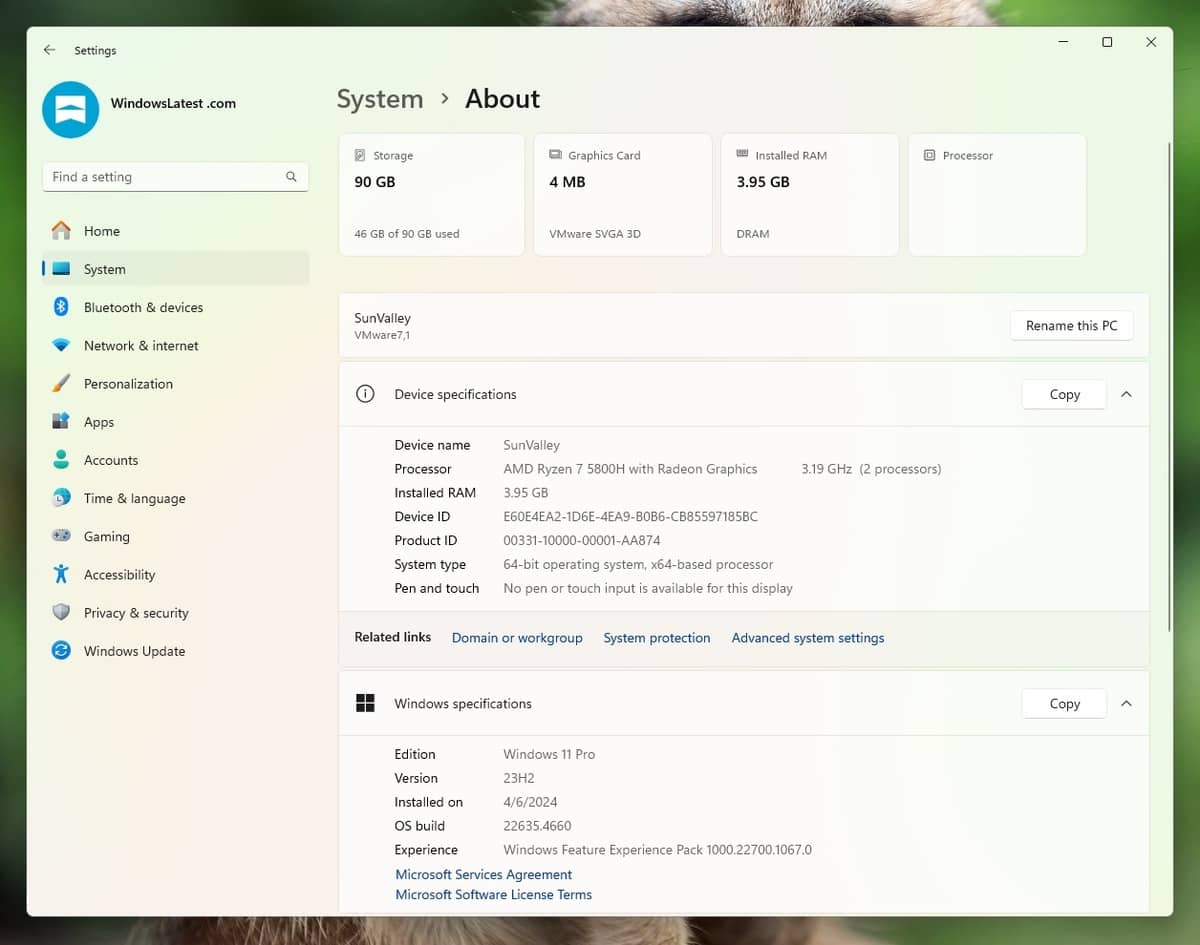
    The update adds new “cards” to the System page, which will display key information about your PC, like storage, graphics card, installed RAM, and processor.

    What’s New?

    The new cards are designed to simplify the process of checking your PC’s specs. Each card highlights one key spec, such as the storage space, RAM, or the graphics card.

    For example, the graphics card section now shows details about your GPU, something that wasn’t easy to find before. The processor section also provides clear information about the type of processor installed in your PC.

    In the past, users had to go through different sections to get all the details. Now, the new System cards make it simple to see everything at a glance.

    GPU Memory Count

    Another major change is that Windows 11 will now show how much GPU memory is installed on your PC. Currently, you need to open the Task Manager to check this. With the new UI, the GPU memory count will be visible directly in the System Settings.

    Upcoming FAQ Section

    Microsoft is also planning to add a FAQ section to the System page. This will help users understand whether their PC is good for gaming or productivity tasks.

    The FAQ section is not yet live but has been tested in preview builds of Windows 10. It will answer questions like, “How does having less than 4GB of RAM affect my PC performance?” and “Is my PC’s GPU enough for gaming?”

    The new System UI update in Windows 11 aims to make understanding your PC specs easier and more straightforward.

    With the addition of cards for key specs and an upcoming FAQ section, Microsoft is helping users better understand their devices.


    Microsoft Windows Windows 11
    Share. Facebook Twitter Pinterest Telegram WhatsApp Copy Link
    Sazid Kabir
    • Website
    • X (Twitter)
    • Pinterest
    • Instagram
    • LinkedIn

    Founder & Chief Editor, NoMusica.com. Sazid Kabir is a tech writer and music producer covering music, tech, and music production with both analytical and practical experience.

    Related Posts

    10 Free AI Courses With Certificates for High-Income Skills in 2026

    7 Best Knowledge Base Tools for Learning in 2026 (Ranked)

    Best Open-Source Softwares in 2026: Safe, Free Tools for Creators, Developers, and Everyday Use

    5 Best Free Audio Editing Software in 2026: For Podcasts & Music

    15 AI Tools Musicians Can Use to Create and Promote Music

    5 Best Free Game Recording Software (No Watermark, No Subscription)

    Add A Comment
    Leave A Reply Cancel Reply

    Latest Posts

    Cardi B calls Karmelo Anthony verdict “disgusting” in Texas teen murder case

    June 13, 2026

    Nipsey Hussle Estate Releases Unseen Footage of Nipsey and Lauren London in New Rap Video “Sacrifices”

    June 13, 2026

    Top 10 lies Being Said About Sean “Diddy” Combs Trial & Who’s Pushing the Narrative

    June 13, 2026

    Travis Scott Drops Cactus Jack Nike Phantom 6 For 2026 World Cup

    June 7, 2026

    Netflix Corruption: Michael Jackson Film is False & Slander, Here’s the Documented Facts

    June 7, 2026
    Facebook X (Twitter) Instagram Pinterest
    © 2026 A WowPress Initiative

    Type above and press Enter to search. Press Esc to cancel.


