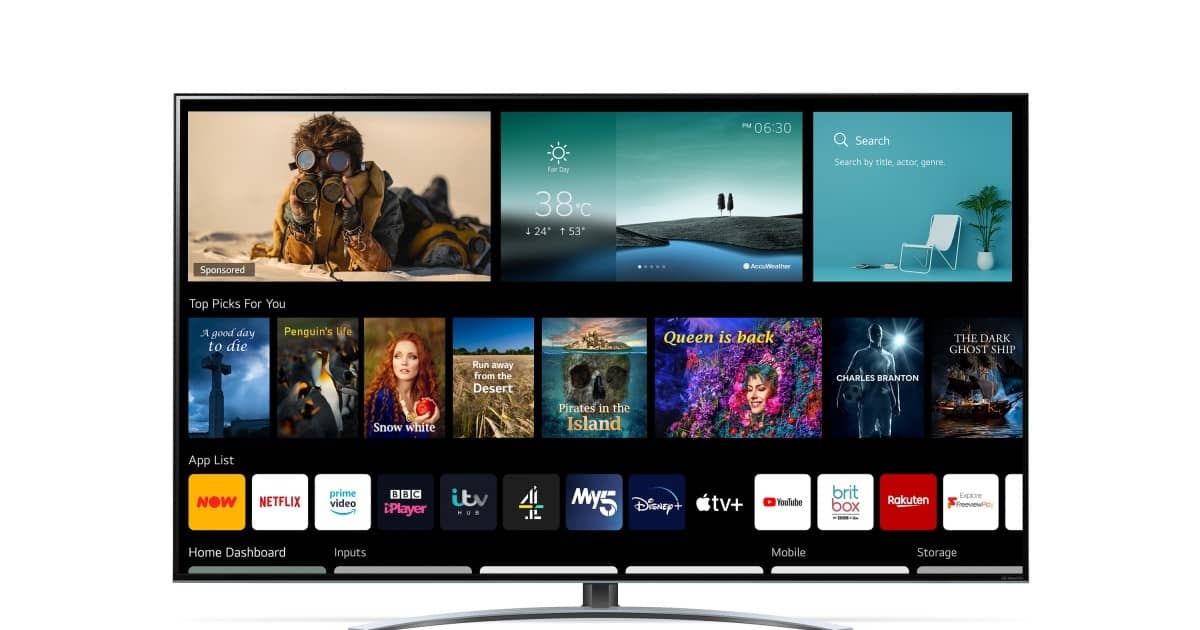
If you own an LG TV, you’re already enjoying one of the top smart TV platforms—webOS. However, even the best systems can be made better. Here are seven simple tricks to enhance your LG TV experience.
1. Customize Your Home Screen
webOS can get cluttered with apps and ads. You can make the interface cleaner by rearranging the apps on your home screen. To do this, scroll to the end of the apps carousel, select “Edit,” and move your favorite apps to the beginning of the list.
You can also delete unwanted apps by going to the Apps page, selecting “Manage Apps,” and removing the ones you don’t need.
2. Set Quick-Access Buttons on Your Remote
The LG Magic Remote has hidden features that let you assign quick-access buttons for your favorite apps. For example, you can set “1” to open Netflix instantly.
Simply open the app, hold the number, and the app will launch. You can also quickly switch between apps by pressing and holding the Home button on the remote.
3. Remove Unnecessary Q-Cards
webOS has a feature called Q-Cards that organize content like Sports, Gaming, and Music. If these sections are cluttering your screen, you can remove them.
To do this, scroll to the end of the Q-Cards list and click “Edit.” From there, you can remove the ones you don’t use and keep the ones that are helpful to you.
4. Connect to the LG ThinQ App
If you use other LG smart devices, you can make your TV even smarter by connecting it to the LG ThinQ app. This app allows you to control your TV with your phone, automate smart home tasks, monitor energy usage, and more.
Simply connect both your TV and phone to the same Wi-Fi network and follow the prompts to sync them.
5. Use the LG AI Chatbot for Help
Newer LG TVs running webOS 25 come with an AI Chatbot that can assist with troubleshooting. If you run into problems, go to Settings, select the Chatbot icon, and describe your issue. The chatbot can even automatically diagnose and fix problems with your TV.
6. Adjust the Pointer Size and Speed
If you find the Magic Remote’s motion controls difficult to use, you can adjust the size and speed of the on-screen pointer. Go to Settings > Accessibility > Pointer Settings and make changes according to your preference. This will help you use the motion controls more comfortably.
7. Turn Off Energy-Saving Features
Energy-saving settings can dim your TV’s brightness and affect picture quality. To disable these settings, go to the General settings menu and turn off the Energy Saving option. Make sure your picture mode is set to Standard or Filmmaker mode for the best display quality.
By following these simple tips, you can improve your LG TV’s performance and enjoy a more personalized viewing experience.
Source: tomsguide.com