Close Menu
NoMusica.com
    Facebook X (Twitter) Instagram
    Facebook X (Twitter) Instagram
    NoMusica.comNoMusica.com
    • Entertainment
    • Music
      • Music Production
    • Tech
      • AI
      • Electronics & Gadgets
      • Apps & Updates
      • Smartphones
    • Films & Shows
    • Gaming
    • Streaming
    NoMusica.com
    Home»Tutorials

    How to Nearly Double Your iPhone Battery Life

    January 28, 2026
    Share
    Facebook Twitter LinkedIn Pinterest Email

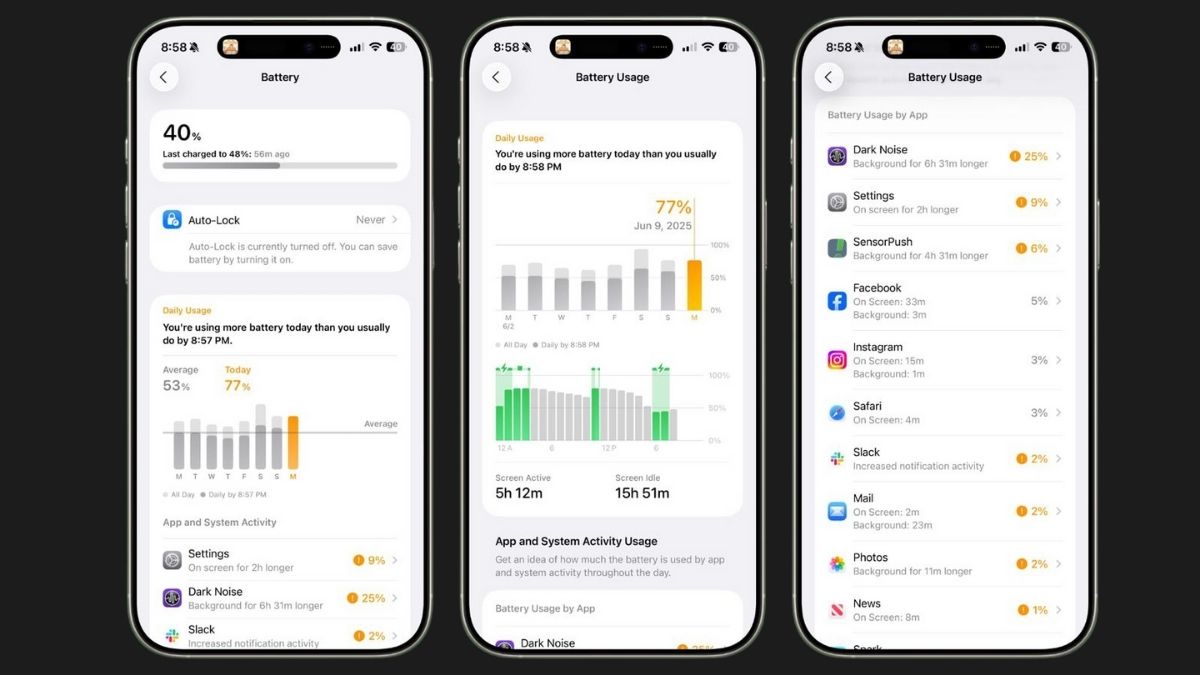
    If your iPhone battery often dies before the day ends, a few simple changes could help it last much longer. According to tech YouTuber Tom Wells, also known as Proper Honest Tech, adjusting just a handful of settings can nearly double your battery life.

    One key adjustment is turning off Wi-Fi Assist. This feature automatically switches your phone to cellular data when Wi-Fi is weak, which can drain your battery unnecessarily. To disable it, go to Settings > Mobile Data Options > Voice and Data.

    Another drain is Background App Refresh. This allows apps to update in the background even when you’re not using them. For most apps, this is unnecessary. You can customize which apps refresh by going into Settings and adjusting each app individually.

    Disabling Always-On Display can also help. While it’s convenient to see your clock and widgets without touching your phone, turning it off can save battery and reduce distractions. Go to Settings > Display & Brightness to switch it off.

    Brightness and Dark Mode are important too. iPhones with OLED screens use less power with darker colors, so enabling Dark Mode can significantly save battery.

    Turning off analytics tracking and location services can also make a difference. Your iPhone collects usage data in the background, which consumes power. Disable these in Settings > Privacy & Security > Analytics & Improvements, and adjust location access to “While Using” for apps that don’t need constant tracking.

    Finally, be mindful of Low Power Mode and charging habits. Using Low Power Mode all the time reduces performance unnecessarily, and fully charging your phone repeatedly can shorten battery life. Experts suggest charging to around 80–90% instead of 100% for better long-term health.

    With these simple tweaks, iPhone users can get significantly more battery life without buying a new device.


    Apple iPhone iOS
    Sazid Kabir
    • Website
    • X (Twitter)
    • Pinterest
    • Instagram
    • LinkedIn

    Founder & Chief Editor, NoMusica.com. Sazid Kabir is a tech writer and music producer covering music, tech, and music production with both analytical and practical experience.

    Keep Reading

    iPhone Fold Delay Confirmed by Apple’s Own Supply Chain

    Apple Is About to Push a New iOS Update to Fix Security Flaws on Your iPhone

    Apple Could Freeze iPhone 18 Pro Price Despite Rising Chip Costs

    Apple Is Bringing Touch ID Back to the iPhone This Year

    This GitHub Trick Unlocks Claude Opus 4.6 for Free

    iPhone 17E Is Here and It Actually Gives You More for Your Money

    Add A Comment

    Comments are closed.

    Latest Posts

    GTA 6 region-lock policy is ‘garbage’, says ex-Rockstar animator

    July 30, 2026

    Rinbga founders, Adam Young & Harrison Gevirtz, Convicted for Stealing Millions of Dollars with Tech Support Fraud Scheme

    July 27, 2026

    Crypto Traders Bet Big on Cardi B’s Womb in Wild “Cardi Bee” Presale Frenzy

    July 24, 2026

    Snoop Dogg Biopic Set for 2027 Release with Jonathan Daviss in Lead Role

    July 23, 2026

    Kevin durant Ignores Lionel Messi & racist Argentian Soccer Team, refusing to shake their Hands

    July 19, 2026
    Pages
    • Home
    • Blog
    • About
    • Contact
    • Advertise
    • Cookie Policy
    • Privacy Policy
    Categories
    • AI
    • Tech & Science
    • Films & TV Shows
    • Entertainment
    • Music
    • Streaming
    • Music Production
    Random Reads

    Amazon to Unveil Next-Gen Alexa on February 26 – Here’s What to Expect

    Conan O’Brien Stuns Oscars Crowd With Brutal Prince Andrew Joke

    Samsung’s One UI 7 Now Bar Offers Personalized Lock Screen Features

    Facebook X (Twitter) Instagram Pinterest
    © 2026 WowPress Digital

    Type above and press Enter to search. Press Esc to cancel.