



Close Menu
    Facebook X (Twitter) Instagram
    Facebook X (Twitter) Instagram Pinterest
    NoMusica.com
    • AI
    • Tech
      • Electronics & Gadgets
      • Apps & Updates
      • Smartphones
    • Films & Shows
    • Music
    • Gaming
    • Streaming
    • Music Production
    NoMusica.com
    Home How to Use Apple’s New ‘Invites’ App to Plan Events and Send RSVPs
    Apps & Updates Tutorials

    How to Use Apple’s New ‘Invites’ App to Plan Events and Send RSVPs

    2 Mins Read
    Share Facebook Twitter Pinterest Telegram WhatsApp Copy Link

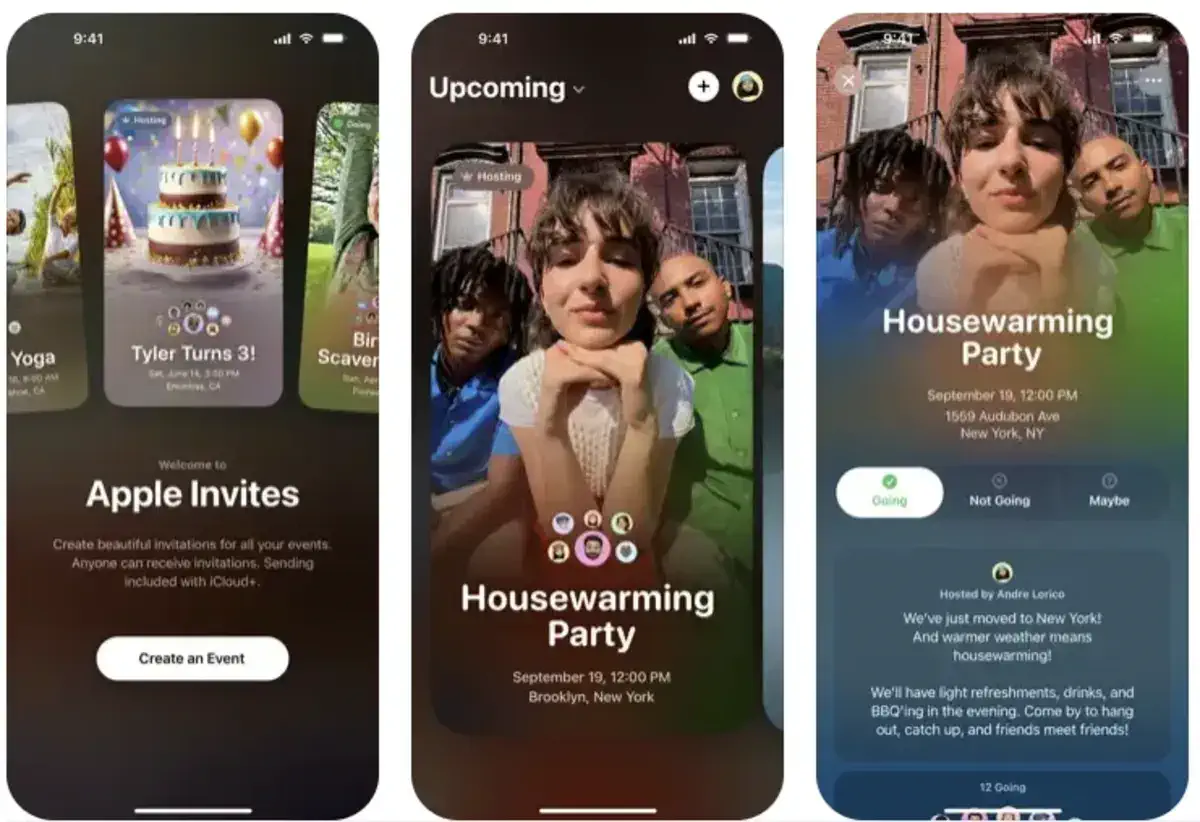
    Apple has introduced a new app called Invites, designed to help users create and manage event invitations from their iPhone or the web.

    The app lets users send invites, track RSVPs, create shared albums, and curate event playlists.

    To use Apple Invites, you need an iCloud+ subscription (99 cents per month), but anyone can RSVP, even without an Apple device.

    How to Create an Event in Apple Invites

    Creating an event in the app is simple:

    • On iPhone, tap the plus sign in the upper-right corner.
    • On the web, select “New Event” at iCloud.com.

    Next, you can:

    • Choose a background (your own photo, camera, Apple’s designs, or generate one with Image Playground on iPhone 15 Pro and newer).
    • Add an event title and select a font style.
    • Set date and time (the app will automatically add a weather forecast for that date).
    • Choose a location (Apple Maps details are included).
    • Write a description (Apple Intelligence’s Writing Tools can assist).

    Once finished, tap Preview to see how your invite looks before sending it.

    How to Add a Shared Album or Playlist

    Apple Invites offers two special features to enhance events:

    • Shared Album – Attendees can upload photos and videos from the event.
    • Event Playlist – Guests can add songs before or during the event (Apple Music subscription required).

    How to Send Invitations

    You can invite guests in two ways:

    • Public link – Share via Messages, Mail, or any app.
    • Direct contact – Select specific guests from your contacts.

    Guests will also receive event updates via shared notes, allowing organizers to send reminders or location changes.

    Apple’s Invites app makes event planning simple and interactive, offering a smooth way to bring people together for special occasions.


    Apple Apple Invites
    Share. Facebook Twitter Pinterest Telegram WhatsApp Copy Link
    Sazid Kabir
    • Website
    • X (Twitter)
    • Pinterest
    • Instagram
    • LinkedIn

    Founder & Chief Editor, NoMusica.com. Sazid Kabir is a tech writer and music producer covering music, tech, and music production with both analytical and practical experience.

    Related Posts

    Are APK Downloads Safe? Risks, Legal Issues, and Safer Alternatives

    5 Best Free Firewall Apps for Android in 2026 (No Root Needed Options Included)

    50+ Best Android Alternative Apps ― Free Movies, No Ads, Offline Maps

    10 Best Free Movie Apps in 2026 (Safe & Working)

    10 Best Free Music Apps in 2026 (No Subscription Needed)

    WhatsApp Tests ‘Plus’ Subscription With New Premium Features

    Add A Comment
    Leave A Reply Cancel Reply

    Latest Posts

    Travis Scott Drops Cactus Jack Nike Phantom 6 For 2026 World Cup

    June 7, 2026

    Netflix Corruption: Michael Jackson Film is False & Slander, Here’s the Documented Facts

    June 7, 2026

    Cassie Ventura Fled U.S. with Diddy’s $30M,  Her Innocence Now in Question

    June 5, 2026

    50 Cent Says Daphne Joy’s OnlyFans Up 85% After Diddy Tape, Hints Model Leaked Her Own Tape

    June 5, 2026

    NEW HIPHOP THIS FRIDAY (JUNE 5, 2026)

    June 5, 2026
    Facebook X (Twitter) Instagram Pinterest
    © 2026 A WowPress Initiative

    Type above and press Enter to search. Press Esc to cancel.


