



Close Menu
    Facebook X (Twitter) Instagram
    Facebook X (Twitter) Instagram Pinterest
    NoMusica.com
    • AI
    • Tech
      • Electronics & Gadgets
      • Apps & Updates
      • Smartphones
    • Films & Shows
    • Music
    • Gaming
    • Streaming
    • Music Production
    NoMusica.com
    Home Google Launches Magic Cue on Pixel 10 to Simplify Daily Tasks
    Apps & Updates

    Google Launches Magic Cue on Pixel 10 to Simplify Daily Tasks

    2 Mins Read
    Share Facebook Twitter Pinterest Telegram WhatsApp Copy Link
    Google Magic Cue

    Google has unveiled a new AI-powered feature called Magic Cue for its Pixel 10 smartphones. The tool is designed to make daily tasks easier by providing personalized suggestions drawn from multiple apps.

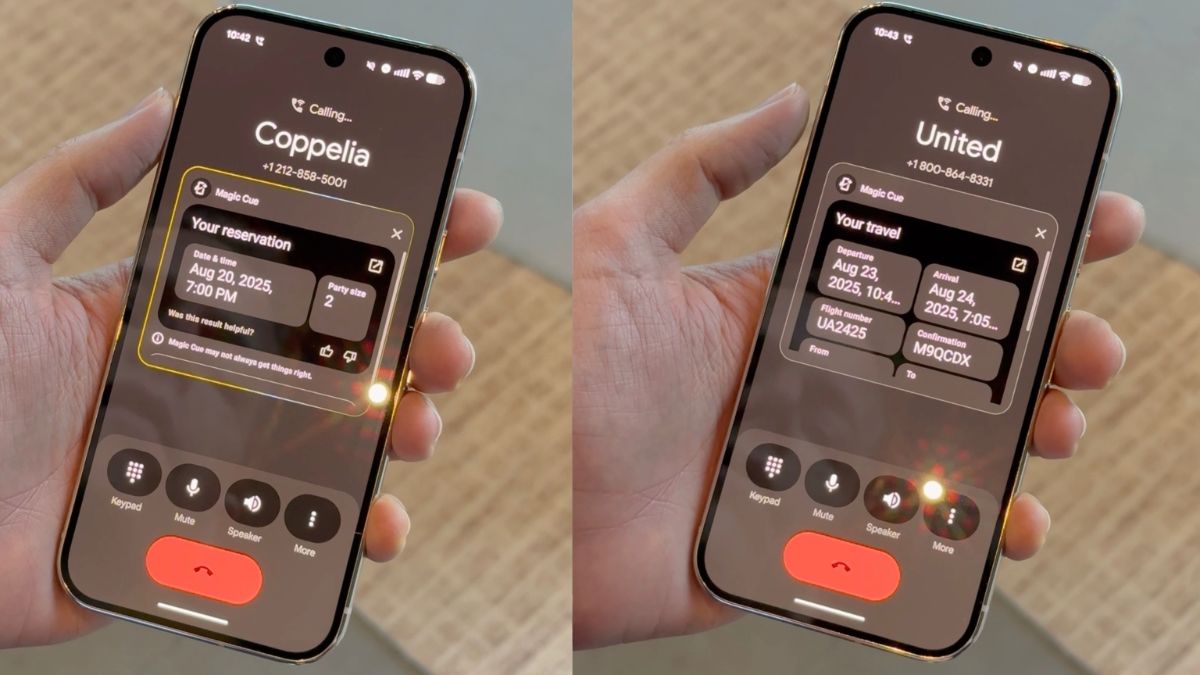
    Magic Cue monitors the contents of the screen and uses Google’s Gemini AI models to offer relevant prompts. While it does not yet control the phone fully, the feature aims to “connect the dots of your digital life” and streamline common actions.

    How Magic Cue Works

    Magic Cue acts as an enhanced version of Android’s app actions. It analyses the screen and pulls information from other apps to offer predictive suggestions. For example, if a user is calling a business, Magic Cue can display details such as addresses, appointment times, or order IDs directly in a floating overlay window on the dialer.

    Similarly, when chatting on Google Messages, the feature can suggest replies by drawing from search history, Maps, or other apps. Users can tap these suggestions to respond quickly without switching apps.

    Magic Cue expands on concepts previously introduced with the Pixel Screenshots app on the Pixel 9, which allowed AI-powered search and summarisation of screenshots. The new feature now works across multiple app types, reducing the need for manual actions.

    Supported Apps

    At launch, Magic Cue will work with a range of Google apps, including Calendar, Chrome, Docs, Files, Gmail, Messages, Photos, and YouTube. Google has also promised limited support for third-party apps, including regional apps such as Line.

    User Experience and Privacy

    Google says Magic Cue processes much of its AI analysis on-device, helping to keep user data private. The feature is designed to improve over time as it learns from usage, though Google warns that some suggestions may occasionally be inaccurate. Users will have the option to disable the feature if they prefer.

    Magic Cue represents part of Google’s ongoing strategy to differentiate its Pixel phones through unique software experiences, similar to features Apple is exploring with Siri.


    Google Google Pixel 10 Google Pixel 10 Pro
    Share. Facebook Twitter Pinterest Telegram WhatsApp Copy Link
    Sazid Kabir
    • Website
    • X (Twitter)
    • Pinterest
    • Instagram
    • LinkedIn

    Founder & Chief Editor, NoMusica.com. Sazid Kabir is a tech writer and music producer covering music, tech, and music production with both analytical and practical experience.

    Related Posts

    Are APK Downloads Safe? Risks, Legal Issues, and Safer Alternatives

    How to Use Google Nano Banana: Prompt Structure, Examples, and Limitations

    5 Best Free Firewall Apps for Android in 2026 (No Root Needed Options Included)

    50+ Best Android Alternative Apps ― Free Movies, No Ads, Offline Maps

    10 Best Free Movie Apps in 2026 (Safe & Working)

    10 Best Free Music Apps in 2026 (No Subscription Needed)

    Add A Comment

    Comments are closed.

    Latest Posts

    Travis Scott Drops Cactus Jack Nike Phantom 6 For 2026 World Cup

    June 7, 2026

    Netflix Corruption: Michael Jackson Film is False & Slander, Here’s the Documented Facts

    June 7, 2026

    Cassie Ventura Fled U.S. with Diddy’s $30M,  Her Innocence Now in Question

    June 5, 2026

    50 Cent Says Daphne Joy’s OnlyFans Up 85% After Diddy Tape, Hints Model Leaked Her Own Tape

    June 5, 2026

    NEW HIPHOP THIS FRIDAY (JUNE 5, 2026)

    June 5, 2026
    Facebook X (Twitter) Instagram Pinterest
    © 2026 A WowPress Initiative

    Type above and press Enter to search. Press Esc to cancel.


