Close Menu
NoMusica.com
    Facebook X (Twitter) Instagram
    Facebook X (Twitter) Instagram
    NoMusica.comNoMusica.com
    • Entertainment
    • Music
      • Music Production
    • Tech
      • AI
      • Electronics & Gadgets
      • Apps & Updates
      • Smartphones
    • Films & Shows
    • Gaming
    • Streaming
    NoMusica.com
    Home»AI

    Gemini in Chrome Can See Your Screen — But Can It Really Help?

    May 26, 2025
    Gemini in Chrome (Image: TheVerge)
    Gemini in Chrome (Image: TheVerge)
    Share
    Facebook Twitter LinkedIn Pinterest Email

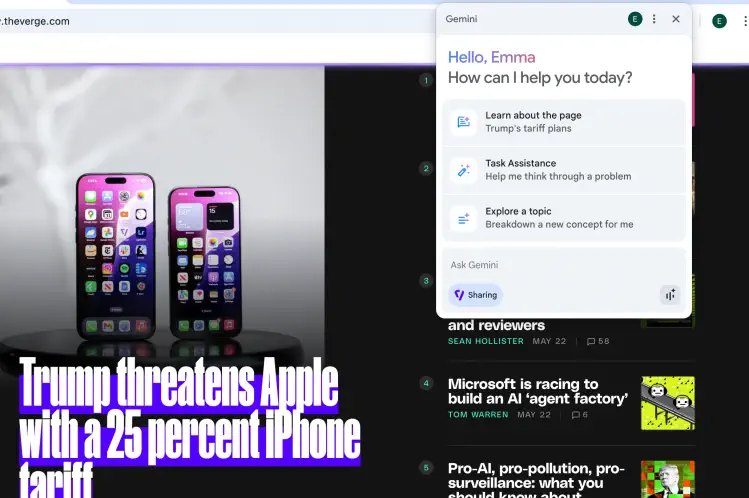
    Google has started testing Gemini integration in Chrome, allowing users to access its AI assistant directly from the browser. Instead of visiting a separate page, users can now click the Gemini button in the top-right corner of Chrome to start chatting. What makes this version different is that Gemini can “see” what’s on your screen.

    The new feature is currently only available to AI Pro and Ultra subscribers using Chrome Beta, Dev, or Canary versions. Writer Emma Roth tried it out and found both strengths and shortcomings.

    Gemini worked well when summarizing news articles, YouTube videos, and Amazon search pages. It could identify tools in DIY videos, pull out recipes from cooking videos, and even find waterproof bags in shopping results. You can also use voice input and hear Gemini’s spoken responses with the “Live” feature.

    However, Gemini still feels limited. It can only process visible content on one tab at a time. You have to manually show what you want summarized. Sometimes its answers were too long for the small popup window. And even when asked for concise replies, it often responded with lengthy paragraphs.

    Inconsistencies also showed up. In one video, it failed to identify MrBeast’s location, even though the answer was in the description. Gemini also couldn’t link to specific products or place orders, even when prompted — tasks that future “agentic” AIs are expected to handle.

    Despite its flaws, the tool shows potential. Google’s upcoming Project Mariner and its Agent Mode could bring smarter task handling and web search, possibly making Gemini in Chrome much more powerful soon.

    Right now, it’s a helpful assistant — but not yet the full-on AI agent Google is aiming for.

    Source: Verge

    Chrome Google Google Gemini
    Sazid Kabir
    • Website
    • X (Twitter)
    • Pinterest
    • Instagram
    • LinkedIn

    Founder & Chief Editor, NoMusica.com. Sazid Kabir is a tech writer and music producer covering music, tech, and music production with both analytical and practical experience.

    Keep Reading

    5 Best Free AI Image Generators in 2026: Tested & Compared

    10 Free AI Courses With Certificates for High-Income Skills in 2026

    Best Discord AI Bots in 2026 (Safe, Useful & Verified Tools)

    15 Best AI Apps for Daily Use (2026 Guide)

    10 Free AI Voice Changers for Gamers and Streamers in 2026

    Best Free AI Tools for Content Creators in 2026 (Features, Limits, and Real Use Cases)

    Add A Comment
    Leave A Reply Cancel Reply

    Latest Posts

    Drake Is The Most Streamed Apple Music Artist Ever

    June 19, 2026

    Tay Keith, Grammy-Nominated ‘Sicko Mode’ Producer, Found Dead at 29

    June 19, 2026

    Cardi B Wins Key Ruling in 2023 Vegas Beachclub Lawsuit

    June 18, 2026

    North West & Molly Santana Set for 14-City “Kimokawaii Tour”

    June 18, 2026

    Drake Want To Sell 50% of OVO With This New Deal

    June 18, 2026
    Pages
    • Home
    • Blog
    • About
    • Contact
    • Advertise
    • Cookie Policy
    • Privacy Policy
    Categories
    • AI
    • Tech & Science
    • Films & TV Shows
    • Entertainment
    • Music
    • Streaming
    • Music Production
    Random Reads

    Taylor Swift Gifts Her Eras Tour Crew $197 Million in Bonuses

    ‘Lilo & Stitch’ Breaks Records With $183M U.S. Debut, $341.7M Worldwide

    Demon Slayer Wallpaper Download for iPhone & Android

    Facebook X (Twitter) Instagram Pinterest
    © 2026 WowPress Digital

    Type above and press Enter to search. Press Esc to cancel.