Close Menu
NoMusica.com
    Facebook X (Twitter) Instagram
    Facebook X (Twitter) Instagram
    NoMusica.comNoMusica.com
    • Entertainment
    • Music
      • Music Production
    • Tech
      • AI
      • Electronics & Gadgets
      • Apps & Updates
      • Smartphones
    • Films & Shows
    • Gaming
    • Streaming
    NoMusica.com
    Home»Tutorials

    How to Hide Files and Folders on macOS Like a Pro

    February 10, 2025
    Share
    Facebook Twitter LinkedIn Pinterest Email

    Your Mac is secured with a password, Touch ID, or Apple Watch authorization, but that doesn’t guarantee privacy from curious kids, friends, or colleagues.

    If you want to hide sensitive files and folders, macOS offers built-in methods—and for extra security, third-party tools can add password protection.

    Using Built-in macOS Tools

    1. Show Hidden Files:
    Press Shift + Cmd + . (period) in Finder to toggle hidden files on or off.

    2. Hide Files by Renaming:

    • Select a file or folder.
    • Add a period (.) at the beginning of the name.
    • Press Enter and confirm.
    • Press Shift + Cmd + . again to fully hide it.

    To unhide, remove the period and restart Finder by running killall Finder in Terminal.

    3. Hide Files via Terminal:

    • Open Terminal and type: chflags hidden [file/folder path]
    • To unhide, use: chflags nohidden [file/folder path]
    • Restart Finder with killall Finder if needed.

    Using Third-Party Software

    Funter: A free menu bar tool that toggles hidden files on or off with a single click.

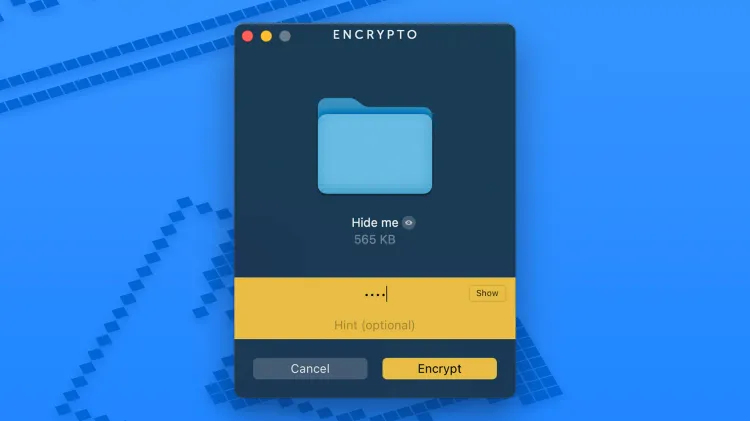
    Encrypto: A powerful encryption tool that lets you lock files behind a password:

    • Drag and drop files into Encrypto.
    • Set a password and click Encrypt.
    • Save the encrypted file anywhere.

    To access encrypted files, double-click them and enter your password.

    Final Thoughts

    For basic file hiding, macOS shortcuts work well. But for stronger security, Encrypto adds password protection—and combining both methods ensures maximum privacy for your sensitive files.


    Apple Macbook Mac macOS
    Sazid Kabir
    • Website
    • X (Twitter)
    • Pinterest
    • Instagram
    • LinkedIn

    Founder & Chief Editor, NoMusica.com. Sazid Kabir is a tech writer and music producer covering music, tech, and music production with both analytical and practical experience.

    Keep Reading

    Windows 11 Upgrade Incoming as MacBook Neo Raises Pressure

    This GitHub Trick Unlocks Claude Opus 4.6 for Free

    Apple Targets Budget Laptop Market with Colorful New MacBook Neo

    Apple Preparing Major Mac and iPhone Announcements for March

    How to Nearly Double Your iPhone Battery Life

    Android Users May Soon Share Files with iPhones

    Add A Comment
    Leave A Reply Cancel Reply

    Latest Posts

    Drake Is The Most Streamed Apple Music Artist Ever

    June 19, 2026

    Tay Keith, Grammy-Nominated ‘Sicko Mode’ Producer, Found Dead at 29

    June 19, 2026

    Cardi B Wins Key Ruling in 2023 Vegas Beachclub Lawsuit

    June 18, 2026

    North West & Molly Santana Set for 14-City “Kimokawaii Tour”

    June 18, 2026

    Drake Want To Sell 50% of OVO With This New Deal

    June 18, 2026
    Pages
    • Home
    • Blog
    • About
    • Contact
    • Advertise
    • Cookie Policy
    • Privacy Policy
    Categories
    • AI
    • Tech & Science
    • Films & TV Shows
    • Entertainment
    • Music
    • Streaming
    • Music Production
    Random Reads

    Spotify Is Testing Emergency Alerts

    Samsung Develops 500MP Sensor for Galaxy, New Tech for iPhone 18

    Sam Altman Denies IPO Plans, Dismisses Worries About OpenAI’s Financial Future

    Facebook X (Twitter) Instagram Pinterest
    © 2026 WowPress Digital

    Type above and press Enter to search. Press Esc to cancel.