Close Menu
NoMusica.com
    Facebook X (Twitter) Instagram
    Facebook X (Twitter) Instagram
    NoMusica.comNoMusica.com
    • Entertainment
    • Music
      • Music Production
    • Tech
      • AI
      • Electronics & Gadgets
      • Apps & Updates
      • Smartphones
    • Films & Shows
    • Gaming
    • Streaming
    NoMusica.com
    Home»AI

    Dia Browser: The AI-Powered Rival to Google Chrome

    December 11, 2024
    Share
    Facebook Twitter LinkedIn Pinterest Email

    The Browser Company, creators of the Arc browser, is developing Dia, a cutting-edge web browser designed to revolutionize workflows with integrated AI features.

    Expected to launch in early 2025, Dia aims to streamline tasks like browsing, task automation, and personalized assistance, positioning itself as a serious competitor to Google Chrome.

    Key Features of Dia

    1. AI-Integrated Tools:
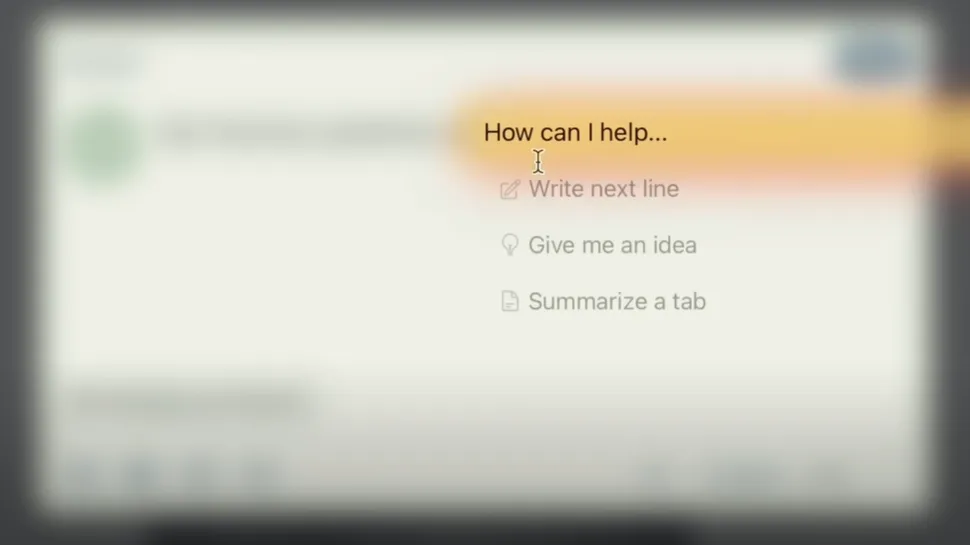
      • Insertion Cursor: Offers smart suggestions, like sentence completions and actions based on web activity.
      • URL Address Bar: Retrieves documents, summarizes content, and performs actions like emailing or scheduling calendar events directly from the address bar.
      • Web Cursor: Executes bulk actions, such as adding items to an Amazon cart in one click.
    2. Personalized Functionality:
      • Dia adapts to users’ habits and workflows, requiring a one-time setup to replicate tasks efficiently.
    3. Task Automation:
      • Automates repetitive tasks like organizing links or managing online purchases with natural language commands.

    Ambitious Vision or Practical Tool?

    The Browser Company’s recruitment video showcases these features but leaves questions about their real-world effectiveness.

    While many existing tools offer similar capabilities, Dia’s seamless integration and user-centric approach could set it apart.

    Who Is Dia For?

    Like Arc, Dia will likely appeal to users who value customization and efficiency.

    For professionals looking to optimize workflows and reduce manual tasks, Dia might become the go-to browser.

    Keep an eye on official announcements from The Browser Company to sign up for early access or join the waitlist.


    Dia Browser The Browser Company
    Sazid Kabir
    • Website
    • X (Twitter)
    • Pinterest
    • Instagram
    • LinkedIn

    Founder & Chief Editor, NoMusica.com. Sazid Kabir is a tech writer and music producer covering music, tech, and music production with both analytical and practical experience.

    Keep Reading

    New UK Law Could Stop Under-16s From Using TikTok, Instagram and More

    5 Best Free AI Image Generators in 2026: Tested & Compared

    10 Free AI Courses With Certificates for High-Income Skills in 2026

    7 Best Knowledge Base Tools for Learning in 2026 (Ranked)

    Best Discord AI Bots in 2026 (Safe, Useful & Verified Tools)

    15 Best AI Apps for Daily Use (2026 Guide)

    Add A Comment

    Comments are closed.

    Latest Posts

    People Want To Know Why Cities Are Banning Kanye But Not Netanyahu & Israel’s Genocidal Regime, Epstein-Allies

    June 24, 2026

    Drake Fans Go Off On Lil Yachty Over A$AP Rocky Link-Up

    June 22, 2026

    New Pooh Shiesty x GloRilla Track Sparks Gucci Mane Debate Online

    June 22, 2026

    #HimToo: The Man Cassie Ventura exposed to STDs & Public Embarrassment, wants Accountability

    June 20, 2026

    21 Savage Mentions Lamelo Ball’s Car Accident in New Rap Song “WTF Goin”

    June 20, 2026
    Pages
    • Home
    • Blog
    • About
    • Contact
    • Advertise
    • Cookie Policy
    • Privacy Policy
    Categories
    • AI
    • Tech & Science
    • Films & TV Shows
    • Entertainment
    • Music
    • Streaming
    • Music Production
    Random Reads

    Pharrell’s “Piece by Piece” Lego Movie: Trailer, Release Date, Songs & More

    Xreal One Pro AR Glasses Deliver a Stunning Personal Cinema Experience

    Netflix to Launch Italian Version of Hit Korean Reality Show ‘Physical 100’

    Facebook X (Twitter) Instagram Pinterest
    © 2026 WowPress Digital

    Type above and press Enter to search. Press Esc to cancel.