


Close Menu
NoMusica.com
    Facebook X (Twitter) Instagram
    Facebook X (Twitter) Instagram
    NoMusica.comNoMusica.com
    • Entertainment
    • Music
      • Music Production
    • Tech
      • AI
      • Electronics & Gadgets
      • Apps & Updates
      • Smartphones
    • Films & Shows
    • Gaming
    • Streaming
    NoMusica.com
    Home»Tech & Science

    Google to Delete Cloud-Stored Location Data After 180 Days

    December 2, 2024
    Google On-Device TImeline Feature
    Google On-Device TImeline Feature
    Share
    Facebook Twitter LinkedIn Pinterest Email

    Google is rolling out a significant privacy change regarding location data storage. Starting now, Google will only store your location history for 180 days before it is deleted from its cloud servers.

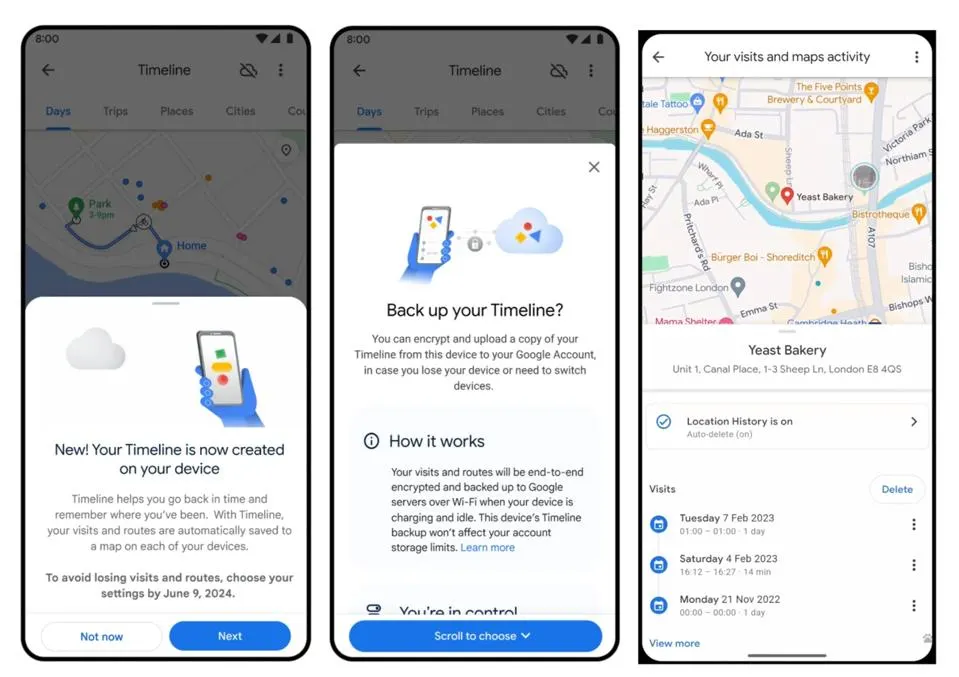
    The change comes as part of Google’s effort to enhance privacy, moving from storing location data on the cloud to keeping it on-device.

    Previously, Google’s Timeline feature tracked and stored users’ precise location data, even when Google apps weren’t in use. This data was used to personalize user experiences, including place recommendations and ads.

    While Google allows users to adjust privacy settings, the change now ensures that all cloud-stored location data will be deleted after 180 days, unless users decide to back it up on their devices.

    Users will receive an email notification with a 180-day countdown once the update begins. When you get the notification, it’s important to open Google Maps, review your Timeline preferences, and make any necessary adjustments. This way, Google can delete its cloud data while ensuring your on-device data remains secure.

    For those concerned about losing their data when switching devices, Google assures that any backed-up location data will be encrypted for privacy.

    However, experts caution that stored data can still be accessed, raising concerns about its potential use in digital forensics.

    As part of a broader trend, Apple is also introducing features in iOS 18.2 to help users manage and remove location data before sharing photos, further emphasizing the importance of location privacy.

    Google
    Sazid Kabir
    • Website
    • X (Twitter)
    • Pinterest
    • Instagram
    • LinkedIn

    Founder & Chief Editor, NoMusica.com. Sazid Kabir is a tech writer and music producer covering music, tech, and music production with both analytical and practical experience.

    Keep Reading

    New UK Law Could Stop Under-16s From Using TikTok, Instagram and More

    10 Free AI Courses With Certificates for High-Income Skills in 2026

    7 Best Knowledge Base Tools for Learning in 2026 (Ranked)

    Best Open-Source Softwares in 2026: Safe, Free Tools for Creators, Developers, and Everyday Use

    How to Use Google Nano Banana: Prompt Structure, Examples, and Limitations

    5 Best Free Audio Editing Software in 2026: For Podcasts & Music

    Add A Comment

    Comments are closed.

    Latest Posts

    People Want To Know Why Cities Are Banning Kanye But Not Netanyahu & Israel’s Genocidal Regime, Epstein-Allies

    June 24, 2026

    Drake Fans Go Off On Lil Yachty Over A$AP Rocky Link-Up

    June 22, 2026

    New Pooh Shiesty x GloRilla Track Sparks Gucci Mane Debate Online

    June 22, 2026

    #HimToo: The Man Cassie Ventura exposed to STDs & Public Embarrassment, wants Accountability

    June 20, 2026

    21 Savage Mentions Lamelo Ball’s Car Accident in New Rap Song “WTF Goin”

    June 20, 2026
    Pages
    • Home
    • Blog
    • About
    • Contact
    • Advertise
    • Cookie Policy
    • Privacy Policy
    Categories
    • AI
    • Tech & Science
    • Films & TV Shows
    • Entertainment
    • Music
    • Streaming
    • Music Production
    Random Reads

    Xiaomi to Drop Leica Branding, Focus on In-House Camera Tech

    How to Delete a Recovery Partition on Windows? Step-by-Step Guide

    Justin Bieber Defends Hailey, Gets Roasted by Fans Over ‘Brazzzzyy’ Post

    Facebook X (Twitter) Instagram Pinterest
    © 2026 WowPress Digital

    Type above and press Enter to search. Press Esc to cancel.