


Close Menu
NoMusica.com
    Facebook X (Twitter) Instagram
    Facebook X (Twitter) Instagram
    NoMusica.comNoMusica.com
    • Entertainment
    • Music
      • Music Production
    • Tech
      • AI
      • Electronics & Gadgets
      • Apps & Updates
      • Smartphones
    • Films & Shows
    • Gaming
    • Streaming
    NoMusica.com
    Home»Tech & Science

    Get the Most Out of the iOS 18 Photos App with These Tweaks

    December 25, 2024
    Share
    Facebook Twitter LinkedIn Pinterest Email

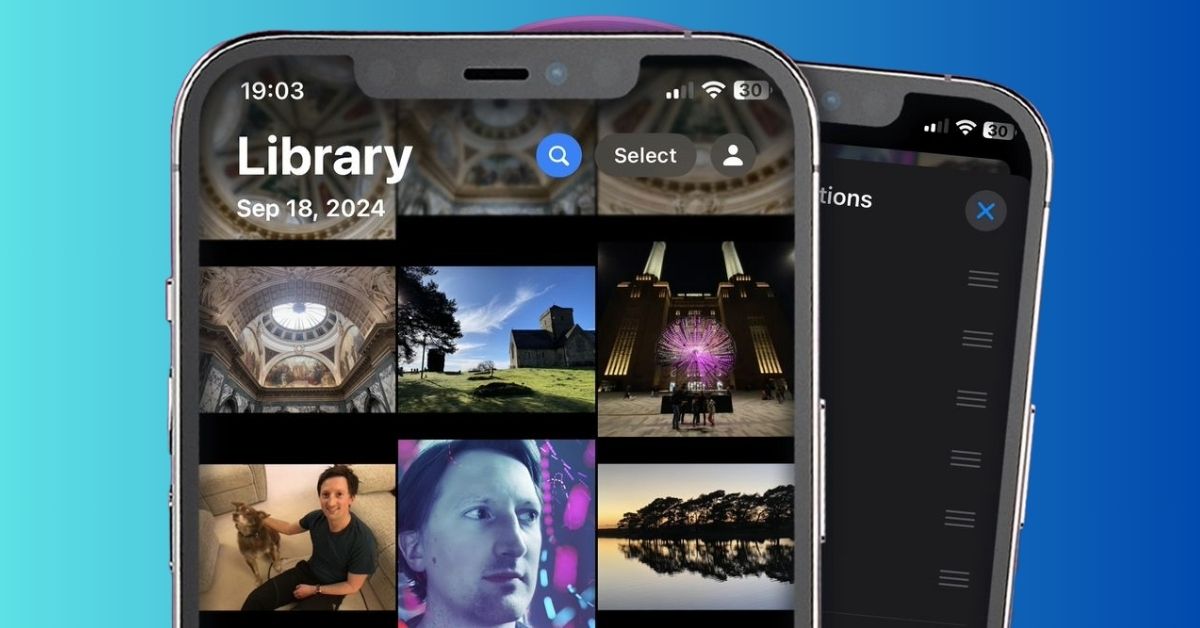
    Apple’s overhaul of the Photos app in iOS 18 introduced a unified design that replaced the navigation bar with a single screen layout.

    While it’s a significant change, many users have found the new design controversial and difficult to navigate.

    While there’s no way to revert to the old version unless Apple decides to roll back the update, there are a few ways to make the new Photos app easier to use.

    1. Customize the Top of the App

    If you haven’t already, scroll to the bottom of the Photos app and tap on Edit. From here, you can rearrange the sections of the app to make it more accessible.

    Place your most-used features like Recent Days, Albums, People and Pets, Memories, and Pinned Collections at the top. You can also hide sections you don’t need, such as Featured Photos or Wallpaper Suggestions, by unchecking them.

    2. Understand Pinned Collections

    The Pinned Collections section can be confusing, as it mirrors many of the same options as the main app. Think of it as a folder within a folder.

    It’s useful for organizing your most-accessed items, like screenshots or specific albums. You can add or remove collections from this section to streamline your experience.

    3. Use Filters for Better Organization

    If you haven’t explored the filters yet, they can help you find specific images quickly. In Library view, swipe down and tap the arrows to reveal the filters option.

    You can filter photos by type (photos, videos, edited images, screenshots, favorites), or sort them by recently added or date captured. You can even remove screenshots or Shared With You images from your main library if they clutter up your view.

    4. Leverage Improved Search

    The search function in the new Photos app is much improved. You can now search for very specific parameters, such as “plants in Florida” or “Eric in a blue shirt”, making it easier to find exactly what you’re looking for.

    While the changes to the Photos app in iOS 18 may not be to everyone’s liking, with a few tweaks, you can make the experience more tailored to your needs and make the app much easier to use.

    Apple iOS iOS 18
    Sazid Kabir
    • Website
    • X (Twitter)
    • Pinterest
    • Instagram
    • LinkedIn

    Founder & Chief Editor, NoMusica.com. Sazid Kabir is a tech writer and music producer covering music, tech, and music production with both analytical and practical experience.

    Keep Reading

    10 Free AI Courses With Certificates for High-Income Skills in 2026

    7 Best Knowledge Base Tools for Learning in 2026 (Ranked)

    Best Open-Source Softwares in 2026: Safe, Free Tools for Creators, Developers, and Everyday Use

    5 Best Free Audio Editing Software in 2026: For Podcasts & Music

    15 AI Tools Musicians Can Use to Create and Promote Music

    5 Best Free Game Recording Software (No Watermark, No Subscription)

    Add A Comment
    Leave A Reply Cancel Reply

    Latest Posts

    Cardi B, 50 Cent, and A$AP Rocky Go Wild After Historic Knicks Championship

    June 16, 2026

    Spike Lee Trolls Michael Jordan With Hilarious Voice Message After Knicks Win Championship

    June 16, 2026

    Fat Joe Spotted Singing ‘Lean Back’ With Knicks Fans on NYC Subway

    June 16, 2026

    NBA Star Klay Thompson Reportedly Called Megan Thee Stallion “Ghetto” As Relationship Fell Apart

    June 15, 2026

    Cardi B calls Karmelo Anthony verdict “disgusting” in Texas teen murder case

    June 13, 2026
    Pages
    • Home
    • Blog
    • About
    • Contact
    • Advertise
    • Cookie Policy
    • Privacy Policy
    Categories
    • AI
    • Tech & Science
    • Films & TV Shows
    • Entertainment
    • Music
    • Streaming
    • Music Production
    Random Reads

    BTS’ Jin Joins Kim Seon Ho Smile Challenge, Fans Excited for His K-Drama Debut

    Snapchat’s New Revenue Program: How Creators Can Earn More

    Elon Musk’s Latest AI, Grok 3, Promises Faster and Smarter Performance

    Facebook X (Twitter) Instagram Pinterest
    © 2026 WowPress Digital

    Type above and press Enter to search. Press Esc to cancel.