

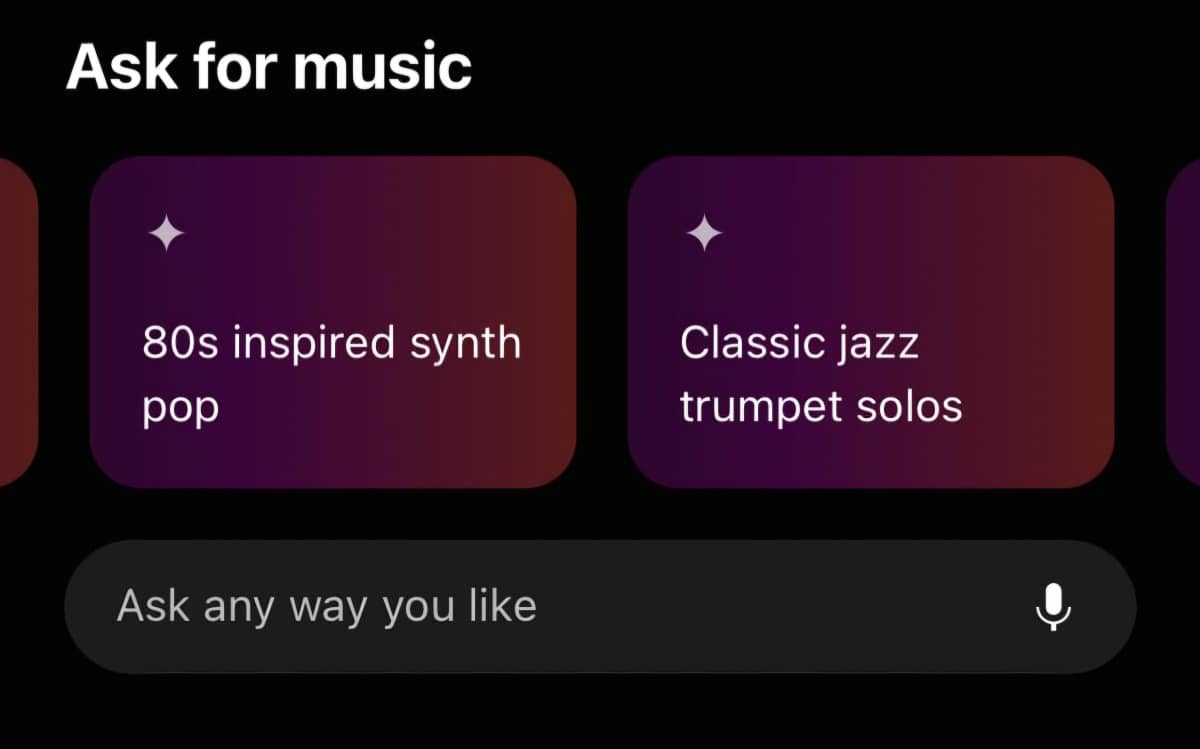
YouTube Music now lets you create AI-generated radio stations using a new feature called Ask Music, available exclusively to YouTube Premium and YouTube Music Premium subscribers.
With just a short prompt like “UK Punjabi songs” or “smooth jazz for a relaxing date night,” the app instantly builds a radio station that matches your request.
? How to Create an AI-Generated Radio Station
- Open the YouTube Music app.
- Scroll to the “Ask for music” section on the Home screen.
- Type or speak your request—anything from genres and moods to events or vibes.
- The app will automatically start playing a custom radio station based on your prompt.
- You can refine it using suggestion bubbles like “More traditional Punjabi music” or “latest Bollywood tracks.”
- Once satisfied, you can shuffle, save, delete, or pin the station to Speed Dial.
? How Does It Work?
This new feature uses generative AI to create playlists based on:
- Your past listening habits
- Your specific text or voice command
- Mood, tempo, genre, artist, or location preferences
The AI keeps learning and improving the station as you interact with it, making it ideal for everything from workouts to parties or even long drives.
? Why It’s a Game-Changer
Playlist creation now takes seconds. Instead of searching or building a list manually, YouTube Music’s AI handles it for you, delivering a hand-picked music stream that evolves with your taste.
Perfect for events, moods, or daily use, the AI radio can easily last through a full summer BBQ or late-night chill session.
? How Much Does It Cost?
To access this feature, you need either:
- YouTube Premium: $14/month – includes ad-free access to YouTube, YouTube Kids, VR, and more
- YouTube Music Premium: $11/month – ad-free music only, with a 1-month free trial
? In Summary
- Ask Music lets you build custom radio stations using AI.
- Works with prompts like genre, mood, or event.
- Refine your station in real time with suggestions.
- Requires a YouTube Premium or Music Premium subscription.
- Makes YouTube Music smarter and more personal than ever.








Leave a comment