Close Menu
NoMusica.com
    Facebook X (Twitter) Instagram
    Facebook X (Twitter) Instagram
    NoMusica.comNoMusica.com
    • Entertainment
    • Music
      • Music Production
    • Tech
      • AI
      • Electronics & Gadgets
      • Apps & Updates
      • Smartphones
    • Films & Shows
    • Gaming
    • Streaming
    NoMusica.com
    Home»Electronics & Gadgets

    Loupedeck Announces New Discord Control Plugin

    June 19, 2024
    Share
    Facebook Twitter LinkedIn Pinterest Email

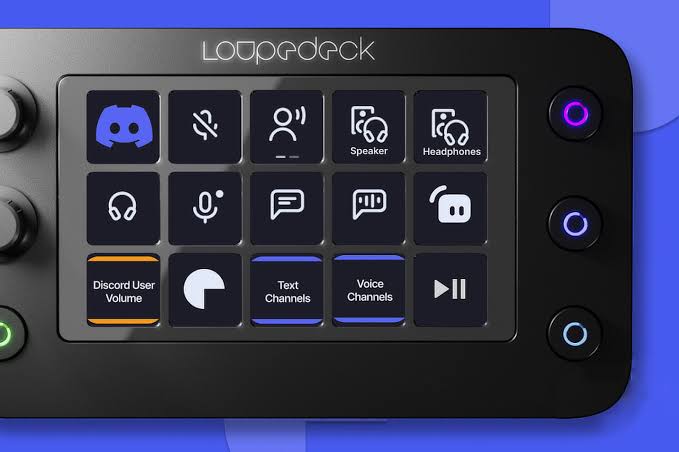
    Loupedeck, the maker of customizable control consoles, has just announced a new plugin that brings powerful Discord integration to both Mac and Windows users. The new Discord plugin makes it easier than ever to control all of your Discord text and voice channels directly from a Loupedeck device.

    With just a tap, Loupedeck owners can now join any Discord server and channel, all consolidated onto their console’s touch controls. The plugin automatically pulls in your full Discord channel list, allowing you to simply drag and drop channels onto the Loupedeck for quick access.

    But the integration goes beyond just joining channels. The new plugin provides granular controls like adjusting individual user volumes in voice chats using the Loupedeck’s dials. Visual cues show if a user is muted or how many participants are in each voice channel.

    Other handy features include push-to-mute, push-to-talk, setting audio devices, and toggling between voice input modes – all easily accessed from the Loupedeck’s streamlined controls.

    For gamers and streamers, the new plugin makes it easy to control Discord alongside other apps, without having to tab back and forth. The tight integration blends Discord controls seamlessly into the Loupedeck experience.

    The Discord plugin is available now as a free download from the Loupedeck Marketplace for the Loupedeck Live, Live S, and CT models. It joins other streaming tool integrations like Streamlabs, OBS Studio, Twitch, vMix and more.

    With this new control capability, Loupedeck is cementing its devices as essential unified control surfaces for content creators. Discord’s rich communication layers can now be controlled alongside video editing, photo editing, gaming and other creative apps already supported by Loupedeck’s plugin.


    Discord Loupedeck
    Sazid Kabir
    • Website
    • X (Twitter)
    • Pinterest
    • Instagram
    • LinkedIn

    Founder & Chief Editor, NoMusica.com. Sazid Kabir is a tech writer and music producer covering music, tech, and music production with both analytical and practical experience.

    Keep Reading

    10 Best Discord Music Bots to Enhance Your Server in 2026

    15 Best Bots to Add to Your Discord Server in 2026

    Best Discord AI Bots in 2026 (Safe, Useful & Verified Tools)

    Windows 11 Upgrade Incoming as MacBook Neo Raises Pressure

    X Takes on WhatsApp With New Private Messaging App

    Apple Quietly Launches AirPods Max 2 With Major New Features

    Add A Comment

    Comments are closed.

    Latest Posts

    Remy Ma Confronts Distrust and Danger in Chilling Lifetime Drama

    June 16, 2026

    Cardi B, 50 Cent, and A$AP Rocky Go Wild After Historic Knicks Championship

    June 16, 2026

    Spike Lee Trolls Michael Jordan With Hilarious Voice Message After Knicks Win Championship

    June 16, 2026

    Fat Joe Spotted Singing ‘Lean Back’ With Knicks Fans on NYC Subway

    June 16, 2026

    NBA Star Klay Thompson Reportedly Called Megan Thee Stallion “Ghetto” As Relationship Fell Apart

    June 15, 2026
    Pages
    • Home
    • Blog
    • About
    • Contact
    • Advertise
    • Cookie Policy
    • Privacy Policy
    Categories
    • AI
    • Tech & Science
    • Films & TV Shows
    • Entertainment
    • Music
    • Streaming
    • Music Production
    Random Reads

    TikTok Bans Beauty Filters for Teens Over Mental Health Concerns

    Matter Certification Now Accepted by Apple, Google, and Samsung

    BLACKPINK’s Jennie to Release Solo Album in 2025

    Facebook X (Twitter) Instagram Pinterest
    © 2026 WowPress Digital

    Type above and press Enter to search. Press Esc to cancel.