Apple has introduced major battery improvements with the release of iOS 26. The new features give iPhone users better control and deeper insights into their battery usage.
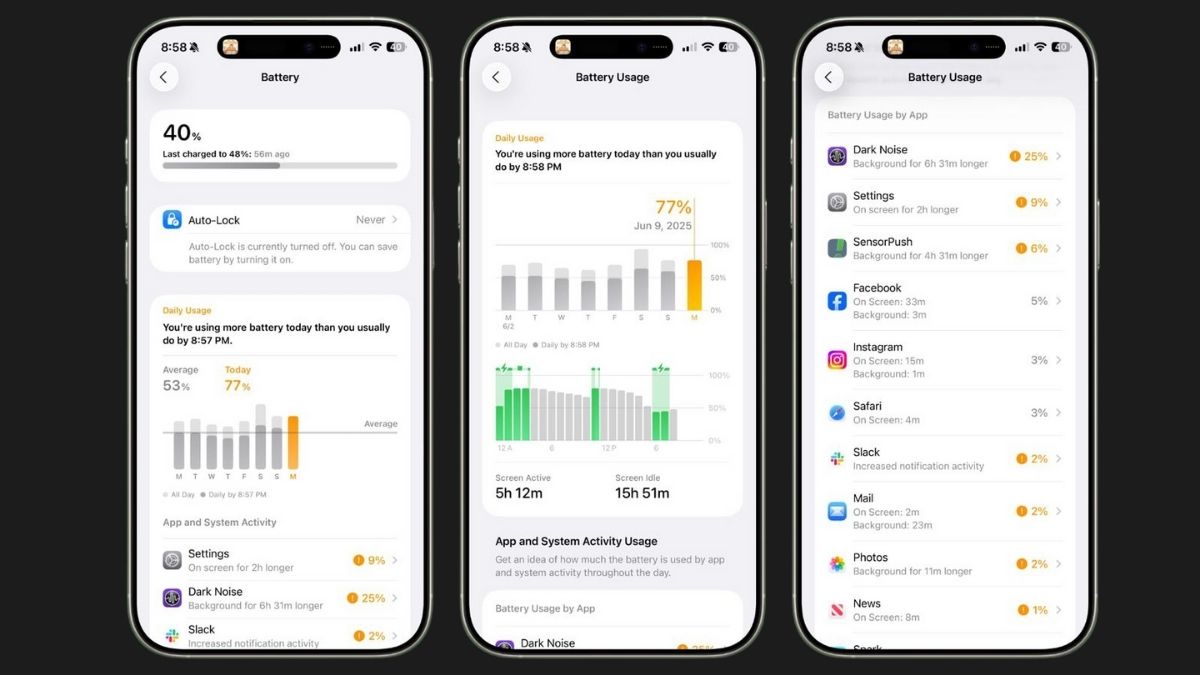
The Battery section in the Settings app now shows how your daily habits affect battery life. You can now see how much charge you have left, when you last charged, and if your iPhone is charging, how long it will take to fully charge.
Apple has replaced the old 24-hour and 10-day battery view with a new weekly report. This weekly summary compares your current battery usage to your usual average. It tells you if you are using more, less, or the same battery as before.
You can also check exactly which apps are using the most power. It shows details like how long an app was running on the screen, how much it worked in the background, and how many notifications it sent. This helps users easily find out what’s draining their battery.
Users can scroll through the last seven days to see how much battery they used each day. The report breaks it down into active use and idle time, and even shows when and for how long you charged your phone.
Apple kept the Battery Health feature, which shows maximum capacity and charge cycles. The Charge Limit feature is still there too, letting users limit charging to 80% to protect battery health.
A new tool, called Adaptive Power Mode, adjusts iPhone settings automatically when battery usage is higher than normal. It can lower brightness and adjust background activity to help the battery last longer.
These features are available on both iPhones and iPads with iOS 26 and iPadOS 26. For now, only developers can try it. A public beta will launch next month, and the official release is expected in September.
With these updates, iPhone users will get more control over their device’s battery and enjoy longer battery life.