



Close Menu
    Facebook X (Twitter) Instagram
    Facebook X (Twitter) Instagram Pinterest
    NoMusica.com
    • AI
    • Tech
      • Electronics & Gadgets
      • Apps & Updates
      • Smartphones
    • Films & Shows
    • Music
    • Gaming
    • Streaming
    • Music Production
    NoMusica.com
    Home New Features Coming To Xiaomi HyperOS 2.0
    Apps & Updates Tech & Science

    New Features Coming To Xiaomi HyperOS 2.0

    Updated:January 28, 20252 Mins Read
    Share Facebook Twitter Pinterest Telegram WhatsApp Copy Link

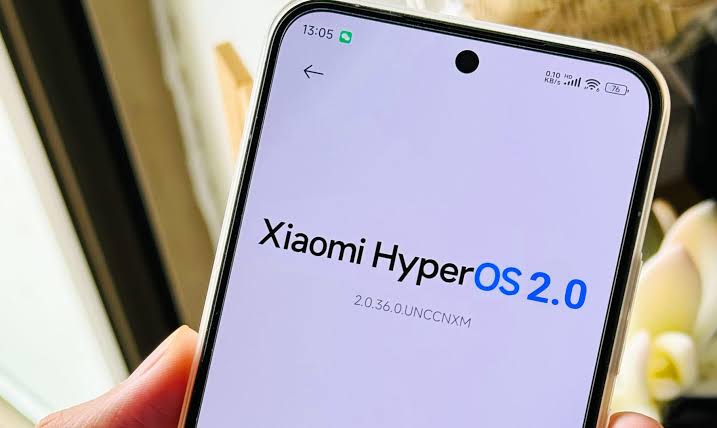
    Xiaomi has announced the HyperOS 2.0 beta, marking a significant step forward in the company’s software strategy. This update is designed to enhance the overall user experience by introducing various refinements and integrations.

    Here are some key features that make HyperOS 2.0 a noteworthy upgrade:

    Optimized Animations

    HyperOS 2.0 boasts optimized, smoother, and accelerated system animations, particularly on devices with Snapdragon 8 Gen 2 processors or higher.

    Super Wallpapers: Ocean and Desert Themes

    The new Super Wallpapers feature includes Ocean and Desert themes, which bring visually appealing backgrounds with smooth, subtle animations.

    Advanced Textures 2.0

    Advanced Textures 2.0 enhances the look of the UI and adds a tactile feel to buttons and other interactive parts, contributing to a premium OS experience.

    Revamped Camera UI

    The new Camera UI is designed to be intuitive and user-friendly, offering simple access to settings and allowing users to focus on capturing the perfect shot.

    Xiaomi Hypermind 2.0 AI Engine

    The new Xiaomi Hypermind 2.0 AI engine optimizes performance and battery life by learning from user behavior and allocating resources smartly.

    New Notification and Widget Stacking Effects

    HyperOS 2.0 introduces new ways to handle notifications and widgets, allowing users to stack alerts and interact with them in a neat manner.

    Cohesive Control Center

    The control center has been made more cohesive with the notification panel, offering a smoother and more seamless experience.

    Enhanced Always-On Display (AOD) Settings

    The AOD feature offers more customization options, allowing users to style the information they want to display on the screen.

    ▶ Xiaomi HyperOS 2.0: Release Date & Supported Devices

    Xiaomi’s commitment to providing users with access to the latest Android features and its own innovative software enhancements through HyperOS 2.0 is evident in this update. Users can expect further refinements and integrations designed to enhance the overall user experience.


    HyperOS Xiaomi
    Share. Facebook Twitter Pinterest Telegram WhatsApp Copy Link
    Sazid Kabir
    • Website
    • X (Twitter)
    • Pinterest
    • Instagram
    • LinkedIn

    Founder & Chief Editor, NoMusica.com. Sazid Kabir is a tech writer and music producer covering music, tech, and music production with both analytical and practical experience.

    Related Posts

    10 Free AI Courses With Certificates for High-Income Skills in 2026

    7 Best Knowledge Base Tools for Learning in 2026 (Ranked)

    Best Open-Source Softwares in 2026: Safe, Free Tools for Creators, Developers, and Everyday Use

    Are APK Downloads Safe? Risks, Legal Issues, and Safer Alternatives

    5 Best Free Audio Editing Software in 2026: For Podcasts & Music

    15 AI Tools Musicians Can Use to Create and Promote Music

    Add A Comment

    Comments are closed.

    Latest Posts

    Travis Scott Drops Cactus Jack Nike Phantom 6 For 2026 World Cup

    June 7, 2026

    Netflix Corruption: Michael Jackson Film is False & Slander, Here’s the Documented Facts

    June 7, 2026

    Cassie Ventura Fled U.S. with Diddy’s $30M,  Her Innocence Now in Question

    June 5, 2026

    50 Cent Says Daphne Joy’s OnlyFans Up 85% After Diddy Tape, Hints Model Leaked Her Own Tape

    June 5, 2026

    NEW HIPHOP THIS FRIDAY (JUNE 5, 2026)

    June 5, 2026
    Facebook X (Twitter) Instagram Pinterest
    © 2026 A WowPress Initiative

    Type above and press Enter to search. Press Esc to cancel.


