
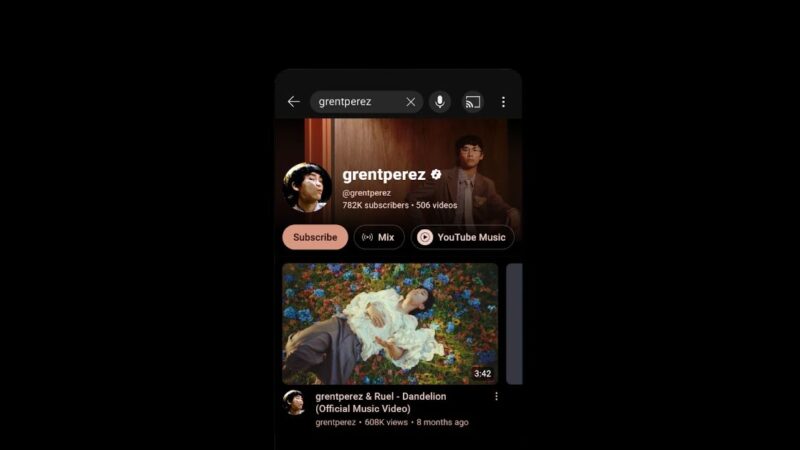
Getting an Official Artist Channel (OAC) on YouTube is an important step for independent musicians who want to build a recognizable music presence. It brings your official music releases and artist channel together, helps consolidate your audience, and unlocks tools designed specifically for musicians.
The good news is that you do not necessarily need thousands of subscribers or a major record label to qualify. YouTube’s published eligibility requirements include at least one official music release delivered by a distributor or label, along with other channel and partner requirements.
However, you cannot simply switch on Official Artist Channel status in YouTube Studio. You generally need to request it through your music distributor, label or an eligible YouTube Music Service Partner.
This guide explains how to get an Official Artist Channel, what you need before applying, and how to avoid common mistakes that can delay your request.
What Is a YouTube Official Artist Channel?
An Official Artist Channel is a YouTube channel recognized as the official presence of a particular musician or band. It brings together subscribers and music content associated with your existing artist channel, automatically generated Topic Channel and, where applicable, Vevo channel.
An OAC is identified by a music note icon next to the channel name on YouTube.
Its main benefits include:
- Audience consolidation: Subscribers from eligible associated channels are brought together under your Official Artist Channel.
- Organized music content: Your official releases and music videos can be presented together in one artist-focused destination.
- Analytics for Artists: Access to analytics designed to help musicians understand their audience and music performance.
- Artist-focused features: Eligible channels may receive additional tools and features, including relevant merchandise and ticketing integrations.
An Official Artist Channel is not a guarantee of more views, monetization or a verification badge on every platform. Its primary purpose is to establish and organize your official music presence.
YouTube Official Artist Channel Requirements
Before applying, make sure your channel meets YouTube’s published criteria.
According to the official YouTube Help Center, you must:
- Own and operate a YouTube channel dedicated to one artist or band and focused on that artist’s music.
- Have at least one official music release on YouTube delivered and distributed by a music distributor or record label.
- Comply with YouTube’s Community Guidelines, Terms of Service and copyright policies.
- Qualify through at least one of YouTube’s recognized partner routes.
The qualifying routes include working with a YouTube Partner Manager, participating in the YouTube Partner Program (YPP), belonging to a label network that works with a Partner Manager, or distributing your music through a music partner listed in YouTube’s Services Directory.
YouTube also recommends uploading at least one public video to your artist channel. Applications from channels without public videos may be rejected or require additional verification.
Important: Meeting the basic requirements does not guarantee approval. Your distributor or partner may have additional conditions.
How to Get an Official Artist Channel on YouTube: Step by Step
Step 1: Create a dedicated artist channel
If you do not already have a YouTube channel for your music, create one using the Google account you control.
Use your established artist name and make the channel clearly focused on your music. Add a profile picture, banner, description and links to your official artist profiles.
If you already have a personal channel, check whether it is appropriate for conversion. A channel filled primarily with unrelated content may not be the best choice for an official music identity.
Step 2: Release music through a distributor
You need at least one official music release delivered to YouTube by a distributor or label.
Music distributors such as DistroKid, TuneCore and RouteNote can deliver releases to YouTube Music. YouTube can then generate Art Tracks and an associated Topic Channel.
After your release becomes available, check that the artist name and release information are correct.
If your music appears under another artist’s profile, contact your distributor to correct the mapping before requesting an OAC.
Step 3: Upload a public video
Publish at least one public video on your own artist channel before applying.
It could be an official music video, visualizer, lyric video or another relevant video featuring your music. The video should support your artist identity rather than serve as unrelated content.
YouTube recommends a public upload, and some distributor application processes have more specific requirements. For example, DistroKid’s instructions specify that Shorts do not count toward its public-video requirement.
Step 4: Find your YouTube Topic Channel
When a distributor delivers your music to YouTube, the platform can create an automatically generated channel containing your Art Tracks.
These channels often use a name such as “Artist Name – Topic.”
Search YouTube for your artist name and look for the channel containing your official releases. Make sure you identify the correct artist profile, particularly if another musician has a similar name.
A Topic Channel is not the same as your own artist-operated channel. You generally cannot manage it as though it were a regular channel you created.
Step 5: Request an Official Artist Channel
Contact your distributor or label and ask to convert your existing artist channel into an Official Artist Channel.
Some distributors provide a self-service application, while others require a support request or form.
You may need to provide:
- Your artist-operated YouTube channel URL.
- Your YouTube Topic Channel or YouTube Music artist profile.
- Your artist name and release information.
- Confirmation that you control the channel.
- Any additional information requested by your distributor.
Use the correct Google account when authentication is required. Double-check every channel URL before submitting because selecting the wrong channel can cause significant problems.
Step 6: Wait for the request to be processed
After submission, your distributor or partner forwards or processes the request according to its procedure.
Processing times vary. Your distributor may provide an estimate, but approval is not guaranteed within a fixed number of days.
If your request is delayed, check the status with your distributor and confirm that your music is live, the artist mapping is correct and your channel meets the current requirements.
How to Apply Through Popular Music Distributors
The precise application process depends on the service that distributes your music.
| Distributor | Where to start |
|---|---|
| DistroKid | Official Artist Channel request |
| RouteNote | RouteNote Support |
| TuneCore | TuneCore Support |
| Other distributors | Contact the distributor’s support team or consult its official OAC documentation |
DistroKid: Sign in to your account, open the Features menu, select Special Access and choose YouTube Official Artist Channel. Follow the instructions to select your artist and authenticate your YouTube account.
DistroKid advises artists to allow time for a new release to appear before applying. It also warns that an OAC claim cannot simply be undone or transferred to another channel, so verify your selection carefully.
RouteNote and TuneCore: Check the current instructions for your account and distribution plan. Requirements and submission methods can differ, so do not assume that another distributor’s steps apply to your account.
If your distributor does not offer an OAC request service, consult YouTube’s Music Services Directory to identify eligible partners.
Do You Need 1,000 Subscribers or Three Releases?
These are two common misconceptions about Official Artist Channels.
Do you need 1,000 subscribers?
YouTube’s published OAC criteria do not establish a universal 1,000-subscriber minimum.
However, joining the YouTube Partner Program is one of the recognized qualifying routes, and YPP has separate eligibility requirements. Other partner routes may be available to artists who are not in YPP.
A small independent artist may therefore qualify without reaching 1,000 subscribers, provided the artist meets the other requirements and has an eligible partner route.
Do you need three official releases?
YouTube’s main eligibility page currently specifies at least one official release delivered by a distributor or label. It does not establish a universal three-release minimum in its main OAC criteria.
A distributor may impose additional requirements or eligibility checks. Always distinguish its rules from YouTube’s published policy.
What Happens to Your Topic Channel After Approval?
When your Official Artist Channel is established, YouTube consolidates subscribers from your associated artist channel, Topic Channel and eligible Vevo channel, where applicable.
The subscriber count and Subscribe button will no longer be displayed on the separate channels in the same way, and your audience will be consolidated under the OAC.
However, this does not necessarily mean your Topic Channel is deleted. YouTube may continue to maintain it as an automatically generated destination for music content.
Your official releases and Art Tracks can become associated with your Official Artist Channel, helping listeners find your music alongside your other artist content.
For the most accurate explanation of how subscriber consolidation works, consult YouTube’s official OAC documentation.
Common Official Artist Channel Problems and How to Fix Them
Your music is not appearing on your Topic Channel
Confirm that your distributor has delivered the release to YouTube Music and that the release is live. If the release is missing or assigned to the wrong artist, ask your distributor to investigate the delivery or artist mapping.
Your artist does not appear in the application form
A newly delivered release may take time to appear in your distributor’s OAC system. Check that it is live and that the correct artist profile is selected.
If it remains missing, contact your distributor rather than submitting repeated requests.
Your application is rejected
Review the eligibility criteria, channel ownership, public-video requirement and any distributor-specific conditions. Correct any problems before requesting another review.
You selected the wrong YouTube channel
Take particular care when submitting your request. DistroKid warns that established OAC claims cannot simply be undone or transferred to a different channel. Contact your distributor if you believe you made an error, but do not assume that the claim can be reversed.
Frequently Asked Questions
Can independent artists get an Official Artist Channel?
Yes. You do not have to be signed to a major record label. You must meet YouTube’s eligibility requirements and apply through an eligible distributor, label or Music Service Partner.
Is an Official Artist Channel free?
YouTube’s OAC program does not itself establish a universal application fee. However, your distributor may require a paid distribution plan or impose other service conditions. Check the terms of your provider.
How long does it take to get an Official Artist Channel?
There is no universal processing time. It depends on the distributor or partner, the completeness of your request and YouTube’s review process. DistroKid advises allowing up to six weeks, but that estimate should not be treated as a guarantee for every provider.
Can I apply directly through YouTube Studio?
YouTube’s published process directs artists to their label, distributor or an eligible Music Service Partner. There is no universal OAC application switch in YouTube Studio.
Does an Official Artist Channel guarantee monetization?
No. OAC status and YouTube monetization eligibility are separate matters. Your channel must meet the applicable monetization requirements if you want to earn through the YouTube Partner Program.
Getting an Official Artist Channel (OAC) on YouTube is an important step for independent musicians who want to build a recognizable music presence. It brings your official music releases and artist channel together, helps consolidate your audience, and unlocks tools designed specifically for musicians.
The good news is that you do not necessarily need thousands of subscribers or a major record label to qualify. YouTube’s published eligibility requirements include at least one official music release delivered by a distributor or label, along with other channel and partner requirements.
However, you cannot simply switch on Official Artist Channel status in YouTube Studio. You generally need to request it through your music distributor, label or an eligible YouTube Music Service Partner.
This guide explains how to get an Official Artist Channel, what you need before applying, and how to avoid common mistakes that can delay your request.
What Is a YouTube Official Artist Channel?
An Official Artist Channel is a YouTube channel recognized as the official presence of a particular musician or band. It brings together subscribers and music content associated with your existing artist channel, automatically generated Topic Channel and, where applicable, Vevo channel.
An OAC is identified by a music note icon next to the channel name on YouTube.
Its main benefits include:
- Audience consolidation: Subscribers from eligible associated channels are brought together under your Official Artist Channel.
- Organized music content: Your official releases and music videos can be presented together in one artist-focused destination.
- Analytics for Artists: Access to analytics designed to help musicians understand their audience and music performance.
- Artist-focused features: Eligible channels may receive additional tools and features, including relevant merchandise and ticketing integrations.
An Official Artist Channel is not a guarantee of more views, monetization or a verification badge on every platform. Its primary purpose is to establish and organize your official music presence.
YouTube Official Artist Channel Requirements
Before applying, make sure your channel meets YouTube’s published criteria.
According to the official YouTube Help Center, you must:
- Own and operate a YouTube channel dedicated to one artist or band and focused on that artist’s music.
- Have at least one official music release on YouTube delivered and distributed by a music distributor or record label.
- Comply with YouTube’s Community Guidelines, Terms of Service and copyright policies.
- Qualify through at least one of YouTube’s recognized partner routes.
The qualifying routes include working with a YouTube Partner Manager, participating in the YouTube Partner Program (YPP), belonging to a label network that works with a Partner Manager, or distributing your music through a music partner listed in YouTube’s Services Directory.
YouTube also recommends uploading at least one public video to your artist channel. Applications from channels without public videos may be rejected or require additional verification.
Important: Meeting the basic requirements does not guarantee approval. Your distributor or partner may have additional conditions.
How to Get an Official Artist Channel on YouTube: Step by Step
Step 1: Create a dedicated artist channel
If you do not already have a YouTube channel for your music, create one using the Google account you control.
Use your established artist name and make the channel clearly focused on your music. Add a profile picture, banner, description and links to your official artist profiles.
If you already have a personal channel, check whether it is appropriate for conversion. A channel filled primarily with unrelated content may not be the best choice for an official music identity.
Step 2: Release music through a distributor
You need at least one official music release delivered to YouTube by a distributor or label.
Music distributors such as DistroKid, TuneCore and RouteNote can deliver releases to YouTube Music. YouTube can then generate Art Tracks and an associated Topic Channel.
After your release becomes available, check that the artist name and release information are correct.
If your music appears under another artist’s profile, contact your distributor to correct the mapping before requesting an OAC.
Step 3: Upload a public video
Publish at least one public video on your own artist channel before applying.
It could be an official music video, visualizer, lyric video or another relevant video featuring your music. The video should support your artist identity rather than serve as unrelated content.
YouTube recommends a public upload, and some distributor application processes have more specific requirements. For example, DistroKid’s instructions specify that Shorts do not count toward its public-video requirement.
Step 4: Find your YouTube Topic Channel
When a distributor delivers your music to YouTube, the platform can create an automatically generated channel containing your Art Tracks.
These channels often use a name such as “Artist Name – Topic.”
Search YouTube for your artist name and look for the channel containing your official releases. Make sure you identify the correct artist profile, particularly if another musician has a similar name.
A Topic Channel is not the same as your own artist-operated channel. You generally cannot manage it as though it were a regular channel you created.
Step 5: Request an Official Artist Channel
Contact your distributor or label and ask to convert your existing artist channel into an Official Artist Channel.
Some distributors provide a self-service application, while others require a support request or form.
You may need to provide:
- Your artist-operated YouTube channel URL.
- Your YouTube Topic Channel or YouTube Music artist profile.
- Your artist name and release information.
- Confirmation that you control the channel.
- Any additional information requested by your distributor.
Use the correct Google account when authentication is required. Double-check every channel URL before submitting because selecting the wrong channel can cause significant problems.
Step 6: Wait for the request to be processed
After submission, your distributor or partner forwards or processes the request according to its procedure.
Processing times vary. Your distributor may provide an estimate, but approval is not guaranteed within a fixed number of days.
If your request is delayed, check the status with your distributor and confirm that your music is live, the artist mapping is correct and your channel meets the current requirements.
How to Apply Through Popular Music Distributors
The precise application process depends on the service that distributes your music.
| Distributor | Where to start |
|---|---|
| DistroKid | Official Artist Channel request |
| RouteNote | RouteNote Support |
| TuneCore | TuneCore Support |
| Other distributors | Contact the distributor’s support team or consult its official OAC documentation |
DistroKid: Sign in to your account, open the Features menu, select Special Access and choose YouTube Official Artist Channel. Follow the instructions to select your artist and authenticate your YouTube account.
DistroKid advises artists to allow time for a new release to appear before applying. It also warns that an OAC claim cannot simply be undone or transferred to another channel, so verify your selection carefully.
RouteNote and TuneCore: Check the current instructions for your account and distribution plan. Requirements and submission methods can differ, so do not assume that another distributor’s steps apply to your account.
If your distributor does not offer an OAC request service, consult YouTube’s Music Services Directory to identify eligible partners.
Do You Need 1,000 Subscribers or Three Releases?
These are two common misconceptions about Official Artist Channels.
Do you need 1,000 subscribers?
YouTube’s published OAC criteria do not establish a universal 1,000-subscriber minimum.
However, joining the YouTube Partner Program is one of the recognized qualifying routes, and YPP has separate eligibility requirements. Other partner routes may be available to artists who are not in YPP.
A small independent artist may therefore qualify without reaching 1,000 subscribers, provided the artist meets the other requirements and has an eligible partner route.
Do you need three official releases?
YouTube’s main eligibility page currently specifies at least one official release delivered by a distributor or label. It does not establish a universal three-release minimum in its main OAC criteria.
A distributor may impose additional requirements or eligibility checks. Always distinguish its rules from YouTube’s published policy.
What Happens to Your Topic Channel After Approval?
When your Official Artist Channel is established, YouTube consolidates subscribers from your associated artist channel, Topic Channel and eligible Vevo channel, where applicable.
The subscriber count and Subscribe button will no longer be displayed on the separate channels in the same way, and your audience will be consolidated under the OAC.
However, this does not necessarily mean your Topic Channel is deleted. YouTube may continue to maintain it as an automatically generated destination for music content.
Your official releases and Art Tracks can become associated with your Official Artist Channel, helping listeners find your music alongside your other artist content.
For the most accurate explanation of how subscriber consolidation works, consult YouTube’s official OAC documentation.
Common Official Artist Channel Problems and How to Fix Them
Your music is not appearing on your Topic Channel
Confirm that your distributor has delivered the release to YouTube Music and that the release is live. If the release is missing or assigned to the wrong artist, ask your distributor to investigate the delivery or artist mapping.
Your artist does not appear in the application form
A newly delivered release may take time to appear in your distributor’s OAC system. Check that it is live and that the correct artist profile is selected.
If it remains missing, contact your distributor rather than submitting repeated requests.
Your application is rejected
Review the eligibility criteria, channel ownership, public-video requirement and any distributor-specific conditions. Correct any problems before requesting another review.
You selected the wrong YouTube channel
Take particular care when submitting your request. DistroKid warns that established OAC claims cannot simply be undone or transferred to a different channel. Contact your distributor if you believe you made an error, but do not assume that the claim can be reversed.
Frequently Asked Questions
Can independent artists get an Official Artist Channel?
Yes. You do not have to be signed to a major record label. You must meet YouTube’s eligibility requirements and apply through an eligible distributor, label or Music Service Partner.
Is an Official Artist Channel free?
YouTube’s OAC program does not itself establish a universal application fee. However, your distributor may require a paid distribution plan or impose other service conditions. Check the terms of your provider.
How long does it take to get an Official Artist Channel?
There is no universal processing time. It depends on the distributor or partner, the completeness of your request and YouTube’s review process. DistroKid advises allowing up to six weeks, but that estimate should not be treated as a guarantee for every provider.
Can I apply directly through YouTube Studio?
YouTube’s published process directs artists to their label, distributor or an eligible Music Service Partner. There is no universal OAC application switch in YouTube Studio.
Does an Official Artist Channel guarantee monetization?
No. OAC status and YouTube monetization eligibility are separate matters. Your channel must meet the applicable monetization requirements if you want to earn through the YouTube Partner Program.
Comments are closed.