Spotify has officially introduced lossless audio streaming, giving Premium users the ability to listen to music in higher quality using FLAC up to 24-bit/44.1 kHz. The rollout, which began in September 2025, will continue through October across more than 50 countries.
Unlike previous rumors about a separate “HiFi” tier, lossless audio comes at no additional cost and is included in all existing Premium plans.
How to Enable Lossless Audio on Spotify
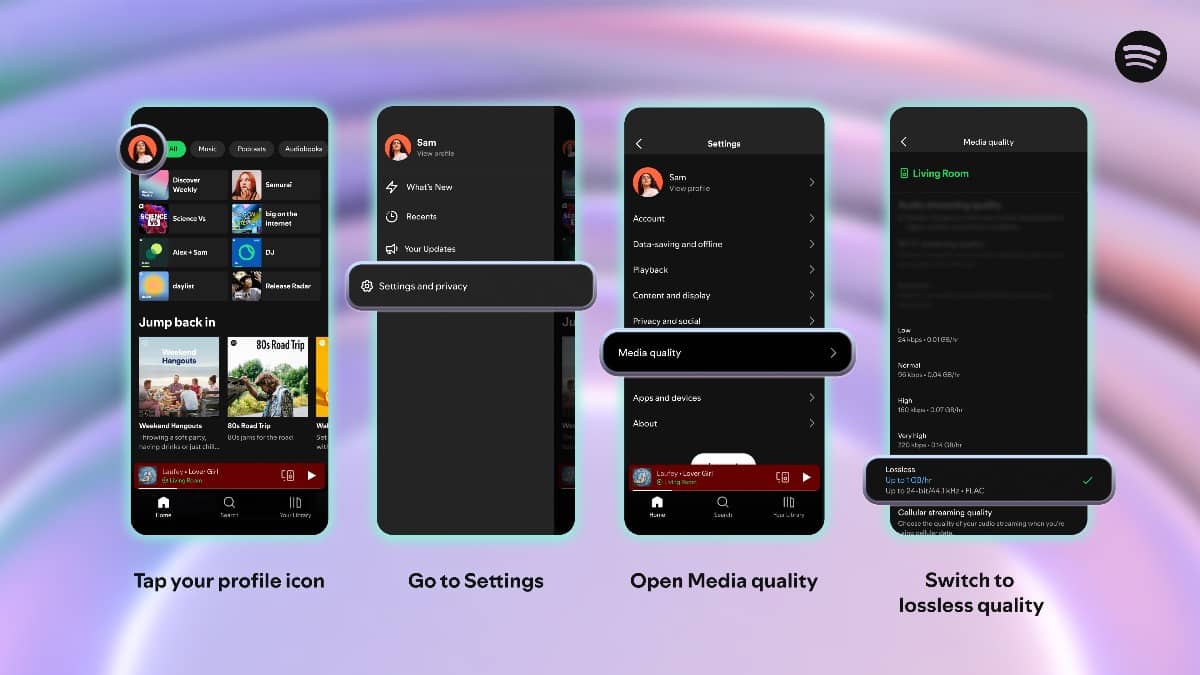
To turn on lossless streaming, subscribers must adjust their settings on each device:
- Open the Spotify app on mobile, desktop, or tablet.
- Tap the profile icon in the top left corner.
- Navigate to Settings & Privacy → Media Quality.
- Select Lossless under streaming and download preferences (for Wi-Fi, cellular, and downloads separately).
- Repeat these steps on every device you want to use.
When active, a “Lossless” badge will appear in the Now Playing bar.
Requirements and Compatibility
- Premium Subscription Only: Free/ad-supported accounts do not have access.
- Best with Wired Devices: For full lossless playback, wired headphones or speakers are recommended. Bluetooth connections compress audio and cannot deliver full quality.
- Supported Hardware: Works on Spotify apps for mobile, desktop, and many Spotify Connect devices, including Sony, Bose, Sennheiser, and Samsung. Sonos and Amazon device support is expected soon.
Things to Consider
- Data Usage: Lossless files are significantly larger, making Wi-Fi the preferred option to avoid high data charges.
- Gradual Rollout: If lossless does not yet appear in settings, subscribers should wait for an in-app notification as the feature expands globally.
- Catalog Coverage: Most of Spotify’s music library supports lossless. Users can confirm playback quality by checking for the “Lossless” badge on each track.
What Is Lossless Audio?
Lossless audio means music is streamed or downloaded without the data compression used in standard formats like MP3 or AAC. Spotify uses FLAC encoding, which preserves the full detail and dynamic range of the original recording. This results in richer, more authentic sound — particularly noticeable with high-quality listening equipment.
While Spotify’s 24-bit/44.1 kHz cap is lower than rivals like Apple Music, Tidal, and Qobuz (which offer up to 24-bit/192 kHz), the feature marks a major step forward for the world’s largest music streaming platform.