AI music generation in 2026 is no longer limited to text prompts. Modern tools now allow creators to upload audio directly—such as voice memos, hummed melodies, or reference tracks—and transform them into fully produced music.
This capability is reshaping music production workflows by removing technical barriers and allowing ideas to be developed from simple recordings.
However, not all platforms handle audio inputs in the same way. Some focus on full song generation, while others specialize in style matching or structured remixing.
🎯 Which Tool Should You Use?
| Goal | Recommended Tool |
|---|---|
| Turn voice memos into full songs | Suno |
| Precise remixing and editing | Udio |
| Style-matched variations | MiniMax Music |
| Experimental low-cost generation | ACE-Step |
| Structured production workflows | Soundverse |
What “Generate Music From Audio” Actually Means
There are two primary approaches used in AI music tools:
| Type | Function | Best Use Case |
|---|---|---|
| Audio-to-Song Generation | Converts a short audio clip into a full composition | Songwriters, vocalists, idea development |
| Reference-Based Style Matching | Uses full tracks to generate similar or derived music | Producers, remixing, consistency workflows |
In both cases, your audio acts as a creative seed, where the AI analyzes pitch, rhythm, structure, and tonal characteristics before generating new musical output.
5 Best AI Tools for Audio-to-Music Generation
1. Suno — Best for Full Song Creation from Audio
Suno is currently one of the most widely used platforms for transforming short audio inputs into complete songs with vocals, instrumentation, and structure.
Key Capabilities
- Upload or record voice memos, melodies, or riffs
- Generate full songs based on audio input
- Use natural language prompts to guide output
- Edit and refine tracks in Suno Studio
- Export multi-stem audio (on supported plans)
Suno is designed to turn rough ideas into complete musical compositions quickly, making it ideal for early-stage songwriting.
Strengths
- Fast end-to-end song generation
- Strong vocal synthesis quality
- Simple workflow for non-technical users
- Useful for turning ideas into demos
Limitations
- Output consistency varies between generations
- Limited precision control compared to production tools
- Licensing and commercial usage terms should be reviewed before publishing
Best For
Songwriters, content creators, and musicians turning voice ideas into finished tracks.
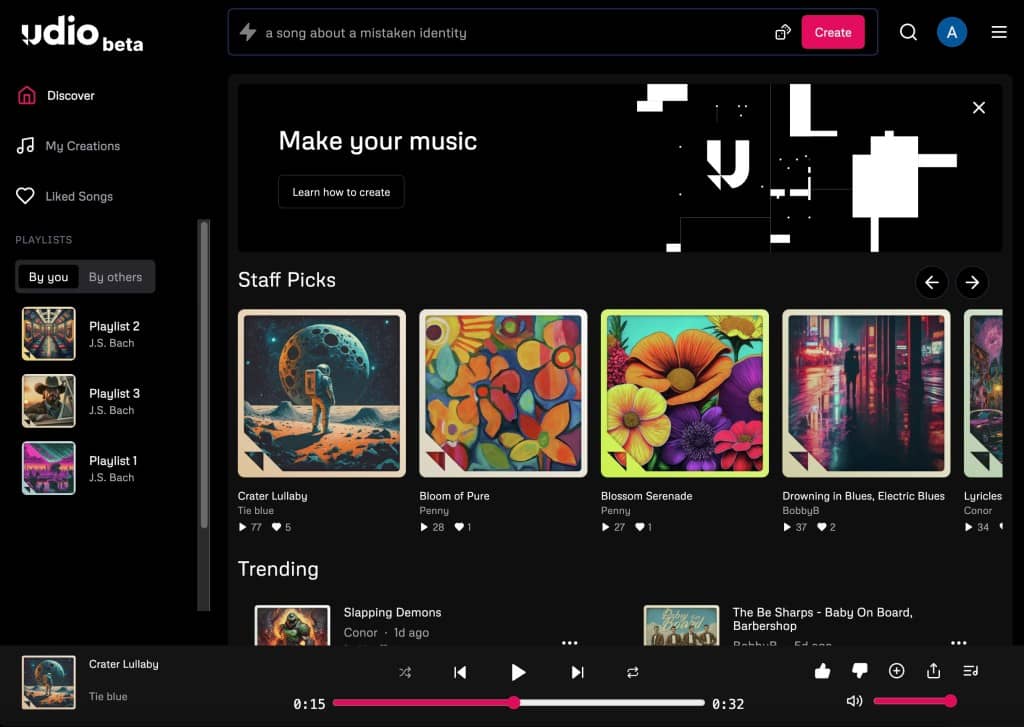
2. Udio — Best for Controlled Audio Remixing
Udio focuses on structured generation and refinement rather than instant full-song creation.
Key Capabilities
- Upload audio for stylistic transformation
- Extend or continue existing music
- Remix audio into new genres
- Segment-based generation for precise control
- Inpainting tools for targeted edits
Unlike full-song generators, Udio processes audio in structured segments, allowing more detailed control over arrangement and progression.
Strengths
- High audio fidelity
- Strong structural control over composition
- Suitable for iterative production workflows
- Effective for remix and variation generation
Limitations
- Requires more time and iteration
- Workflow is less beginner-friendly
- Feature availability (such as downloads) may vary depending on licensing status
Best For
Producers and remix artists who want control over structure and arrangement.
3. MiniMax Music — Best for Reference-Based Style Matching
🔗 https://www.minimax.io (product availability may vary by region)
MiniMax Music specializes in generating new tracks based on reference audio input.
Key Capabilities
- Upload a reference track (with vocals and instrumentation)
- Generate new music in similar style or structure
- Produce multiple variations at low cost
- Supports lyric-based generation inputs
This tool is particularly useful when maintaining a consistent musical style across multiple tracks.
Strengths
- Strong style consistency
- Cost-efficient generation
- Useful for variation-based production workflows
Limitations
- Input requirements are stricter (audio + vocals preferred)
- Less suited for freeform creativity
Best For
Producers creating multiple tracks in a consistent sonic direction.
4. ACE-Step — Best Low-Cost Audio Remixing Tool
🔗 https://github.com/ace-step (open-source ecosystem varies)
ACE-Step is an open-source AI audio model focused on affordability and flexibility.
Key Capabilities
- Audio-to-audio remixing
- Section replacement (inpainting)
- Audio extension (outpainting)
- Experimental production workflows
Strengths
- Extremely low cost per generation
- Flexible experimentation environment
- Open-source accessibility
Limitations
- Lower audio quality compared to premium tools
- Requires technical setup in many cases
- Not optimized for commercial-grade output
Best For
Experimental producers and developers working with AI audio systems.
5. Soundverse — Best for Structured Production Workflows
Soundverse combines AI generation with structured editing tools designed for more professional production workflows.
Key Capabilities
- Reference-based music generation
- Stem separation tools
- Section-based song analysis
- Arrangement editing and refinement
Strengths
- End-to-end production workflow
- Useful for structured composition
- Suitable for commercial project development
Limitations
- Requires learning curve
- More complex than consumer-focused tools
Best For
Producers who want full control over arrangement and production structure.
Best Practices for High-Quality Output
Before Uploading Audio
- Use WAV or FLAC instead of compressed formats
- Keep clips between 15–60 seconds
- Avoid background noise or distortion
- Ensure melody or rhythm is clearly identifiable
After Generation
- Generate multiple variations (3–5 recommended)
- Use remix or extend features for refinement
- Apply detailed prompts for better control
- Export stems where available for mixing workflows
Legal and Usage Considerations
AI music tools introduce new considerations around audio ownership and usage rights.
- Only upload audio you own or have rights to use
- Avoid uploading copyrighted music for transformation
- Review platform-specific licensing terms before commercial release
- Commercial usage rights vary by provider and subscription tier
While some platforms provide royalty-free licensing, the legal framework around AI-generated music is still evolving.
Final Perspective
Generating music from audio inputs represents a shift from traditional production workflows. Instead of building music manually from scratch, creators now begin with ideas captured in simple recordings and refine them through AI-assisted systems.
The most effective approach is not replacing creativity, but accelerating it—turning raw ideas into structured musical output with fewer technical barriers.
Leave a Reply